

gumloopagents.com. Instead of sharing access to the Gumloop builder, you give people a clean, focused chat interface where they can interact with your agent directly.
Dedicated URL
Each agent gets its own
your-agent.gumloopagents.com link that people can bookmark and open directly.Focused chat surface
People use the agent from a standalone chat page instead of navigating through the Gumloop builder.
No separate app needed
The hosted page uses the same agent instructions and tools you already configured in Gumloop.
Control access anytime
Update the URL alias or disable the hosted page whenever you want.
Setting up a hosted page
1
Open the Hosted Page Channel
Open Channels in the agent sidebar, then select Hosted Page.
2
Enable the hosted page
Click Enable Hosted Page. Gumloop automatically generates a URL alias based on your agent’s name. The alias follows the format:You can copy the URL using the copy button, or click the pencil icon to customize the alias.
3
Share the link
Share the hosted page URL with anyone who needs to use the agent. When they open the link, they’ll see a standalone chat interface with your agent’s name and icon.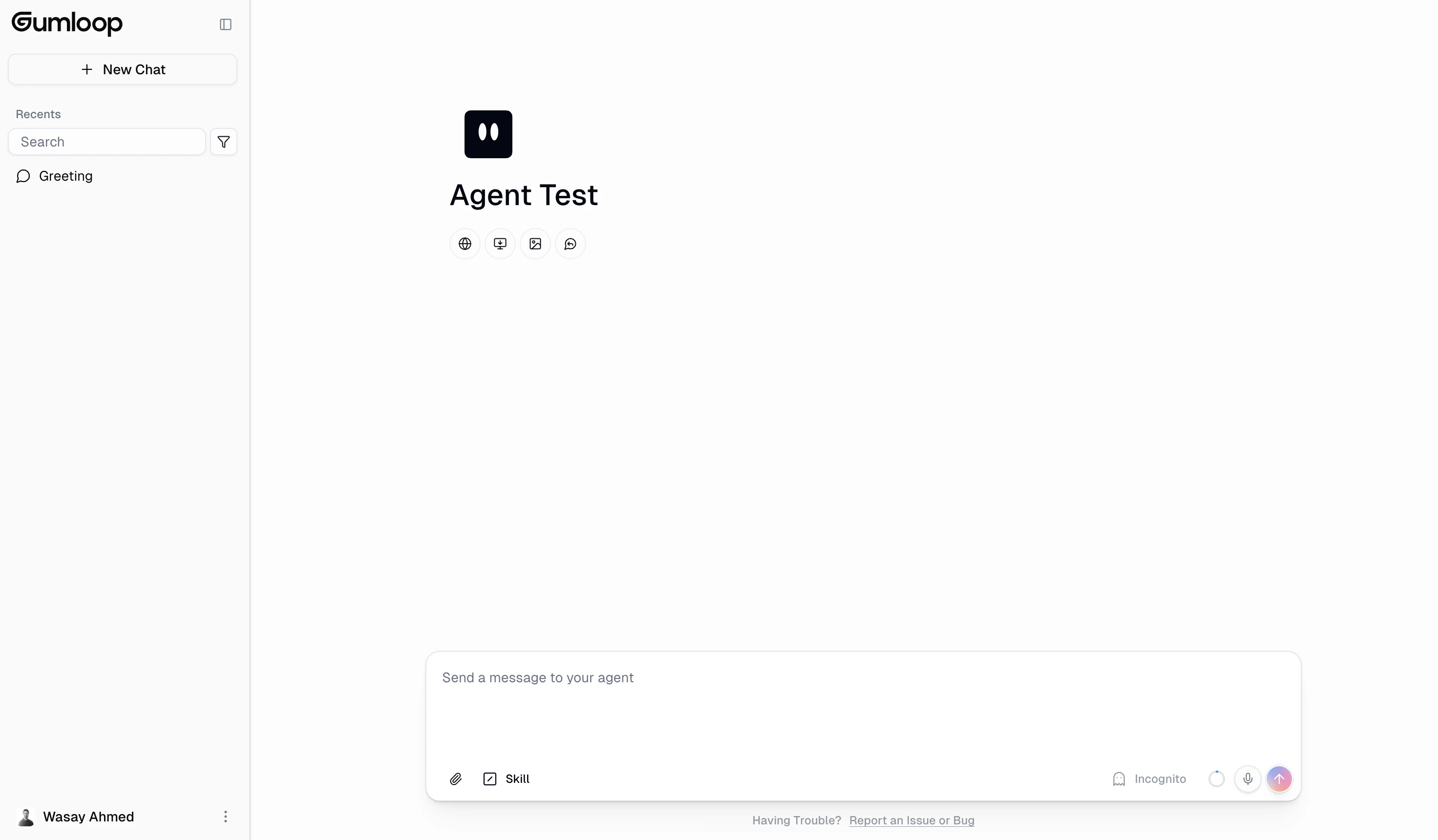
Customizing the URL alias
You can change the hosted page alias at any time:- Click the pencil icon next to the current URL
- Type your desired alias (3-64 characters, lowercase letters, numbers, and hyphens only)
- Press Enter or click the checkmark to save
Certain aliases like
admin, api, app, auth, beta, docs, gumstack, help, localhost, mcp, sandbox, staging, support, ws, and www are reserved and cannot be used.Authentication and sign-in
Hosted pages require users to sign in before they can chat with the agent. Here’s how the authentication flow works:- A visitor opens the hosted page URL (e.g.,
your-agent.gumloopagents.com) - The page resolves the agent alias and loads the agent’s profile (name, icon, tools)
- The visitor is prompted to sign in through Gumloop’s authentication
- After signing in, a secure one-time session token is exchanged, and the visitor is redirected back to the hosted page with full chat access
The sign-in session is scoped to the hosted page domain. Authentication uses a secure broker flow where credentials never pass through the hosted subdomain directly.
Permissions and access
Hosted pages use the same permission system as the rest of Gumloop. Each role determines what a user can do both on the hosted page itself and in the configuration panel within the Gumloop builder.Seeing other people’s tasks needs Team tasks visibility and membership of the agent’s team. Someone shared into an agent one-to-one always sees only their own tasks.
- No configuration panel: Users cannot see or modify agent settings from the hosted page
- No external channel management: The sidebar for Email, Slack, and other channels is hidden
- No app-level navigation: The hosted page doesn’t show the Gumloop builder navigation
Credits and billing
Conversations on hosted pages consume credits the same way as regular agent chats in the Gumloop builder. The credit cost depends on:- AI model usage: Token consumption based on the model your agent uses
- Tool calls: Each MCP integration call costs credits
- Conversation length: Longer conversations with more context use more tokens
Connectors and accounts
Hosted pages use the same connector account settings as Gumloop chat. By default, the agent uses the chatting user’s own connected accounts. Shared team accounts and explicitly agent-owned accounts follow the agent’s configuration. This means:- Connectors (Gmail, Slack, Salesforce, etc.) use the chatting user’s connected accounts
- API keys (BYOK or platform-provided) are resolved from the chatting user’s account
Disabling a hosted page
To disable a hosted page:- Navigate to the Hosted Page channel in your agent’s sidebar
- Click Disable Hosted Page in the status section
FAQ
Can I use a custom domain for my hosted page?
Can I use a custom domain for my hosted page?
Hosted pages are currently served on the
gumloopagents.com domain only. Custom domains are not supported at this time.Do hosted page users need a Gumloop account?
Do hosted page users need a Gumloop account?
Yes. Users are prompted to sign in when they first visit a hosted page. If they don’t already have a Gumloop account, one is created during the sign-in process. This ensures secure access and proper credit tracking.
Can I restrict who can access the hosted page?
Can I restrict who can access the hosted page?
Access is controlled through Gumloop’s standard sharing and permissions system. Someone needs at least User access to the agent. That can come from being shared into the agent directly, being a member of the agent’s team, or from the agent’s General Access setting. Organization admins can also restrict hosted pages entirely via App Rules.
What happens to existing conversations if I change the alias?
What happens to existing conversations if I change the alias?
Changing the alias updates the URL. Existing conversations are preserved in the agent’s chat history and remain accessible to users who sign in again on the new URL.
Is the hosted page available on mobile?
Is the hosted page available on mobile?
Yes. The hosted page is a responsive web interface that works on mobile browsers. Users can open the URL on any device and interact with the agent.
Can I embed the hosted page in my own website?
Can I embed the hosted page in my own website?
Hosted pages are designed to be opened as standalone pages at their
gumloopagents.com URL. Embedding via iframe is not officially supported. If you need to embed an agent in your own site, consider using the Gumloop API to build a custom integration.Who pays for credit usage on hosted pages?
Who pays for credit usage on hosted pages?
Credits are charged to the person chatting. For team agents where all users are in the same organization, this comes from the shared organization credit pool. Users outside the organization use their own credits.
What's the difference between the hosted page and sharing the agent?
What's the difference between the hosted page and sharing the agent?
Sharing an agent gives someone access through the Gumloop builder, where they see the full navigation and configuration options. A hosted page provides a standalone, distraction-free chat surface at a dedicated URL. Use hosted pages when you want people to interact with your agent without needing to navigate the Gumloop platform.
Can I see all conversations happening on my hosted page?
Can I see all conversations happening on my hosted page?
Owners see every task. A User sees other people’s tasks only on a team agent whose Task Visibility is set to Team tasks and only if they are on that team. Everyone else, including hosted page visitors, sees only their own.
How do hosted pages work for team agents?
How do hosted pages work for team agents?
For agents in a team workspace, any workspace member with the appropriate role can access the hosted page. Organization admins automatically get Owner-level access. Members of the agent’s workspace project inherit their project-level role. The agent’s tools and integrations remain the same regardless of who is chatting.