

Why use Reflections
Without Reflections, an agent only improves when you notice something and fix it by hand. That works for the issues you happen to catch, in the tasks you happen to read. With Reflections on, the agent:- Looks across many tasks, so it finds problems that repeat rather than one-off mistakes
- Cites its evidence: which tasks, how many times, when it last happened
- Proposes a specific change, not a vague observation, and can apply it for you when you accept
- Tracks the outcome and tells you if the same problem comes back after a fix
Without Reflections
You spot a bad answer, dig into the task, and edit a skill or instruction yourself. Repeat for every issue you happen to see.
With Reflections
The agent finds that the same lookup has failed 4 times across 2 tasks, proposes the fix with links to the evidence, and applies it when you click Accept.
How a review works
1
Collect what happened
The agent gathers the work it has done since its last review: tool calls, errors, retries, and the shape of the requests it handled.
2
Look for repeats
It clusters that activity into candidate signals: the same failure, the same manual workaround, the same multi-step sequence done over and over.
3
Check the evidence
Candidates are validated against the actual task transcripts. Anything that happened once, was already handled, or is simply part of the job gets dropped.
4
Check what already exists
The agent reads its current instructions, skills, and earlier suggestions so it doesn’t re-propose something that is already covered or that you already dismissed.
5
Propose changes
What survives becomes a small set of typed suggestions, each with a rationale, the evidence behind it, the expected impact, and a confidence level.
6
Track the result
After a change is applied, the agent keeps measuring the original signal. If the problem stops, the suggestion is holding. If it comes back, the suggestion is flagged as Didn’t hold.
What a reflection can propose
Turn Reflections on
1
Open the agent's Performance page
Click Performance in the agent sidebar, then find the Reflections section in the panel on the right.
2
Enable Reflections
Click Enable Reflections. This creates the recurring review automatically, so there is no schedule to set up.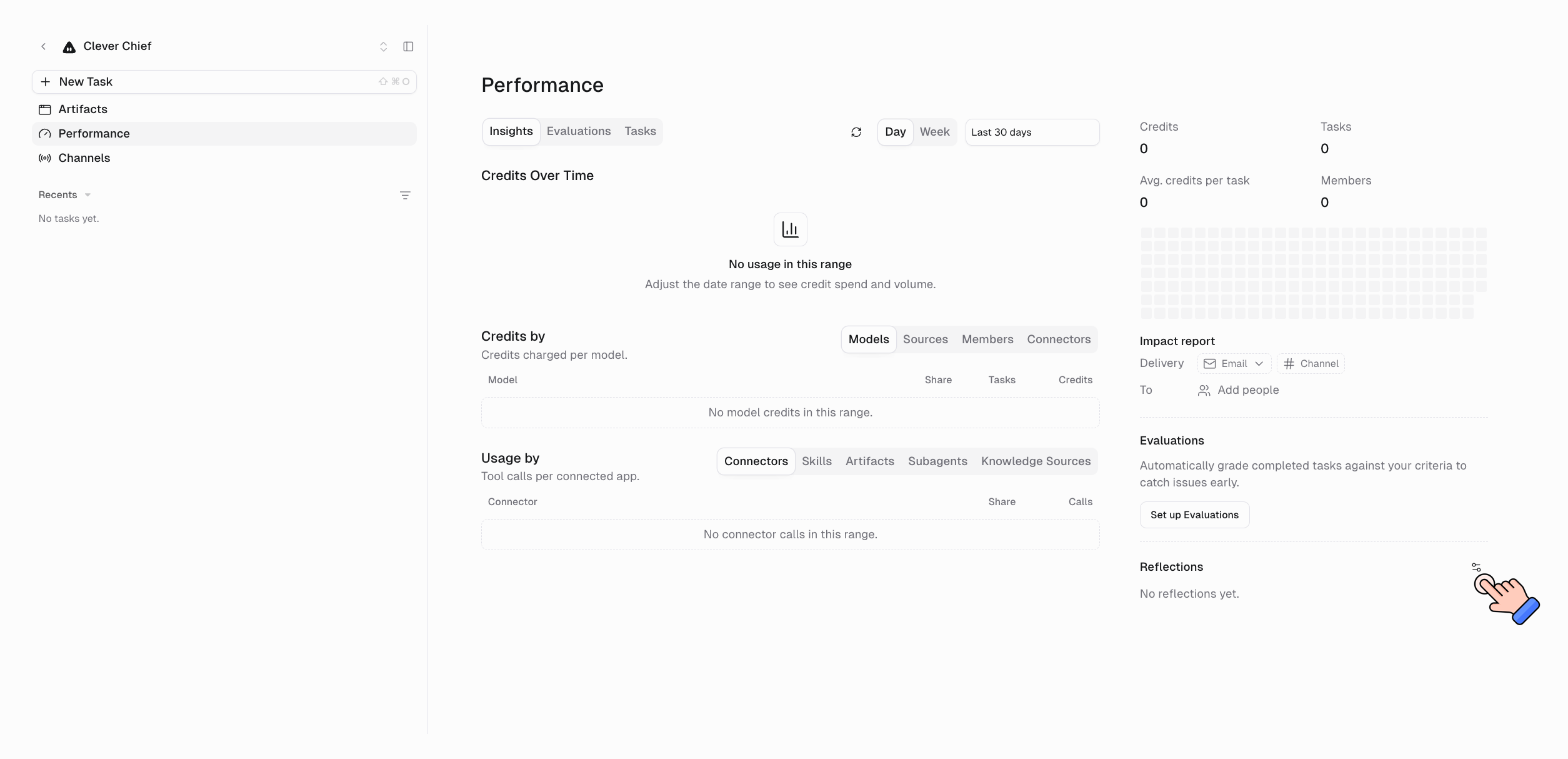
3
Open the settings
Use the settings icon on the Reflections header to choose how suggestions are applied and where reports go.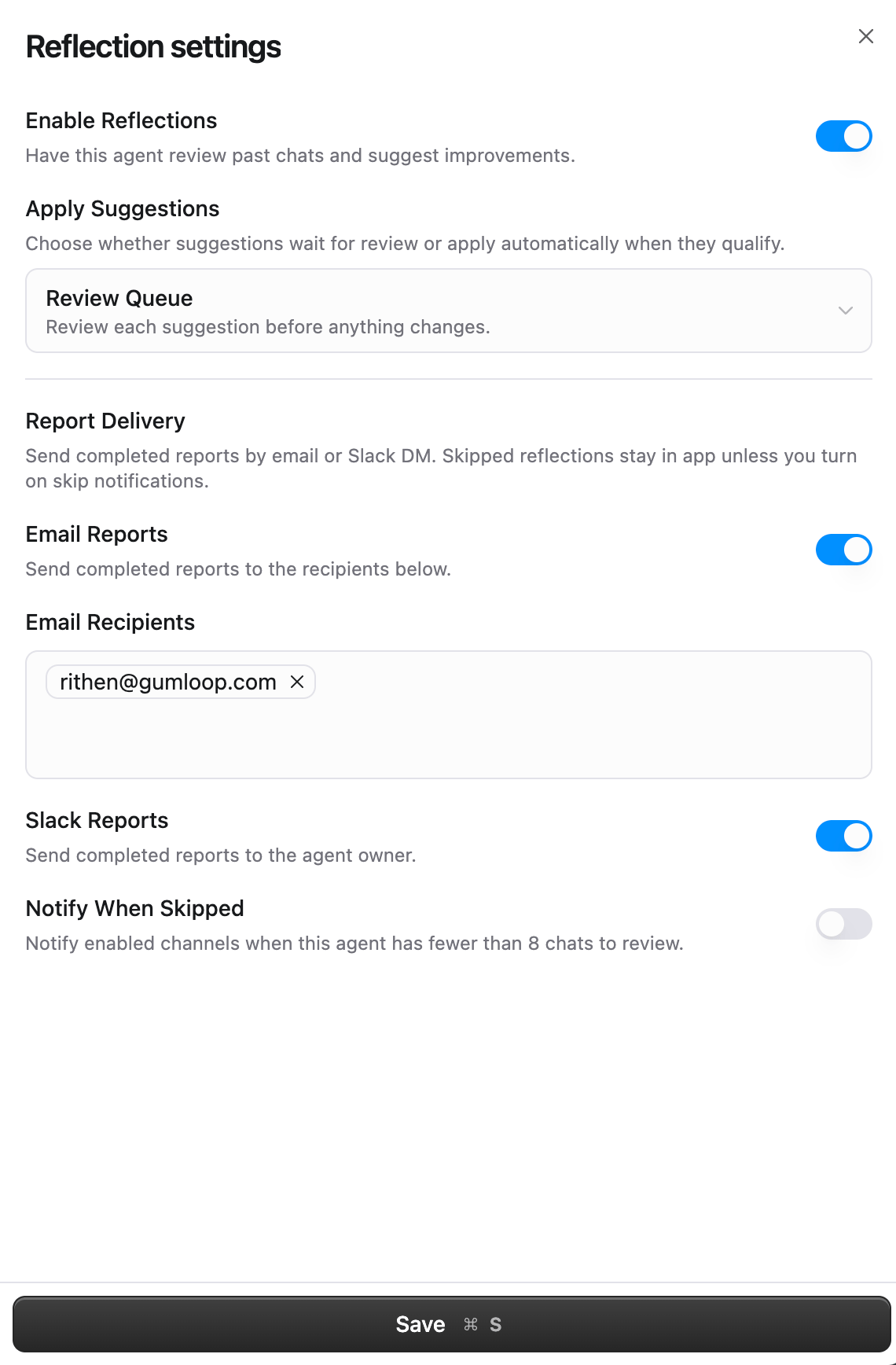
Apply suggestions
This decides what happens when the agent proposes a change.Review queue (default)
Review queue (default)
Every suggestion waits for you. Nothing about the agent changes until you accept it.Best for: production and customer-facing agents, or any agent where you want to see each change first.
Auto-apply low-risk suggestions
Auto-apply low-risk suggestions
Suggestions the system classifies as low-risk with enough supporting evidence are applied as soon as they’re created. Everything else still waits in the queue.Best for: internal agents and personal assistants where you want faster iteration.
Trigger changes and items that need a human are never auto-applied.
Report delivery
Reflection reports stay in the app by default. Turn on a channel if you want to hear about them elsewhere.All delivery is off by default. Enabling Reflections on its own never sends anything outside Gumloop.
When reviews run, and when they’re skipped
Reviews run on their own once enabled, roughly once a day in the evening. A scheduled review is skipped when:- There has been no new activity since the last review, or
- The agent has handled fewer than 8 tasks since the last review, too small a sample to tell a pattern from a coincidence
Reading the Reflections section
Once reviews start producing results, the Reflections section summarizes the state of the queue and lists the most recent items. View all opens the full list, where you can scroll the whole history.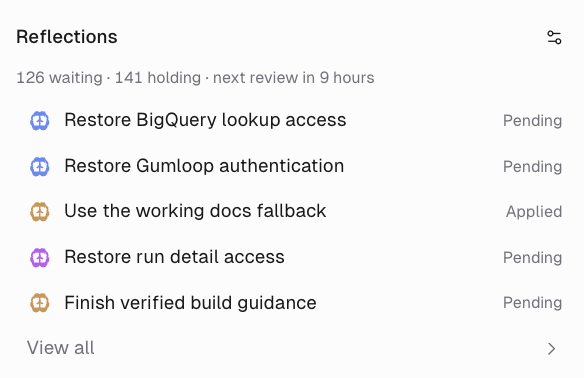
126 waiting · 141 holding · next review in 9 hours.
Statuses
Reviewing a suggestion
Click any row to open the full detail view.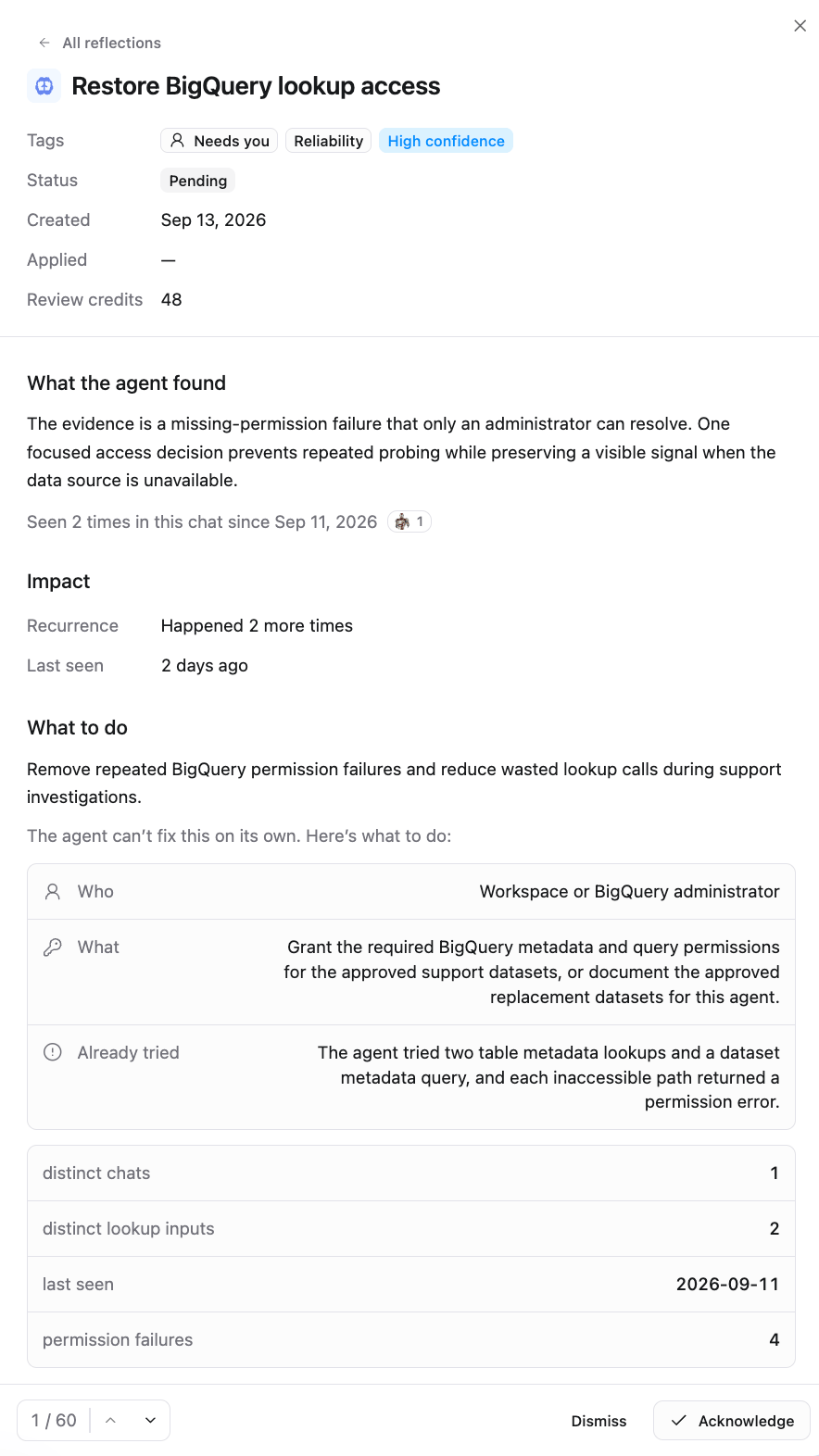
Accepting, dismissing, acknowledging
For a trigger change, a confirmation appears first (Change this agent’s trigger?) because the new schedule takes effect immediately.
After a change is applied
Applied suggestions keep reporting back. The detail view shows before/after numbers for the signal that motivated the change, how often it has recurred since, and whether the change is still in place. If the problem returns, the suggestion flips to Didn’t hold, and the agent can propose a different fix in a later review.How Reflections differ from other self-improvement features
The first two are reactive: they happen because you said something. Reflections are proactive, and they’re the only one that measures whether the change actually worked.
Best practices
Start in review queue
Watch a few cycles of suggestions before deciding whether to let low-risk ones apply themselves.
Clear the queue regularly
Suggestions don’t expire, but the evidence behind them goes stale. Accepting or dismissing also teaches the agent what you care about, since dismissed items aren’t re-proposed.
Act on Needs you items
Usually the highest-value ones: a dead connection or a missing permission the agent has been working around, repeatedly, at your expense.
Watch for Didn't hold
A change that regressed is a sign the real cause is elsewhere. Worth a look from a human.
Give it enough traffic
Reviews are skipped below 8 tasks. A lightly used agent will mostly skip, which is fine: there’s nothing to learn from an empty window.
Turn on reports
If you don’t visit the Performance page, email or Slack delivery means you find out about a broken connector the day it’s detected.
FAQ
Does a review run when nothing happened?
Does a review run when nothing happened?
No. If there’s no new activity since the last review, or fewer than 8 tasks to look at, the review is skipped and no credits are used.
What do Reflections cost?
What do Reflections cost?
A review consumes credits like any other agent work, and each reflection shows its Review credits in the detail view. Cost scales with how much activity there is to analyze.
Can I run a review on demand?
Can I run a review on demand?
Not directly. Reviews run on their recurring schedule. You can always ask the agent in a task to look at recent work, but that uses regular agent abilities rather than the Reflections pipeline.
What if I never review pending suggestions?
What if I never review pending suggestions?
Nothing breaks. They stay in the queue, and later reviews may supersede them with better versions. The counts in the Reflections summary keep growing, so it’s worth a periodic pass.
Can auto-apply make a change I didn't want?
Can auto-apply make a change I didn't want?
Auto-apply is limited to suggestions classified as low-risk with enough evidence. Trigger changes and anything that needs a human never auto-apply. If you want full control, stay on Review Queue.
Who can enable Reflections and accept suggestions?
Who can enable Reflections and accept suggestions?
Anyone with permission to edit the agent. Viewers can’t enable Reflections, change its settings, or accept and dismiss suggestions.
Can I see what changed after a suggestion is applied?
Can I see what changed after a suggestion is applied?
Yes. Skill and instruction suggestions show a preview of the exact change before you accept, and the detail view keeps the applied timestamp along with the tracking numbers for the signal it was meant to fix.