

AI models evolve rapidly. New models are usually available in Gumloop within a day of their public release, so you have the latest options even if this page has not caught up yet.
Choosing a model
Open the model dropdown at the top of the Agent tab. The fastest way to choose is one of the options at the top: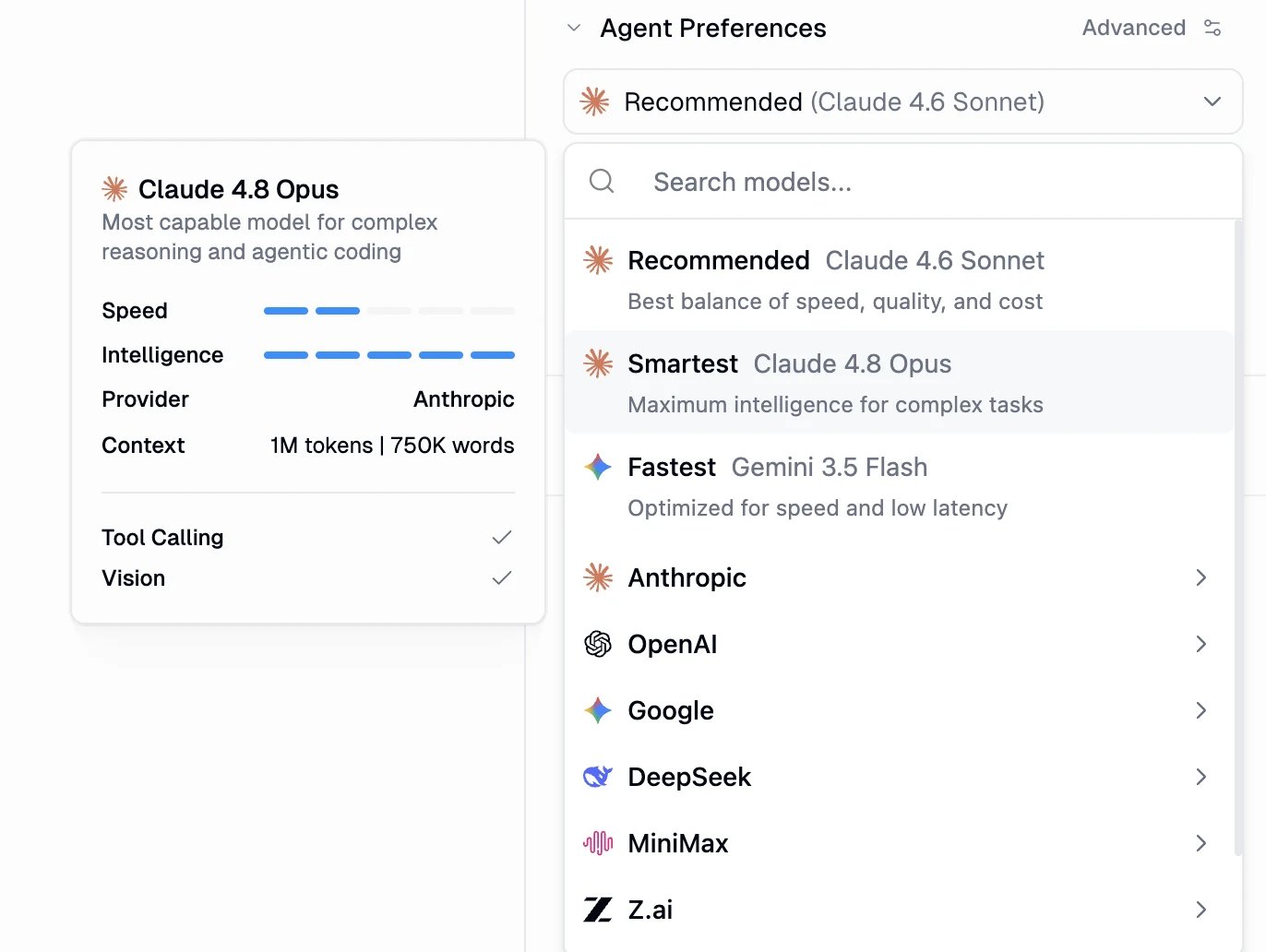
- Auto: Gumloop picks a model per message instead of pinning one. New agents normally default to Auto; Enterprise organizations and accounts where Auto is restricted default to Recommended instead. Organization default-agent settings can select another model.
- Recommended: the best balance of speed, quality, and cost. Currently points to Grok 4.7.
- Smartest: maximum intelligence for complex reasoning and agentic work.
On Enterprise plans, admins can restrict which models a Custom Role may use. Restricted models can appear in the picker marked Restricted by Admin, but you cannot select them. Where available, you can request access.
Auto: let Gumloop choose the model
Auto is Gumloop’s model router, not a model from a provider. Select it once, and Gumloop picks which model runs each message. Your initial selection depends on your organization’s defaults and model restrictions.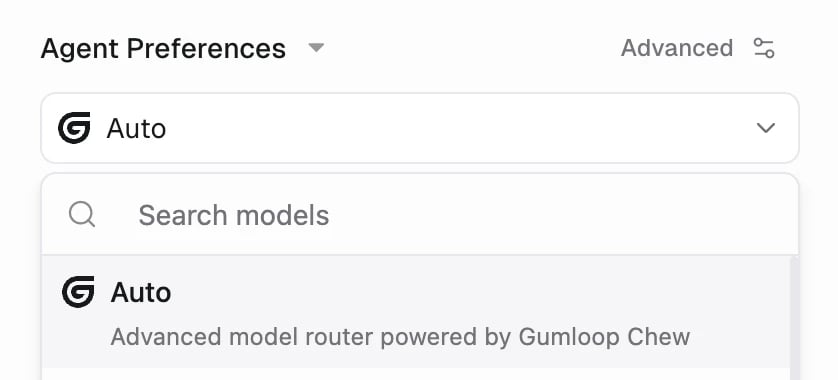
Auto sits at the top of the model dropdown on the Agent tab.
How Auto picks a model
1
It reads your message first
Before the agent starts working, Gumloop judges what the message actually needs — how hard it is, whether anything will check the answer, which tools it implies — and picks the cheapest tier that should still produce the same result for you. Quality comes first: Auto does not save money by accepting a worse answer. While it decides, the chat shows Choosing the best model.
2
It runs on a real model, and tells you which
Each tier is a short, ordered list of models; Auto runs the first one you’re allowed to use. Once the run starts, the chat names it (Using Grok 4.7), and that same model is what shows up in the chat’s models list and its credit breakdown.
3
It can move up mid-run
If a run turns out harder than the message looked, Auto escalates to a stronger tier part-way through — the chat shows Switching to …. That judgement is made from steps the agent has already finished, so it reacts to how a run is going rather than predicting it. Escalation then sticks for the rest of the run: a run never climbs and drops back down, and a message that already started on a top tier doesn’t switch, because nothing sits above it.
The tiers Auto chooses from
Auto picks one of five tiers, from cheapest to most capable. Gumloop keeps the model behind each tier current, so the models below are today’s choices rather than a fixed list — the chat always names the one that actually ran.
Some work never runs on the two cheapest tiers, however trivial the message looks:
- Anything that writes to the real world — send, post, reply, create, update, delete, invite — runs on Grok 4.7’s tier or above, including bulk “do this to each of these” sweeps.
- Turns that use other agents (sub-agents, delegations) run on Grok 4.7’s tier or above, because those tools aren’t available on the cheaper tiers.
- Messages carrying images or other non-text attachments stay on Grok 4.7’s tier, since routing only reads text and can’t judge what it can’t see.
Where Auto can be used
Auto and restricted models
On Enterprise plans, Auto stays inside your organization’s model rules — it is not a way around them.- Both layers of restriction apply. Organization-wide model restrictions and a Custom Role’s model allow-list are both enforced on the routing decision, on the model Auto runs, on any mid-run escalation, and on fallbacks.
- A blocked model is never used. Auto skips it and takes the next permitted model in that tier.
- A fully blocked tier steps aside. If nothing in the chosen tier is permitted, Auto runs on the first tier that does have a permitted model, starting with Grok 4.7’s tier.
- If nothing is permitted, the run fails. Auto stops with a model-restricted error rather than running on a model your organization disallowed.
- Admins can restrict Auto itself. It appears in the restriction and Custom Role model lists like any other picker entry. An allow-list that leaves it out prevents users from selecting it. Agents already saved on Auto use a permitted ordinary model, with no routing or escalation; restrictions still apply.
- Models with 30-day data retention are never routed to. Claude Fable models have to be chosen deliberately, so Auto never selects one.
Auto FAQ
How do I use Auto from the API, SDKs, or CLI?
How do I use Auto from the API, SDKs, or CLI?
Auto’s router is called Gumloop Chew, and its model ID is An illustrative response is shown below. The decision depends on your message, candidate models, and permissions.This endpoint returns a decision only. It does not run the selected model or its fallbacks. Restricted candidates may appear with
gumloop-chew. You will see both names, so it helps to know which is which: Auto is the label in the picker, Chew is the router doing the work, and gumloop-chew is what it is called in code.- Set it on an agent. Set
model_name="gumloop-chew"when creating or updating an agent through the API or Python SDK, or pass--model gumloop-chewin the CLI. - List it.
GET /modelsreturns it among the picker options, marked as a Gumloop router rather than a provider model. - Ask it to decide.
POST /models/routereturns the model Chew would pick for a message.routeris alwaysgumloop-chew; the concrete model it chose isroute.model, with the lane it landed in, orderedfallback_models, and every candidate it considered.
status: "restricted", but are never selected or included in fallback_models.gumloop-chew is a router, not a model you can call directly. Chat completions need a concrete model; routing is exposed through POST /models/route, and the routing decision is not billed. Your organization’s model restrictions apply to it just as they do in the app.Is Auto a model?
Is Auto a model?
No. It’s a router. Selecting Auto means “decide for me”: Gumloop classifies each message and runs a real provider model — Claude, GPT, Gemini, Grok, and others — behind it.
Which model did it actually use?
Which model did it actually use?
The chat tells you. It shows Choosing the best model while deciding, then names the model it runs (Using …) and any mid-run switch (Switching to …). The chat’s models list and credit details record the real models, never the routing guess.
What happens when my admin restricts a model?
What happens when my admin restricts a model?
Auto won’t use it. Organization restrictions and Custom Role allow-lists apply to every model Auto could pick, including escalations and fallbacks, so a restricted model is skipped in favor of a permitted one. If no permitted model is left anywhere, the run fails with a model-restricted error instead of bypassing the rule.
Can an admin turn Auto off?
Can an admin turn Auto off?
Yes. Auto is listed in organization restrictions and Custom Role model lists, so it can be blocked or left out of an allow-list. Agents saved on Auto fall back to running on a normal model, without routing.
How is Auto billed?
How is Auto billed?
Exactly like the model that ran: token-based Chat & Reasoning, plus Compute, Tool Calls, and the orchestration fee. Choosing the model is free — the routing decision is not billed, so the chat’s credit breakdown only shows the model that did the work.
What if routing fails?
What if routing fails?
The message runs on Auto’s baseline model — currently Grok 4.7 — instead of failing. Routing errors, timeouts, and content Auto can’t inspect all fall back to that baseline rather than guessing a cheaper or stronger model.
Should I use Auto or a preset?
Should I use Auto or a preset?
Use Auto for agents whose messages vary a lot in difficulty — it saves money on the easy ones without capping the hard ones. Pin a specific model or preset when you need every run to be predictable and identical, such as a compliance-sensitive agent or an eval baseline.
Reading the model card
Selecting or hovering a model opens a detail card so you can compare options at a glance:- Description: what the model is best at.
- Speed and Intelligence: relative ratings across the catalog. Intelligence ratings are periodically rebased on a third-party benchmark, the Artificial Analysis Intelligence Index, so an existing model’s rating can change as the index is updated.
- Provider and Context: who makes the model and how much it can read at once (in tokens and approximate words).
- Tool Calling and Vision: capability checks.
- Badges: extra labels that call out how a model is served. Models marked US-provider hosted are served by US providers under Zero Data Retention (ZDR) policies, and models marked 30-day data retention are not covered by ZDR.
For agents that read images or screenshots, pick one with Vision.
Available models
These are the models you can choose for an agent, grouped by provider. Every one supports tool calling, so it can use your connected services and data. Models marked Vision can also read images and screenshots. Served through is the inference provider Gumloop sends the request to, which also decides which BYOK key can cover the model. New models are added continually, so the in-product picker is always the most up-to-date list.
Claude 5.5 Haiku (
claude-haiku-5-5) supports vision and tool calling, with a 1M-token context window or 100K tokens with a short window. See Agents for context settings.
All open-source models (such as GPT-OSS 120B, LLaMA, DeepSeek, Qwen, Kimi, MiniMax, and GLM) are accessed through US-based providers under Zero Data Retention (ZDR) policies, and carry a US-provider hosted badge in the model picker. These providers do not train on your data and do not store it after inference.
Where open models are served
Gumloop serves open models through two routes:- Fireworks AI: DeepSeek V4.1 Flash, DeepSeek V4 Flash, DeepSeek V4 Pro, Kimi K3, Kimi K2.7 Code, GLM-5.3, GLM-5.2, MiniMax M3, and Qwen3.8 Max go straight to Fireworks.
- OpenRouter: GPT-OSS 120B, Gemma 4 26B, and GLM-5.3-Flash go through OpenRouter, locked to the hosts listed in the table above. Every OpenRouter request enforces Zero Data Retention and blocks data collection.
Models with 30-day data retention
Gumloop serves every model under Zero Data Retention with one documented exception: the Claude Fable family. Anthropic keeps prompts and outputs sent to Claude Fable models for 30 days to check for misuse, then deletes them. Anthropic does not train on that data, and every other model — including every other Claude model — is unaffected.
These models carry a 30-day data retention badge in the picker, and:
- They are off by default. An organization admin has to explicitly allow non-zero data retention models before anyone can select one. See AI Model Governance.
- They are never chosen for you. They are excluded from the Recommended / Smartest presets, from Auto, and from fallback models — the only way one runs is if you pick it.
- If the acknowledgement is later revoked, they become unavailable immediately and agents set to them fail until you switch models.
Thinking controls
Most modern models think before they answer. How much they think is a setting on the agent: open the Settings tab and expand Advanced AI. What you can change there depends on the model you have selected, because Gumloop only offers the controls a model actually supports — a model with no thinking control simply does not show one.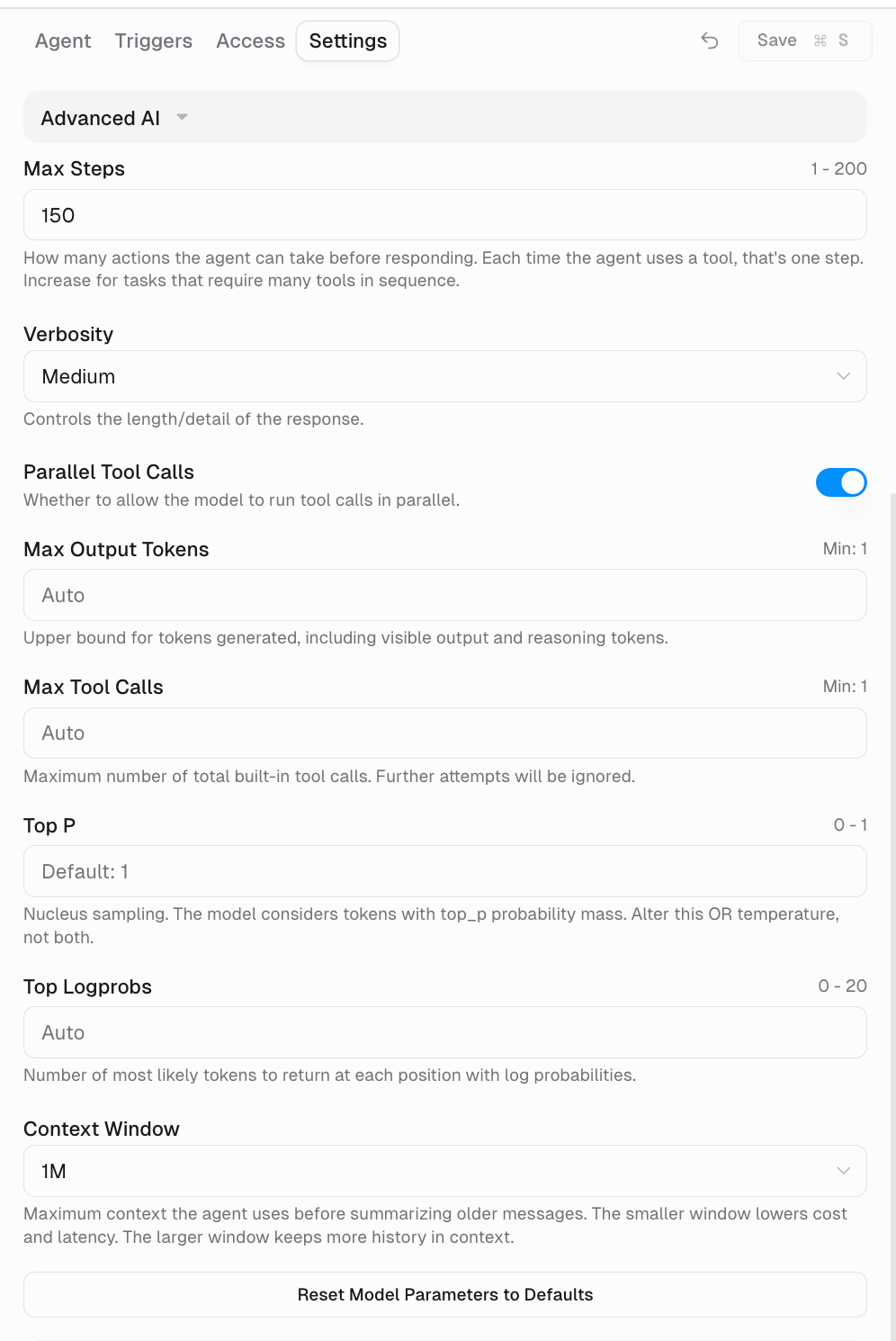
- Effort levels — pick how hard the model thinks, from low up to max. More effort usually means a better answer, more thinking tokens, and a higher cost.
- On or off — turn thinking off for speed and cost on models that allow it.
- A thinking budget — give the model a token allowance to think inside.
Your choices are saved per provider, so switching models keeps the settings you picked for each one. If a model does not support a level you saved, Gumloop uses the closest level it does support rather than failing the run.
What are decision models?
Decision models classify and score information through the Decisions API. Gumloop supports Jev 1.13 from TypeSafe (typesafe/jev-1.13), served through OpenRouter, and GPT-6 Luna from OpenAI (gpt-6-luna), served directly through OpenAI. Jev is decisions-only. GPT-6 Luna supports both decisions and chat under the same model ID.
Give the model some data and a question with defined answers. It returns a decision and probabilities you can use in code, such as whether a ticket is urgent or which team should handle it.
Use Create decision to call either model through
/decisions. For a chat reply from GPT-6 Luna, use /chat/completions instead. Agents can also use decisions in Computer scripts when permitted; see Code sandbox & secrets.
Check List models for current availability. supports_decisions: true identifies models you can call through /decisions. is_classifier_model: true identifies decisions-only models, not every model that supports decisions. Your model permissions still apply.
How agents are charged
In agents, model cost is token-based and variable. You are charged for the tokens each message uses, which depends on the model, the length of the conversation, and the tools available. There are no fixed per-message tiers. Model calls bill at cost, converted to credits at $0.005 per credit, and each run also carries Compute and an Orchestration Fee. Select the credit count in any chat’s header to see its exact usage, and see Credits for the full breakdown.Bring your own key (BYOK)
Provide your own provider API key to cut model costs. On usage-based pricing, eligible BYOK model calls use 0 model credits, including eligible image-generation and transcription calls. Agent chats still have an orchestration fee: normally 16% instead of 8%, calculated on what the run would have been worth. Older organizations may use a different pricing policy, with a discount rather than a full model-credit waiver. See Credits.Each key only waives the models it can actually serve. A Fireworks AI key covers the open models Gumloop serves through Fireworks — DeepSeek V4.1 Flash, DeepSeek V4 Flash, DeepSeek V4 Pro, Kimi K3, Kimi K2.7 Code, GLM-5.3, GLM-5.2, MiniMax M3, and Qwen3.8 Max. The other open models in the picker (GPT-OSS 120B, Gemma 4 26B, GLM-5.3-Flash) run elsewhere, so a Fireworks key does not affect them.
Setting up a key
Setting up a key
Requires a Pro plan or higher and your own OpenAI, Anthropic, Google AI, Perplexity, SpaceXAI, or Fireworks AI account.
- Pro
- Enterprise
Add a key from your personal Connectors so your own calls route through it, or add a shared team key so the whole team can use it without managing individual keys.Pro users cannot set keys at the organization level.