

iMessage, RCS, or SMS
Text from your phone’s messaging app. The same number works over iMessage, RCS, and SMS.
Your own Gumball
Everyone texts the same number. Each verified sender reaches their own Gumball, running on their own connectors and skills.
Follow-ups stay together
A reply continues the current task. A new request after a break starts a fresh one.
Approve by text
When a tool call needs your approval, reply
approve instead of opening Gumloop.Get started
1
Open the Gumball home screen
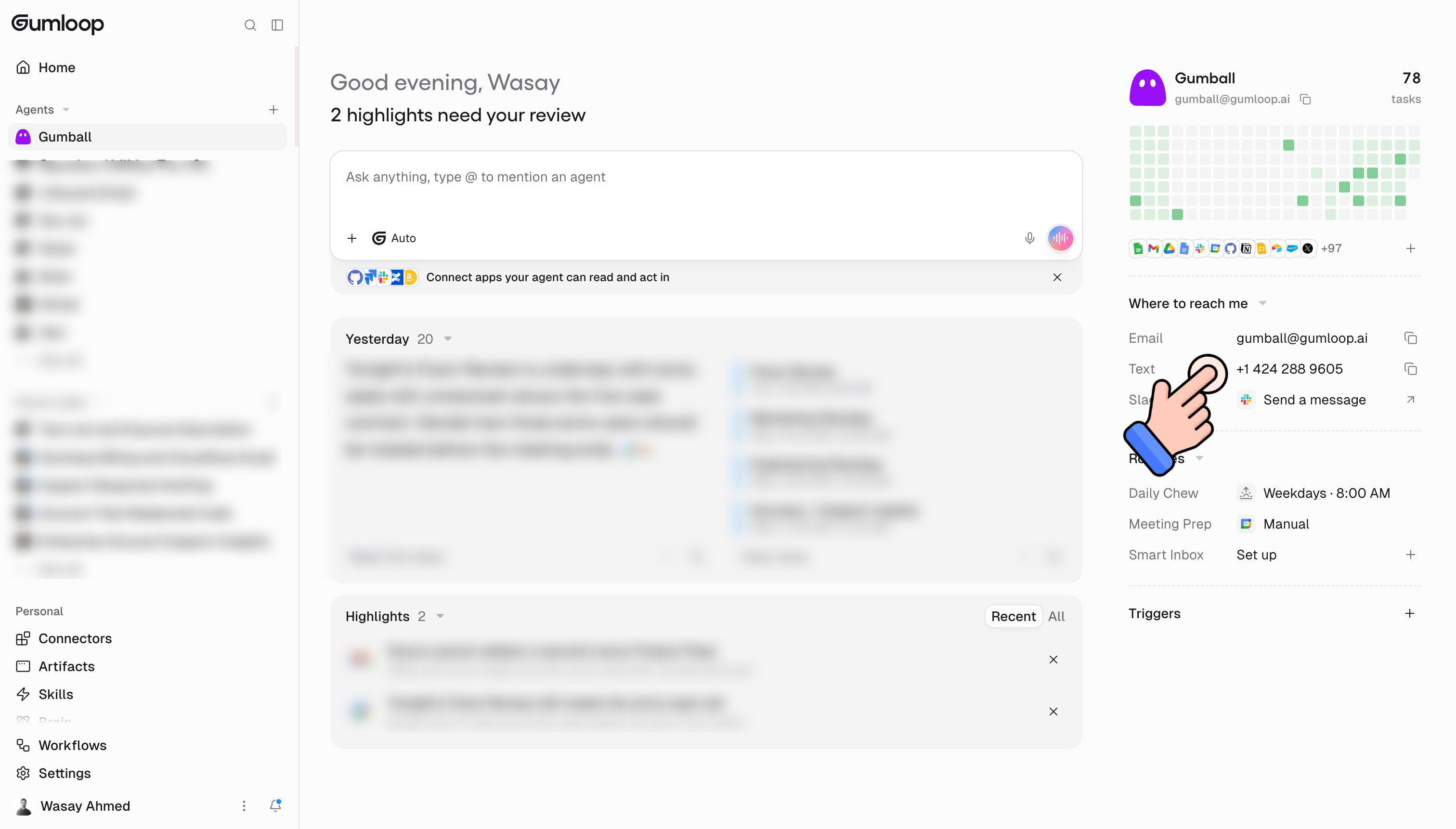
Find the Text row under Where to reach me in the right-hand rail. It shows Gumball’s phone number.
2
Verify your phone number
If you haven’t verified a number yet, clicking the Text row opens Add a phone number. Enter your mobile number, click Text me a code, then enter the 6-digit code under Enter your code and click Verify number.
3
Text Gumball
Once you have a verified number, clicking the Text row copies Gumball’s number. Save it as a contact and send it a message from your verified phone.
The Text row only shows when texting Gumball is available on your deployment. If your role isn’t allowed to text Gumball, the row reads Texting Gumball is off for your role and clicking it lets you request access. See Availability and Permissions.
Verifying your phone number
Gumball only answers phone numbers verified in Gumloop. Your verified number identifies your Gumloop account and your Gumball.Texting before you verify
If you text Gumball from a number that isn’t linked to a Gumloop account, Gumball doesn’t run. It texts back instead:This number isn’t linked to a Gumloop account. New to Gumloop? Get started at … Already have an account? Verify this number at …The verification link opens a Gumloop page with your number already filled in. Sign in, confirm the code, and once you see Number linked, text Gumball again. The page also has an Open Gumball button.
Managing your numbers
Verified numbers are listed under Phone numbers at Settings → Profile → General.- Add phone number opens the same verification flow.
- Each number’s menu has Copy number and Remove number.
- Removing a number means agents with texting enabled stop answering texts from it. You can verify it again later.
What you can send
Files Gumball cannot read directly can still be used on its Computer. If an attachment cannot be downloaded or saved, a dropped-attachment notice accompanies your message, and your typed text is kept.
Each sender can send up to 20 texts per minute and 200 per hour. Over that, Gumball replies “You’re texting faster than I can keep up. Give it a minute and try again.” instead of starting a task.
Can I send an iMessage voice message?
Yes. Send an iMessage voice message and Gumball uses the transcript to understand your request and recognize follow-ups. You can ask it to summarize the transcript or work with the original audio on its Computer. Transcription depends on the audio format and your organization’s model restrictions, and uses credits. Voice requests follow the same tool permissions and approval requirements as typed requests. If transcription fails, your typed text still reaches Gumball, and the audio remains available if it was saved successfully.How a conversation works
1
Gumball sees your text
Your message is marked as read as soon as it’s picked up. On iMessage, you also see a typing indicator while Gumball works. SMS and RCS don’t get typing indicators.
2
Gumball decides: same task or new task
Texts have no threads, so Gumball decides whether your message continues the current task or starts a new one. See Follow-ups and New Tasks.
3
Gumball works on it
It runs like any other Gumball chat, with your connectors, skills, and history. If the task needs more time, Gumball can send a progress update before the final reply.
4
Gumball texts back
The answer arrives in the same chat, written for a phone. Typing stops when the reply is sent.
Follow-ups and new tasks
Gumball uses the task’s last activity and what you wrote to decide whether a text is a follow-up or a separate request.
When a new task starts, Gumball keeps a recap of the text conversation it split from. It can also receive references to up to five recent saved text conversations with that agent, and open a matching conversation when you refer back to it. Deleted and incognito conversations are excluded. Older conversations remain searchable.
When the current task is not running or queued, send a clear new request after the short continuation window. There is no command that forces a split. After 7 days without activity, a task that is not running or queued starts fresh.
What replies look like
Gumball sends short, plain-text replies suited to your phone, with links on their own line.Approving actions by text
When a tool call needs your approval, Gumball texts you what it wants to do. Pending tool approvals in delegated agents also come back to this text conversation. The text ends with:Reply “approve” to approve, or review in Gumloop: …The approval is always sent as its own text, after the rest of the reply, so it’s never cut off.
How to approve
How to approve
Reply
approve to approve the task’s pending tool requests that can be answered by text and were sent to you. This includes delegated agents’ tool approvals, but not another person’s requests. Gumball continues and texts you the result. Capitalization and surrounding spaces do not matter, and the reply does not start a new request.How to decline
How to decline
There’s no decline keyword. Open the review link and decline in Gumloop.
When approve won't work
When approve won't work
Forms, browser handoffs, and a delegated agent’s continue-or-stop checkpoint need an answer on the linked page, not
approve. Open the link in the text to respond. For a request that needs answers, Gumball replies “This one needs answers I can’t take by text. Open the task in Gumloop to respond.”Other approval replies
Other approval replies
How do I answer a browser handoff by text?
Gumball texts a secure link instead of theapprove shortcut. Complete the step on the linked page and Gumball texts the continuation. Never text passwords, API keys, or one-time codes. See Agent browser.
Opting out
Text any of these to stop receiving texts from Gumloop:STOP · UNSUBSCRIBE · OPTOUT · CANCEL · END · QUIT · opt out · opt-out
The single-word keywords must match exactly (all caps, nothing else in the message). opt out and opt-out match in any capitalization.
- An opt-out text never starts a task.
- Once you’ve opted out, Gumloop stops sending texts to your number.
- Sending any other text afterwards turns texts back on, unless the messaging provider still reports your chat as opted out.
- A number that has opted out can’t receive a verification code: “This number has opted out of texts from Gumloop, so we can’t send a code to it.”
Availability and permissions
Messages when access is missing
If Gumball can’t take your text, you get one of these instead. Each is sent at most once per hour per chat, so you won’t get the same one repeatedly.Credits
There’s no per-message charge for texting. The work Gumball does for a text uses credits like any other Gumball task.FAQ
Does everyone text the same number?
Does everyone text the same number?
Yes. Gumball has one shared number. Gumloop looks up who sent each text by their verified number and routes it to that person’s own Gumball, so you never see anyone else’s conversations.
Can I text Gumball from a group chat?
Can I text Gumball from a group chat?
No. Group chats are ignored. Text Gumball one-to-one.
Why don't I see a typing indicator?
Why don't I see a typing indicator?
Typing indicators only work over iMessage. Over SMS and RCS, your message is still marked as read and Gumball still replies.
Why was Gumball's reply cut off?
Why was Gumball's reply cut off?
Replies are capped at 6 texts of up to 1,500 characters each. Anything longer ends with “The full reply is too long for a text. Open it in Gumloop.”
How do I start a new task?
How do I start a new task?
Just text a clear new request. When the current task is not running or queued, Gumball checks whether a text sent after the 60-second continuation window is a follow-up or a separate request. After 7 days without activity, the next text starts a new task if the current one is not running or queued.
Can I send Gumball a photo?
Can I send Gumball a photo?
Yes. Photos and files you text are passed to Gumball as attachments, up to 32 MB each.
Can I link the same number to two accounts?
Can I link the same number to two accounts?
No. A phone number can only be verified on one Gumloop account at a time. Remove it from the other account first.
I texted STOP by accident. How do I turn texts back on?
I texted STOP by accident. How do I turn texts back on?
Send Gumball any other message. That clears the Gumloop opt-out, unless your messaging provider still reports the chat as opted out.