

Organization roles are available on the Pro plan and above. Some feature roles and capabilities require the Enterprise plan.
For granular, feature-by-feature restrictions (app allowlists, tool restrictions, concurrency limits), see Custom Roles. That is a separate, complementary system that restricts what organization roles grant. A user can hold multiple custom roles at the same time.
How it works
Union of permissions
A user with
{Member, Analytics} can do everything Member and Analytics allow. Revoking one role does not remove permissions granted by another.Member is implicit
Every org member automatically holds Member. It is not shown in the Manage Access picker and cannot be removed without removing the user from the org.
Scopes are independent
Organization roles apply across the org. Team roles apply inside a single team. A user can be a Team Admin on one team and a Team Member on another.
Admin vs Feature roles
Admin roles (Admin, Manager) grant broad authority. Feature roles (Security, Developer, Analytics) grant scoped access to one area.
Organization roles
Admin
Full control: billing, SSO, members, organization Brain, and every feature area.
Manager
Member operations, organization Brain, connectors, and analytics. No billing or security.
Member
Implicit baseline. Use agents, skills, and personal connectors.
Security
Custom roles, app policies, AI model access, Agent Defaults, and MCP server settings.
Developer
Build and test Hosted MCPs.
Analytics
Organization analytics, usage, and data export.
Admin
Role ID:
admin · Group: Admin · Scope: OrganizationCan access
- Billing, subscription, and credit limits
- SSO, SAML, and SCIM
- All member operations
- Organization connectors
- Team access and team settings
- Audit logs
- AI model access, app policies, custom roles
- Analytics, usage, and data export
- Connector Activity, Hosted MCPs, and Proxied MCPs (when enabled)
Can assign
Admin, Manager, Security, Developer, Analytics.
Manager
Role ID:
manager · Group: Admin · Scope: OrganizationCan access
- Invite, remove, and manage members
- Organization connectors
- Organization Brain
- Analytics, usage, and data export
Can assign
Analytics, Member.
Member
Role ID:
member · Group: Feature · Scope: Organization and Team · Baseline: YesCan access
- Create and use agents and skills
- Read organization metadata
- Create teams
- Manage personal connectors
- Leave the organization or a team
Can assign
Nothing.
Security
Role ID:
security · Group: Feature · Scope: Organization · Plan: EnterpriseCan access
- Custom Roles and approvers, on the Custom Roles and Approvers pages
- Connector Policies
- AI Model Access Controls
- Agent Defaults (view and manage)
- Hosted MCPs and Proxied MCPs settings pages (on enabled orgs)
- Slack workspaces and the organization service account
Can assign
Developer.
Developer
Role ID:
developer · Group: Feature · Scope: OrganizationCan access
- Create hosted MCP servers and open a server’s page from a direct link
- Agents and skills via Member
Can assign
Nothing.
Analytics
Role ID:
analytics · Group: Feature · Scope: Organization · Plan: EnterpriseCan access
- Organization analytics dashboard
- Usage limits and credit consumption
- Data export
Can assign
Nothing.
Team roles
Teams use a simpler two-role system.Team Admin
Role ID:
admin (team scope) · Scope: TeamCan access
- Team agents and skills
- Team credentials
- Team analytics
- Team membership
Can assign
Team Admin, Team Member.
Team member
Role ID:
member (team scope) · Scope: Team · Baseline: YesCan access
Read access to team content.
Can assign
Nothing.
Organization Admins can manage membership and roles on every team in the organization, regardless of their own team-level role.
Managing roles
Roles are assigned and revoked individually from the Manage Access sheet. You pick the exact combination of roles the user should hold. This is not a promote or demote action.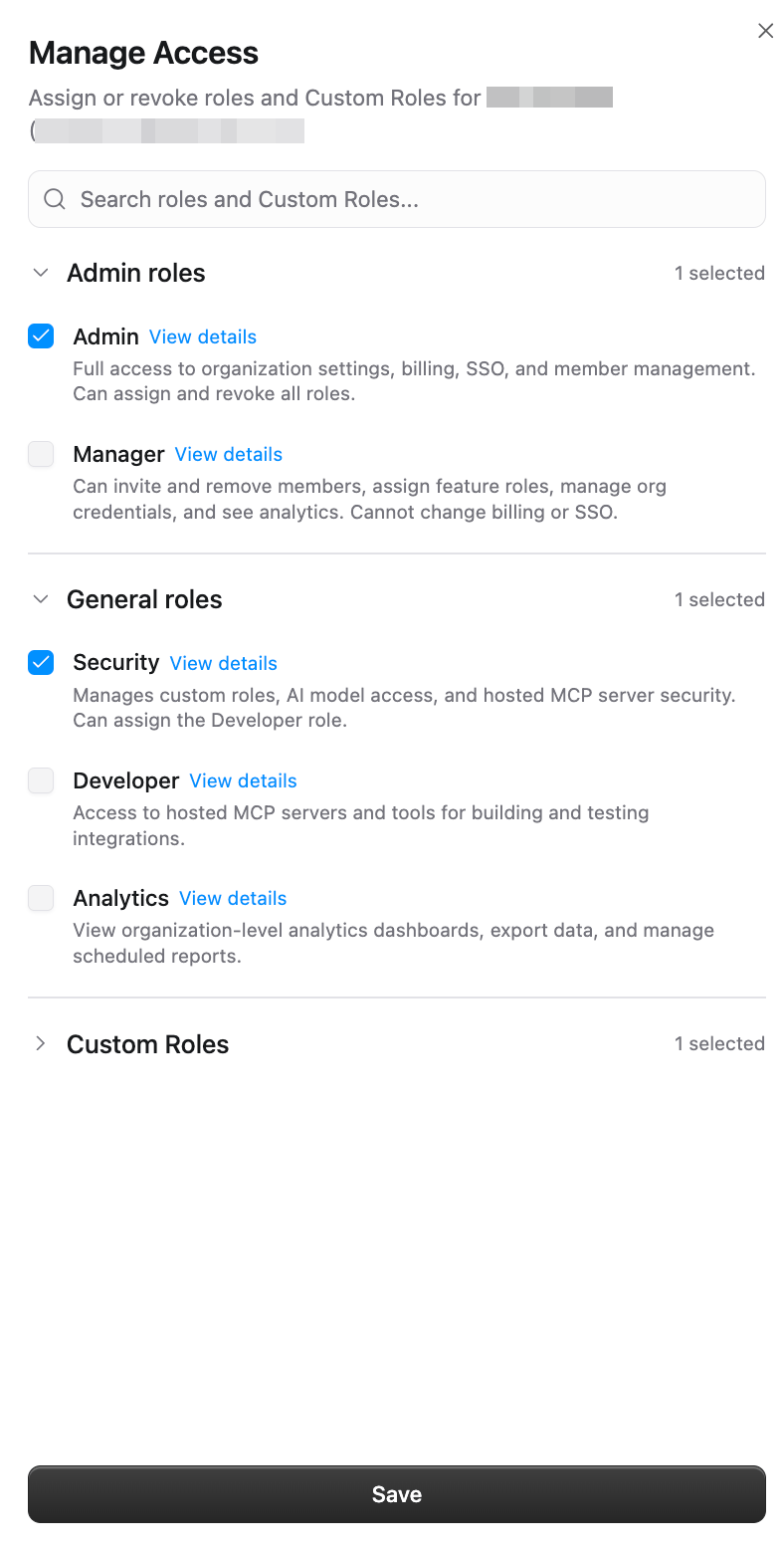
1
Open the members page
Go to Organization Members or a team’s Members tab.
2
Open Manage Access
Click the three-dot menu next to the member and choose Manage Access. The sheet opens with every role the member currently holds pre-selected.
3
Toggle and save
Check or uncheck any available role and click Save. Roles you are not authorized to assign are hidden. Effective permissions update immediately.
Adding a new member with roles
Pre-assign organization roles when you invite someone so they land with the right permissions as soon as they accept.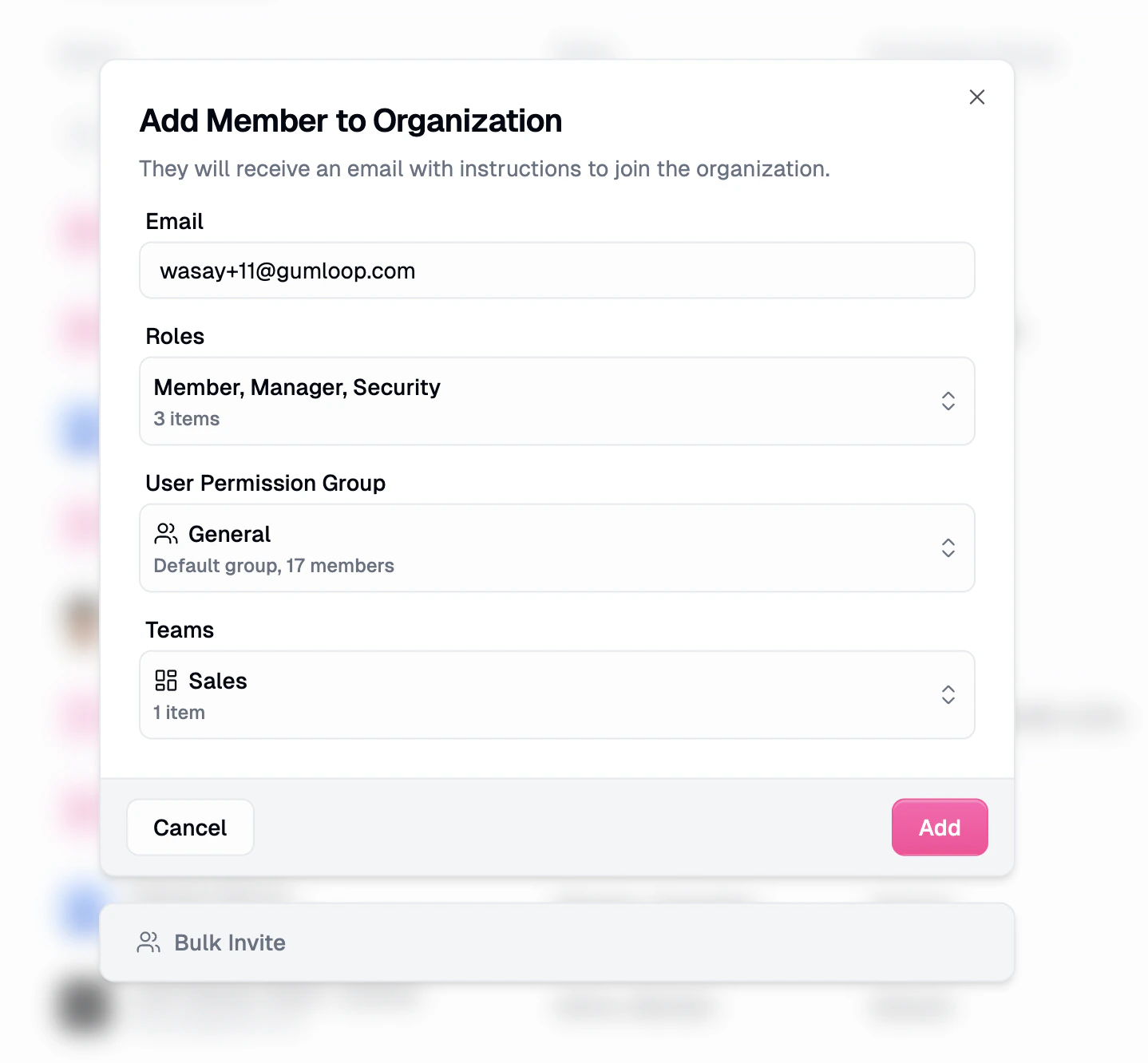
- Roles is a multi-select. Every invitee gets Member implicitly; pick any additional roles your own role lets you assign.
- Custom Roles picks one or more Custom Roles that apply subtractive restrictions on top of the organization roles. New invitees automatically join the default custom role; you can layer additional custom roles on top.
- Teams adds the invitee to one or more teams.
Best practices
Start minimal, then layer on
Start minimal, then layer on
Every user starts as Member automatically. Add the narrowest additional roles that match their responsibilities. You can always add more later.
Prefer feature roles over Manager or Admin
Prefer feature roles over Manager or Admin
If someone only needs analytics visibility, grant Analytics, not Manager. Keep the high-authority list short.
Use Security instead of Admin for guardrails
Use Security instead of Admin for guardrails
Custom roles, app policies, and AI model access no longer require Admin. Grant Security so platform and security teams can own guardrails without billing or SSO.
Review role assignments quarterly
Review role assignments quarterly
Additive roles make it easy to accumulate extras. Run a quarterly review and remove roles that are no longer needed.
Removing a member
Remove a member from the three-dot menu on Organization Members, or from a team’s Members tab to remove them from that team only. Removing a member from the organization, or deprovisioning them through SCIM, stops every trigger they run right away: Gumloop pauses their agent triggers and deletes their workflow triggers. Admins can then transfer or delete the member’s resources from the Recently left tab, as described below. For a full handoff checklist, see Keep agents running after someone leaves.Transfer or delete a removed member’s resources
Organization Admins can hand a removed member’s resources to someone else, or delete them, from the Recently left tab on Organization → Members.- Open the Recently left tab. Left within filters by when they left (7 days, 30 days, 90 days, or Any time). Remaining resources shows what each person still owns.
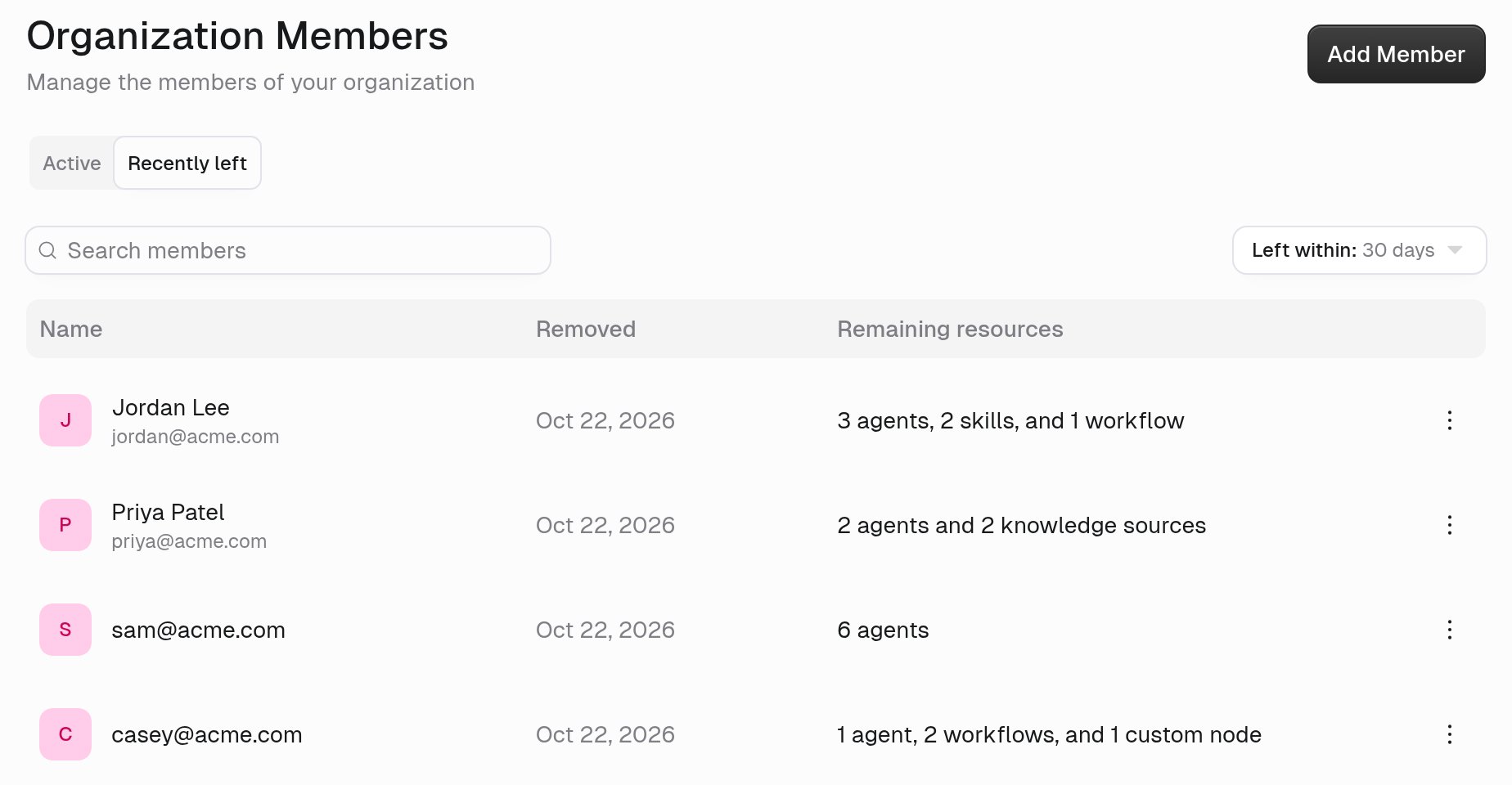
- Open the member’s menu and select Transfer resources.
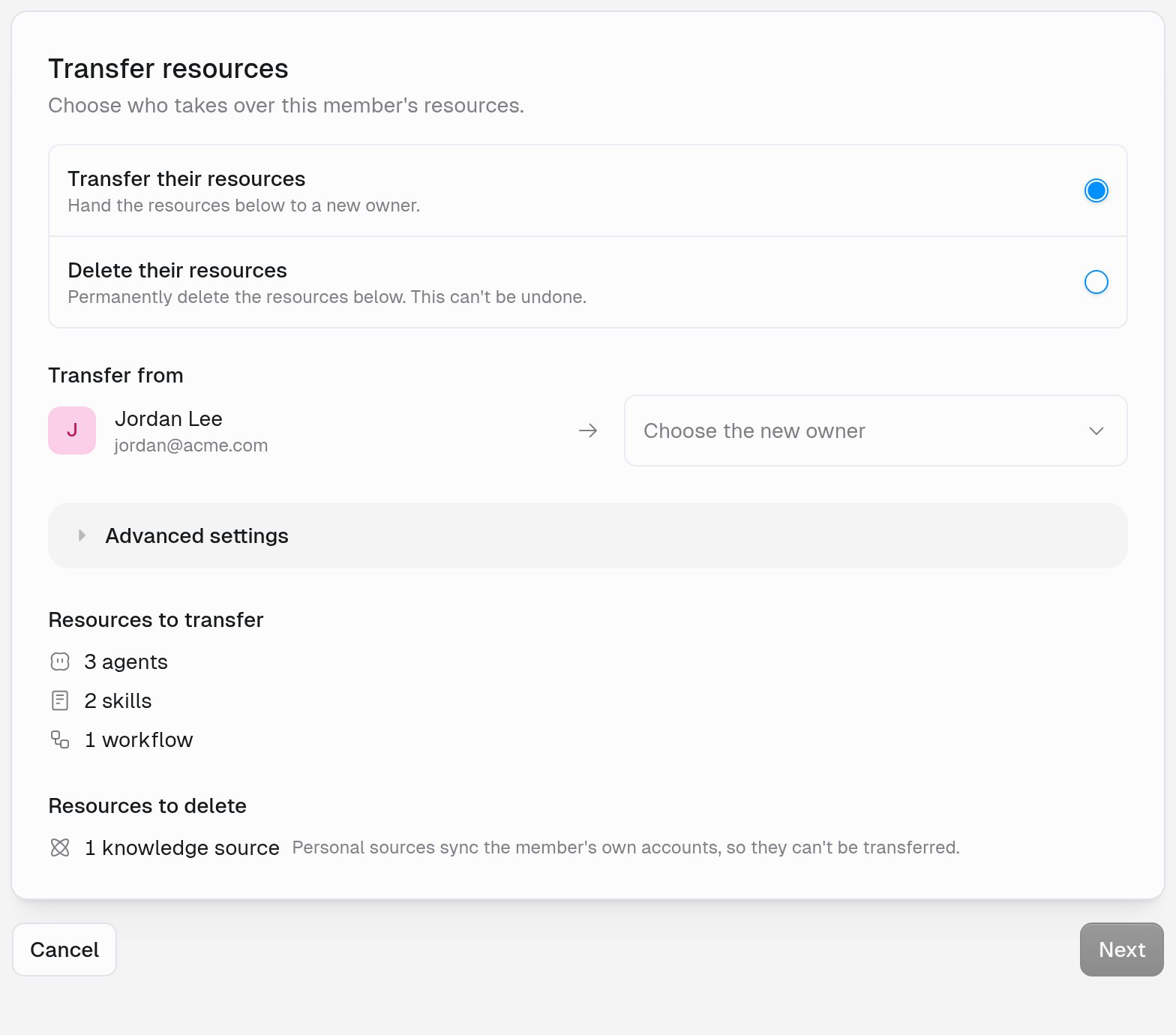
- Choose Transfer their resources to hand them to a new owner, or Delete their resources to delete them permanently. Deleting can’t be undone.
- For a transfer, choose the new owner. Under Advanced settings, Choose destination for resources in personal space picks the team that receives items from the member’s personal space. Items in other teams stay in those teams.
- Click Next, review the summary, and confirm.
- Triggers on the member’s agents move with the agent.
- A trigger that was running restarts for the new owner, or stays paused when it needs setup first, such as choosing an account.
- A transferred webhook trigger gets a new URL and stays paused. The new owner turns it on and gives the sender the new URL.
- You can only delete copies of a shared trigger, not transfer them.
How permissions resolve
When someone takes an action, Gumloop checks three things. The action goes through only if all three agree.1. Roles
The union of everything your organization and team roles grant at the relevant scope. This is the ceiling on what you can do.
2. Item sharing
For a specific agent, an Owner can add you as an Owner or a User (see Agent Access). For a skill, the owner can grant you Editor, Viewer, or Use only. Sharing overrides the default per item.
3. Custom roles
Your Custom Roles can subtract from what roles and sharing allow. For example, they can block certain apps or tools. A user can hold multiple custom roles, and the effective restriction is composed across all of them.
What does view-only access to a settings page look like?
Each organization settings page checks two permissions: one to open the page and one to change it. Every built-in role that can change a settings page can also open it, so for most pages, the pages a role can open are the pages it can edit. General is the exception. Every organization member can open General from Settings in the bottom-left sidebar, under Organization, to see settings such as Organization Name and Organization ID. Only roles allowed to change organization settings can save there. When you open a settings page you can view but not change, the page shows the note “You can view these settings. Ask an admin to change them.” Its edit and create controls are disabled, so you can read the saved configuration without starting a change.Role comparison
Users with multiple roles get the union of the “Yes” columns.
Team Admin can assign Team Admin and Team Member inside the team. Team Member is implicit and has read access to team content.
Related resources
Custom roles
Additive restriction roles that subtract from what organization roles grant.
Connector policies
Allow or block specific apps for users.
AI model access controls
Restrict which AI models users can call.
Audit logging
Track every administrative action.
Teams
Group users and content for shared access.