

What am I seeing, and what do I do?
How do I answer a CAPTCHA handoff?
- On the handoff card, click Open browser if the Browser panel isn’t already open on the right.
- Solve the check directly in the Live view, the same way you would in your own browser.
- Click Continue on the handoff card. The agent picks up from there.
How do I set a proxy country?
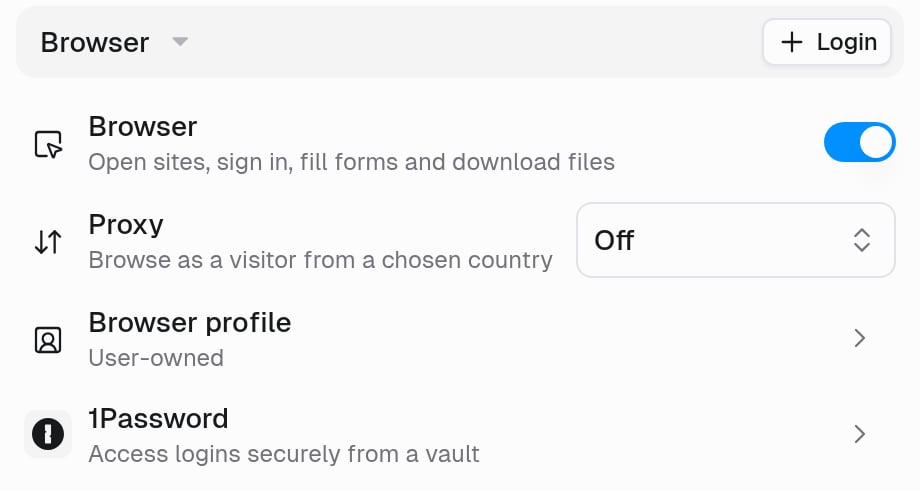
With a proxy, the browser connects through a residential connection, so sites see an ordinary visitor. With Proxy set to Off, it connects directly from the agent’s computer, which many bot-protection services treat as automated.
When you turn the browser on, Proxy starts on Auto. Older agents keep the proxy they had. To change it:
- Open the agent and find the Browser section on the Agent tab.
- Click the Proxy row and choose Auto or a country.
- Click Save. The setting applies from your next message.
What if the site still blocks the agent?
Some sites block every automated browser, whatever the proxy, and retrying won’t help. Reach the data another way:- Use a connector. If Gumloop has one for the service, it isn’t affected by bot checks. See Give an agent a connector.
- Use Web Fetch for public pages. Ask the agent to fetch the page with Web Fetch instead of the browser. It can’t click or sign in, and strict sites may block it too.
- Use the site’s API. Store the API key or access token as a secret on the agent, then ask the agent to call the API from its code sandbox. Once it works, ask the agent to save it as a skill.
Use the browser only on sites you’re allowed to access, and follow each site’s terms of service.
Related
Agent browser
Handoffs, proxy, live view, and limits
Code sandbox & secrets
Store tokens and API keys as secrets