> ## Documentation Index
> Fetch the complete documentation index at: https://docs.gumloop.com/llms.txt
> Use this file to discover all available pages before exploring further.
# Website Scraper
The Website Scraper node is Gumloop's unified web scraping solution that handles both **basic content extraction** and **interactive browser automation** in a single node. Whether you need to scrape static pages or interact with dynamic websites, this node has you covered.
## Quick Overview
1 credit for basic scraping
10 credits for interactive actions
Fully supported for batch processing
Plain text content & URLs
## Two Modes of Operation
**What it does:**
* Extracts readable text from web pages
* Handles static HTML content
* Processes standard websites efficiently
**Best for:**
* Blog posts and articles
* Public web pages
* Simple data extraction
* Cost-sensitive projects
**How to use:**
Simply provide a URL—no additional configuration needed
**What it does:**
* Performs interactive browser actions
* Clicks buttons, fills forms, scrolls
* Takes screenshots and extracts URLs
* Navigates multi-step processes
**Best for:**
* Content behind interactions
* Dynamic JavaScript-heavy sites
* Multi-step workflows
* Sites requiring user actions
**How to enable:**
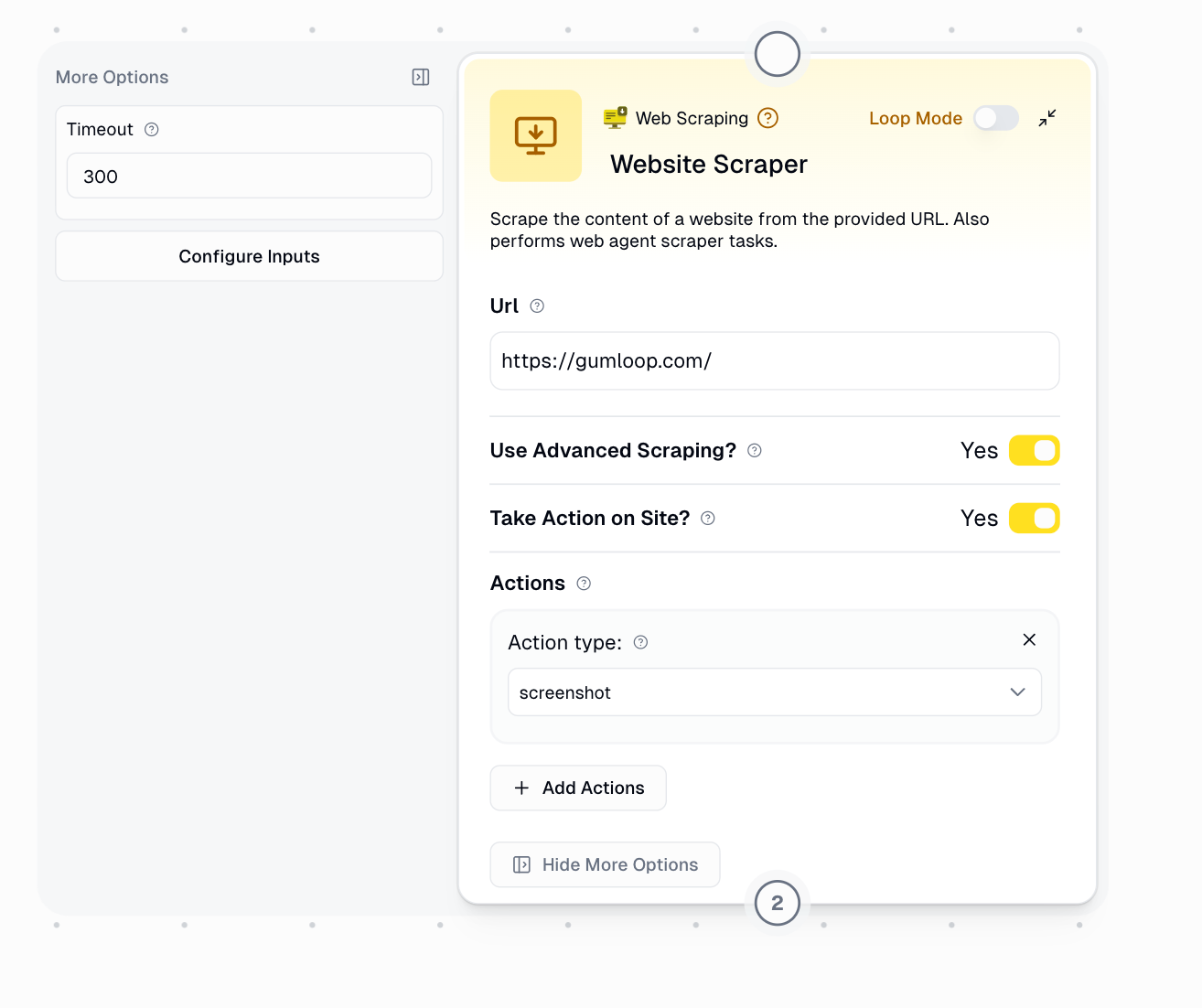
Toggle **"Take Action on Site?"** to access the Actions parameter
## Configuration
### Required Input
**URL** (String)
* The web address you want to scrape or interact with
* Example: `https://www.gumloop.com/`
### Optional Parameters
**Purpose:** Enables interactive browser automation (Web Agent mode)
**When to enable:**
* Content requires clicking, scrolling, or typing
* Need to navigate through multi-step processes
* Want to take screenshots
* Must interact with dynamic elements
**What it unlocks:**
* **Actions** parameter (configure browser interactions)
* **Scraped URL** output (get the final URL after actions)
**Cost impact:** Adds **+9 credits** to the base cost (total: 10 credits)
**Availability:** Only appears when "Take Action on Site?" is enabled
**Purpose:** Define a sequence of actions for the browser agent to perform
**Available Actions:**
1. **click** - Click on an element
2. **hover** - Hover over an element
3. **scroll** - Scroll the page
4. **write** - Type text into a field
5. **wait** - Pause for a specified duration
6. **screenshot** - Capture visible area
7. **screenshot - full page** - Capture entire page
8. **screenshot - full page mobile** - Capture full page in mobile view
9. **scrape** - Extract content
10. **scrape raw HTML** - Get raw HTML
11. **get url** - Get current URL
12. **get all urls** - Extract all URLs on page
13. **get link by label** - Find link by its text
**Best Practice:** Always end your action sequence with a scraping or URL extraction action to ensure you get usable output.
**Purpose:** Uses residential proxies for better access to restricted sites
**When to enable:**
* Website blocks standard scrapers
* Experiencing rate limiting or IP blocks
* Need higher reliability on protected sites
**Cost impact:**
* Basic mode: **+1 credit** (total: 2 credits)
* Web Agent mode: **+10 credits** (total: 20 credits)
Test standard scraping first before enabling this option—it significantly increases credit costs when combined with Web Agent mode.
**Purpose:** Maximum wait time (in seconds) before considering the request failed
**Default:** 300 seconds (5 minutes)
**When to adjust:**
* **Increase** for complex multi-step processes or very slow sites
* **Decrease** if you want faster failure detection
**Example:** Set to `60` for a 1-minute timeout
## Output
**Always available** in both modes
Returns the scraped text content from the webpage, including:
✅ Main text content and article body\
✅ Readable elements and structured data\
✅ Clean text extraction
❌ Excludes JavaScript code, CSS styling, and hidden elements
**Only available when "Take Action on Site?" is enabled**
Returns the final URL after all actions are completed. Useful for:
* Tracking navigation through multi-page processes
* Capturing redirects after form submissions
* Recording the final destination after interactions
## Common Use Cases
**Scenario:** Research industry trends
**Workflow:**
```
Web Search → Website Scraper → Ask AI → Google Sheets Writer
```
**Configuration:**
* Take Action: Disabled
* Advanced Scraping: Disabled
**Credit cost:** \~13-23 credits for 10 results
**Scenario:** Extract data from pages requiring login or clicks
**Workflow:**
```
Website Scraper (Web Agent) → Extract Data (AI) → Notion Database Writer
```
**Configuration:**
* Take Action: **Enabled**
* Actions: Click login → Write credentials → Click submit → Scrape
**Credit cost:** 10 credits per execution (or 20 with Advanced Scraping)
**Scenario:** Monitor website visual changes
**Workflow:**
```
Website Scraper (Web Agent) → Analyze Image (AI)
```
**Configuration:**
* Take Action: **Enabled**
* Actions: Navigate → Wait → Screenshot full page
**Credit cost:** 10 credits per screenshot
**Scenario:** Enrich CRM data with website information
**Workflow:**
```
HubSpot Reader → Website Scraper → Extract Data (AI) → HubSpot Updater
```
**Configuration:**
* Take Action: Disabled (unless sites need interaction)
* Loop Mode: Enabled for batch processing
**Credit cost:** 1 credit per company (or 10 if interactions needed)
## Using Loop Mode
Process multiple URLs efficiently with Loop Mode for batch scraping or automation.
Input an array of URLs instead of a single URL
```json theme={"dark"}
[
"https://example.com/page1",
"https://example.com/page2",
"https://example.com/page3"
]
```
Choose between:
* **Basic scraping** (1 credit each) for simple content extraction
* **Web Agent mode** (10 credits each) for interactive tasks
All URLs will use the same configuration and actions.
Your plan determines parallel processing capacity:
| Plan | Concurrent Operations |
| ---------- | --------------------- |
| Free | 2 |
| Pro | 15 |
| Enterprise | Custom |
The node returns arrays of results, maintaining input order:
* Array of **Website Content** (one per URL)
* Array of **Scraped URLs** (if Take Action enabled)
**Best Practice:** Wrap in Error Shield to handle individual failures gracefully without stopping the entire batch.
## Integration Patterns
`Web Search → Website Scraper`
Find relevant pages, then extract their content
`Website Scraper → Extract Data (AI)`
Scrape content, then extract structured information with AI
`Website Scraper (Agent) → Ask AI`
Perform interactions, then analyze the results
`Sheets Reader → Website Scraper (Loop) → Sheets Writer`
Read URLs from spreadsheet, scrape all, save results
## Best Practices
**Use Basic Mode (1 credit) when:**
* Scraping static HTML pages
* Content is immediately available
* No user interaction required
* Cost efficiency is important
**Use Web Agent Mode (10 credits) when:**
* Content loads dynamically via JavaScript
* Need to click, type, or navigate
* Taking screenshots
* Extracting URLs after interactions
* Always ensure URLs include `https://` or `http://`
* Use Text Formatter to add protocol if missing
* Filter out empty or invalid URLs before scraping
* Test with a single URL before running large batches
* Wrap Website Scraper in **Error Shield** for production workflows
* Especially critical in Loop Mode where one failure can affect all results
* Plan alternate logic paths for failed scrapes
* Monitor workflow history to identify problematic URLs
When using Web Agent mode:
* **Always end with a scraping or URL action** to get usable output
* Add **wait** actions after clicks to allow content to load
* Use **hover** before click if dropdown menus are involved
* Test action sequences with single URLs first
* Use basic scraping whenever possible (1 credit vs 10)
* Only enable Advanced Scraping when you encounter blocking issues
* Test without Advanced Scraping first
* Monitor credit consumption for large Loop Mode batches
* Default 5 minutes is suitable for most use cases
* **Increase** for complex multi-step Web Agent workflows
* **Decrease** if you want faster failure detection
* Balance between reliability and execution speed
## Troubleshooting
**Problem:** The node returns an "Invalid URL" error
**Solution:** Ensure the URL includes the protocol prefix
**Examples:**
* ❌ `www.example.com`
* ❌ `example.com`
* ✅ `https://www.example.com`
* ✅ `http://www.example.com`
**Problem:** The scrape times out before completing
**Solutions:**
1. Increase the timeout value (try 600 seconds for complex workflows)
2. Verify the website is accessible from your browser
3. Check if the site has slow response times
4. For Web Agent mode, ensure actions aren't waiting indefinitely
5. Try enabling Advanced Scraping for better reliability
**Problem:** The scraped content is missing or incomplete
**Solutions:**
1. Enable **"Take Action on Site?"** if content loads dynamically
2. Add wait actions to allow JavaScript to execute
3. Enable **Advanced Scraping** for better content extraction
4. Check if the content requires login or authentication
5. Use screenshot action to visually debug what the agent sees
**Problem:** Website blocks or restricts access
**Solutions:**
1. Enable **Advanced Scraping** for residential proxy support
2. Add wait actions between interactions
3. Verify the website allows automated access (check robots.txt)
4. Check if the site requires authentication
5. Consider whether the scraping violates terms of service
**Problem:** Actions fail to complete or produce expected results
**Solutions:**
1. Add **wait** actions after clicks to allow content to load
2. Use **screenshot** action to debug what the agent sees
3. Verify element selectors are correct
4. Check if the site structure has changed
5. Ensure actions are in the correct sequence
6. End with a scrape or get URL action to capture output
**Problem:** Some URLs fail and affect the entire batch
**Solutions:**
1. Wrap Website Scraper in **Error Shield** node
2. Test individual problematic URLs separately
3. Filter invalid URLs before processing
4. Check concurrency limits for your plan
5. Review workflow history to identify failure patterns
**Note about Web Agent Scraper:** This standalone node has been merged into Website Scraper. Enable "Take Action on Site?" to access the same functionality at the same 10-credit cost.