> ## Documentation Index
> Fetch the complete documentation index at: https://docs.gumloop.com/llms.txt
> Use this file to discover all available pages before exploring further.
# Scorer
This document explains the Scorer node, which assigns numerical scores (0-100) to items based on custom criteria.
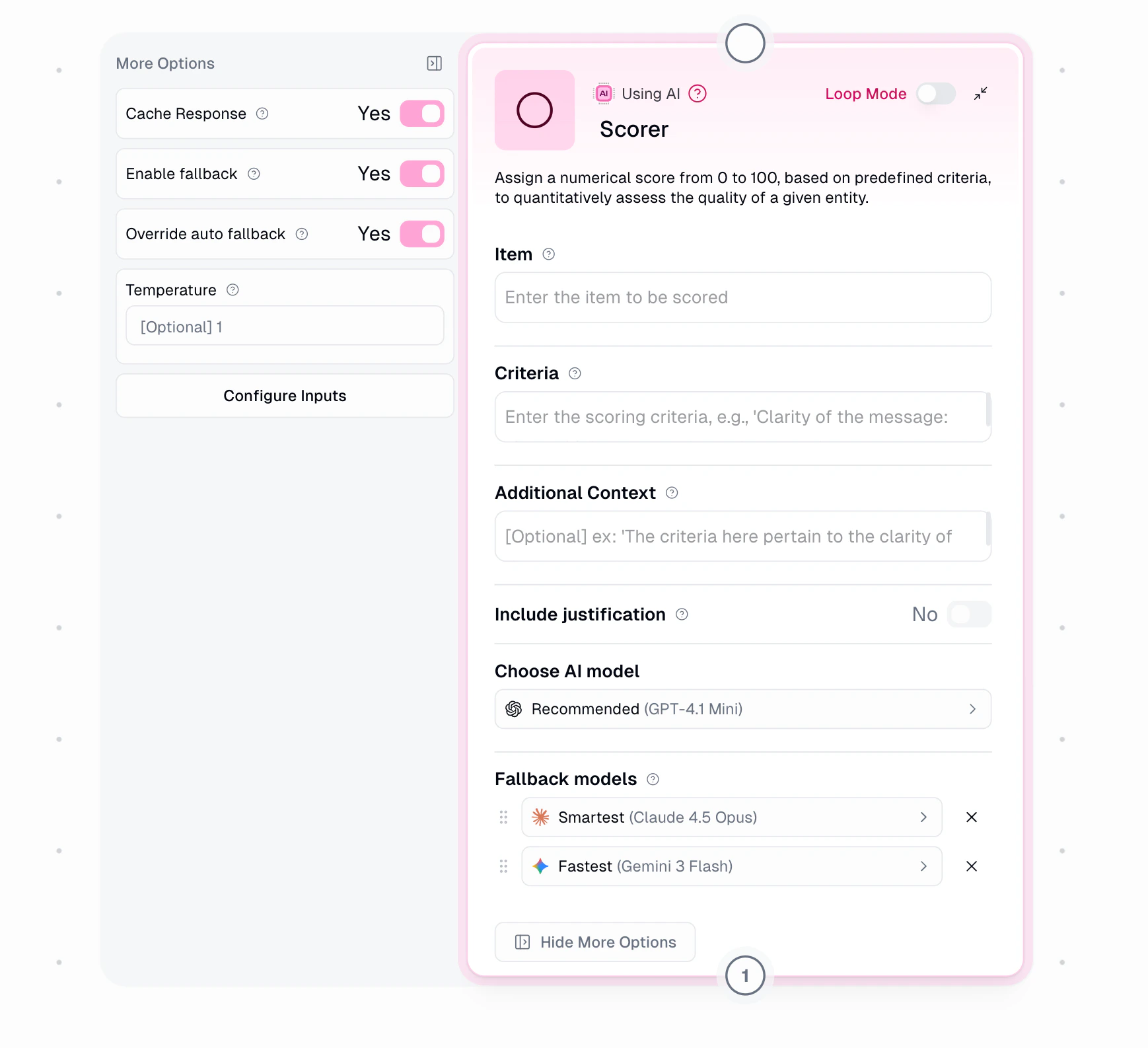 ## Node Inputs
### Required Fields
* **Item**: The content to be scored
* **Criteria**: Rules for scoring (e.g., "Clarity: 0-30, Grammar: 0-40, Relevance: 0-30")
### Optional Fields
* **Include Justification**: Get AI's reasoning for scores
* **Additional Context**: Extra guidance for scoring
* **Temperature**: Controls scoring consistency (0-1)
* 0: More focused, consistent
* 1: More creative, varied
* **Cache Response**: Save responses for reuse
### Show As Input
The node allows you to configure certain parameters as dynamic inputs. You can enable these in the "Configure Inputs" section:
* **item**: String
* The text or item to be scored
* Example: "Customer feedback response"
* **criteria**: String
* The scoring criteria or rubric
* Example: "Score based on clarity, politeness, and helpfulness"
* **Additional Context**: String
* Extra information to help with scoring
* Example: "This is feedback from a premium customer"
* **include\_justification**: Boolean
* true/false to include explanation for the score
* When enabled, provides reasoning for the assigned score
* **model\_preference**: String
* Name of the AI model to use
* Accepted values: "Claude 4.6 Sonnet", "Claude 4.5 Haiku", "GPT-5.5", "GPT-5.4", etc.
* **Cache Response**: Boolean
* true/false to enable/disable response caching
* Helps reduce API calls for identical inputs
* **Temperature**: Number
* Value between 0 and 1
* Controls scoring consistency
When enabled as inputs, these parameters can be dynamically set by previous nodes in your workflow. If not enabled, the values set in the node configuration will be used.
### AI Model Fallback
Under **Show More Options**, configure automatic fallback when your selected AI model is unavailable. **Fallback is enabled by default.**
When an error occurs (rate limits, provider outages, timeouts), the system retries based on severity, then falls back to the next model. Fallback models are always from different providers for true redundancy.
| Error Type | Retries Before Fallback |
| ------------- | ----------------------- |
| Rate Limit | 2 |
| Provider 5xx | 1 |
| Network Error | 0 (immediate) |
| Timeout | 1 |
**Default (Auto):** System auto-selects fallbacks based on your primary model:
* Expert → Claude 4.8 Opus → GPT-5.5 → Gemini 3.1 Pro
* Fastest → Gemini 3.5 Flash → Claude 4.5 Haiku → GPT-5.4 Mini
* Recommended → GPT-5.4 Mini → Claude 4.5 Haiku → Gemini 3.5 Flash
**Override:** Enable to manually select up to 2 fallback models with drag-and-drop priority.
Disabling fallback means your node will fail if the primary model is unavailable.
## Node Output
* **Score**: Numerical value between 0-100
* **Justification**: AI's scoring explanation (if enabled)
## Node Functionality
The Scorer node:
* Analyzes content against criteria
* Assigns numerical scores
* Provides scoring rationale
* Handles batch scoring
* Ensures consistent evaluation
## Available AI Models
| Tier | Models |
| ------------ | ------------------------------------------------------------------------------------------------------------------ |
| **Expert** | GPT-5.5, GPT-5.4, GPT-5.3 Codex, Claude 4.8/4.5 Opus, Gemini 3.1 Pro, Grok 4 |
| **Advanced** | Claude 4.6/4.5/4 Sonnet, Grok 3, Perplexity Sonar Reasoning Pro/Pro, LLaMA 3 405B |
| **Standard** | GPT-5.4 Mini/Nano, Claude 4.5 Haiku, Gemini 3.5/3 Flash, Grok 3 Mini, DeepSeek V3/R1/V4 Pro/V4 Flash, Mixtral 8x7B |
| **Special** | Auto-Select, Azure OpenAI (requires credentials) |
Auto-Select uses third-party routing to choose models based on cost and performance. Not ideal when consistent behavior is required.
## AI Model Selection Guide
When choosing an AI model for your task, consider these key factors:
| Model Type | Ideal Use Cases | Considerations |
| ------------------------------------ | ------------------------------------------------------------------------------------------------------------ | ---------------------------------------------------------------------------------------------- |
| **Standard Models** | General content creation, basic Q\&A, simple analysis | Lower cost, faster response time, good for most everyday tasks |
| **Advanced Models** | Complex analysis, nuanced content, specialized knowledge domains | Better quality but higher cost, good balance of performance and efficiency |
| **Expert & Thinking-Enabled Models** | Complex reasoning, step-by-step problem-solving, coding, detailed analysis, math problems, technical content | Highest quality but most expensive, best for complex and long-form tasks, longer response time |
Additional selection factors:
* Task complexity and required accuracy
* Response time requirements
* Cost considerations
* Consistency needs across runs
* Specialized knowledge requirements
For more detailed information on AI models with advanced reasoning capabilities, you can refer to:
* [Anthropic Models Overview](https://docs.anthropic.com/en/docs/models-overview)
* [Anthropic Extended Thinking Documentation](https://docs.anthropic.com/en/docs/build-with-claude/extended-thinking)
* [OpenAI Reasoning Guide](https://platform.openai.com/docs/guides/reasoning)
* [OpenAI GPT-5 Models](https://openai.com/index/gpt-5/)
## Common Use Cases
1. **Content Quality**:
```text theme={"dark"}
Criteria:
- Writing clarity (0-30)
- Accuracy (0-40)
- Engagement (0-30)
```
2. **Support Responses**:
```text theme={"dark"}
Criteria:
- Politeness (0-25)
- Problem solving (0-50)
- Response time (0-25)
```
3. **Product Reviews**:
```text theme={"dark"}
Criteria:
- Detail level (0-30)
- Helpfulness (0-40)
- Objectivity (0-30)
```
## Loop Mode
```text theme={"dark"}
Input: List of items to score
Process: Score each against criteria
Output: Scores and justifications for each item
```
## Important Considerations
1. Expert models (GPT-5.5, Claude 4.8 Opus) cost 30 credits, advanced models (Claude 4.6 Sonnet, Grok 3) cost 20 credits, and standard models cost 2 credits per run
2. You can drop the credit cost to 1 by providing your own API key under the [Connectors page](https://www.gumloop.com/personal/connectors)
3. Define clear, measurable criteria for accurate output
4. Enable justification for transparency
In summary, the Scorer node helps quantify quality and performance using AI-powered assessment against your custom criteria.
## Node Inputs
### Required Fields
* **Item**: The content to be scored
* **Criteria**: Rules for scoring (e.g., "Clarity: 0-30, Grammar: 0-40, Relevance: 0-30")
### Optional Fields
* **Include Justification**: Get AI's reasoning for scores
* **Additional Context**: Extra guidance for scoring
* **Temperature**: Controls scoring consistency (0-1)
* 0: More focused, consistent
* 1: More creative, varied
* **Cache Response**: Save responses for reuse
### Show As Input
The node allows you to configure certain parameters as dynamic inputs. You can enable these in the "Configure Inputs" section:
* **item**: String
* The text or item to be scored
* Example: "Customer feedback response"
* **criteria**: String
* The scoring criteria or rubric
* Example: "Score based on clarity, politeness, and helpfulness"
* **Additional Context**: String
* Extra information to help with scoring
* Example: "This is feedback from a premium customer"
* **include\_justification**: Boolean
* true/false to include explanation for the score
* When enabled, provides reasoning for the assigned score
* **model\_preference**: String
* Name of the AI model to use
* Accepted values: "Claude 4.6 Sonnet", "Claude 4.5 Haiku", "GPT-5.5", "GPT-5.4", etc.
* **Cache Response**: Boolean
* true/false to enable/disable response caching
* Helps reduce API calls for identical inputs
* **Temperature**: Number
* Value between 0 and 1
* Controls scoring consistency
When enabled as inputs, these parameters can be dynamically set by previous nodes in your workflow. If not enabled, the values set in the node configuration will be used.
### AI Model Fallback
Under **Show More Options**, configure automatic fallback when your selected AI model is unavailable. **Fallback is enabled by default.**
When an error occurs (rate limits, provider outages, timeouts), the system retries based on severity, then falls back to the next model. Fallback models are always from different providers for true redundancy.
| Error Type | Retries Before Fallback |
| ------------- | ----------------------- |
| Rate Limit | 2 |
| Provider 5xx | 1 |
| Network Error | 0 (immediate) |
| Timeout | 1 |
**Default (Auto):** System auto-selects fallbacks based on your primary model:
* Expert → Claude 4.8 Opus → GPT-5.5 → Gemini 3.1 Pro
* Fastest → Gemini 3.5 Flash → Claude 4.5 Haiku → GPT-5.4 Mini
* Recommended → GPT-5.4 Mini → Claude 4.5 Haiku → Gemini 3.5 Flash
**Override:** Enable to manually select up to 2 fallback models with drag-and-drop priority.
Disabling fallback means your node will fail if the primary model is unavailable.
## Node Output
* **Score**: Numerical value between 0-100
* **Justification**: AI's scoring explanation (if enabled)
## Node Functionality
The Scorer node:
* Analyzes content against criteria
* Assigns numerical scores
* Provides scoring rationale
* Handles batch scoring
* Ensures consistent evaluation
## Available AI Models
| Tier | Models |
| ------------ | ------------------------------------------------------------------------------------------------------------------ |
| **Expert** | GPT-5.5, GPT-5.4, GPT-5.3 Codex, Claude 4.8/4.5 Opus, Gemini 3.1 Pro, Grok 4 |
| **Advanced** | Claude 4.6/4.5/4 Sonnet, Grok 3, Perplexity Sonar Reasoning Pro/Pro, LLaMA 3 405B |
| **Standard** | GPT-5.4 Mini/Nano, Claude 4.5 Haiku, Gemini 3.5/3 Flash, Grok 3 Mini, DeepSeek V3/R1/V4 Pro/V4 Flash, Mixtral 8x7B |
| **Special** | Auto-Select, Azure OpenAI (requires credentials) |
Auto-Select uses third-party routing to choose models based on cost and performance. Not ideal when consistent behavior is required.
## AI Model Selection Guide
When choosing an AI model for your task, consider these key factors:
| Model Type | Ideal Use Cases | Considerations |
| ------------------------------------ | ------------------------------------------------------------------------------------------------------------ | ---------------------------------------------------------------------------------------------- |
| **Standard Models** | General content creation, basic Q\&A, simple analysis | Lower cost, faster response time, good for most everyday tasks |
| **Advanced Models** | Complex analysis, nuanced content, specialized knowledge domains | Better quality but higher cost, good balance of performance and efficiency |
| **Expert & Thinking-Enabled Models** | Complex reasoning, step-by-step problem-solving, coding, detailed analysis, math problems, technical content | Highest quality but most expensive, best for complex and long-form tasks, longer response time |
Additional selection factors:
* Task complexity and required accuracy
* Response time requirements
* Cost considerations
* Consistency needs across runs
* Specialized knowledge requirements
For more detailed information on AI models with advanced reasoning capabilities, you can refer to:
* [Anthropic Models Overview](https://docs.anthropic.com/en/docs/models-overview)
* [Anthropic Extended Thinking Documentation](https://docs.anthropic.com/en/docs/build-with-claude/extended-thinking)
* [OpenAI Reasoning Guide](https://platform.openai.com/docs/guides/reasoning)
* [OpenAI GPT-5 Models](https://openai.com/index/gpt-5/)
## Common Use Cases
1. **Content Quality**:
```text theme={"dark"}
Criteria:
- Writing clarity (0-30)
- Accuracy (0-40)
- Engagement (0-30)
```
2. **Support Responses**:
```text theme={"dark"}
Criteria:
- Politeness (0-25)
- Problem solving (0-50)
- Response time (0-25)
```
3. **Product Reviews**:
```text theme={"dark"}
Criteria:
- Detail level (0-30)
- Helpfulness (0-40)
- Objectivity (0-30)
```
## Loop Mode
```text theme={"dark"}
Input: List of items to score
Process: Score each against criteria
Output: Scores and justifications for each item
```
## Important Considerations
1. Expert models (GPT-5.5, Claude 4.8 Opus) cost 30 credits, advanced models (Claude 4.6 Sonnet, Grok 3) cost 20 credits, and standard models cost 2 credits per run
2. You can drop the credit cost to 1 by providing your own API key under the [Connectors page](https://www.gumloop.com/personal/connectors)
3. Define clear, measurable criteria for accurate output
4. Enable justification for transparency
In summary, the Scorer node helps quantify quality and performance using AI-powered assessment against your custom criteria.