> ## Documentation Index
> Fetch the complete documentation index at: https://docs.gumloop.com/llms.txt
> Use this file to discover all available pages before exploring further.
# Ask AI
The Ask AI node lets you interact with AI models to process text and generate responses. Connect it to other nodes to create powerful automated workflows that leverage the latest AI capabilities.
## Quick Start
Drag the Ask AI node from the node library into your canvas
Enter clear, detailed instructions in the prompt field to guide the AI
Select the model that best fits your task complexity and budget
Connect inputs from other nodes by dragging output badges into your prompt
## Node Configuration
### Required Fields
The main instruction or question for the AI. Your prompt should be clear and detailed to get the best possible response.
**Example prompt formats:**
```text theme={"dark"}
Analyze this website content and provide a one-page summary:
[drag Website Scraper badge here]
```
```text theme={"dark"}
Write a professional email response to:
[drag Customer Query badge here]
```
### More Options
Select from over 20 AI models including Claude, GPT, Gemini, and specialized reasoning models. See [AI Model Selection Guide](#ai-model-selection-guide) below for detailed recommendations.
Controls response creativity and consistency.
* **0**: More focused and consistent responses
* **1** (default): More creative and varied outputs
Use lower temperatures for factual tasks, higher for creative content.
Limits the total response length. Sets the upper bound for how long the AI's response can be.
For Claude models with Extended Thinking enabled, this must be greater than your Thinking Tokens setting.
Saves responses for reuse when inputs remain constant.
**Caching works when ALL of these are identical:**
* Prompt text (including any inserted input badges)
* Model selection
* Temperature setting
* Maximum tokens
* Thinking tokens (if applicable)
Perfect for testing workflows or handling repeated queries.
Sets a budget for the model's internal reasoning process before generating the final response.
**Requirements:**
* Minimum: 1,024 tokens
* Must be less than Maximum Tokens
* Recommended: 4,000-16,000 for complex tasks
Larger budgets improve reasoning quality but increase cost and response time.
Connect to a remote Model Context Protocol (MCP) server to extend the AI's capabilities with custom tools and data sources.
Learn how to set up and use MCP servers with the Ask AI node in the [Custom MCP Servers documentation](https://docs.gumloop.com/nodes/mcp/custom_mcp_servers).
### AI Model Fallback
Under **Show More Options**, configure automatic fallback when your selected AI model is unavailable. **Fallback is enabled by default.**
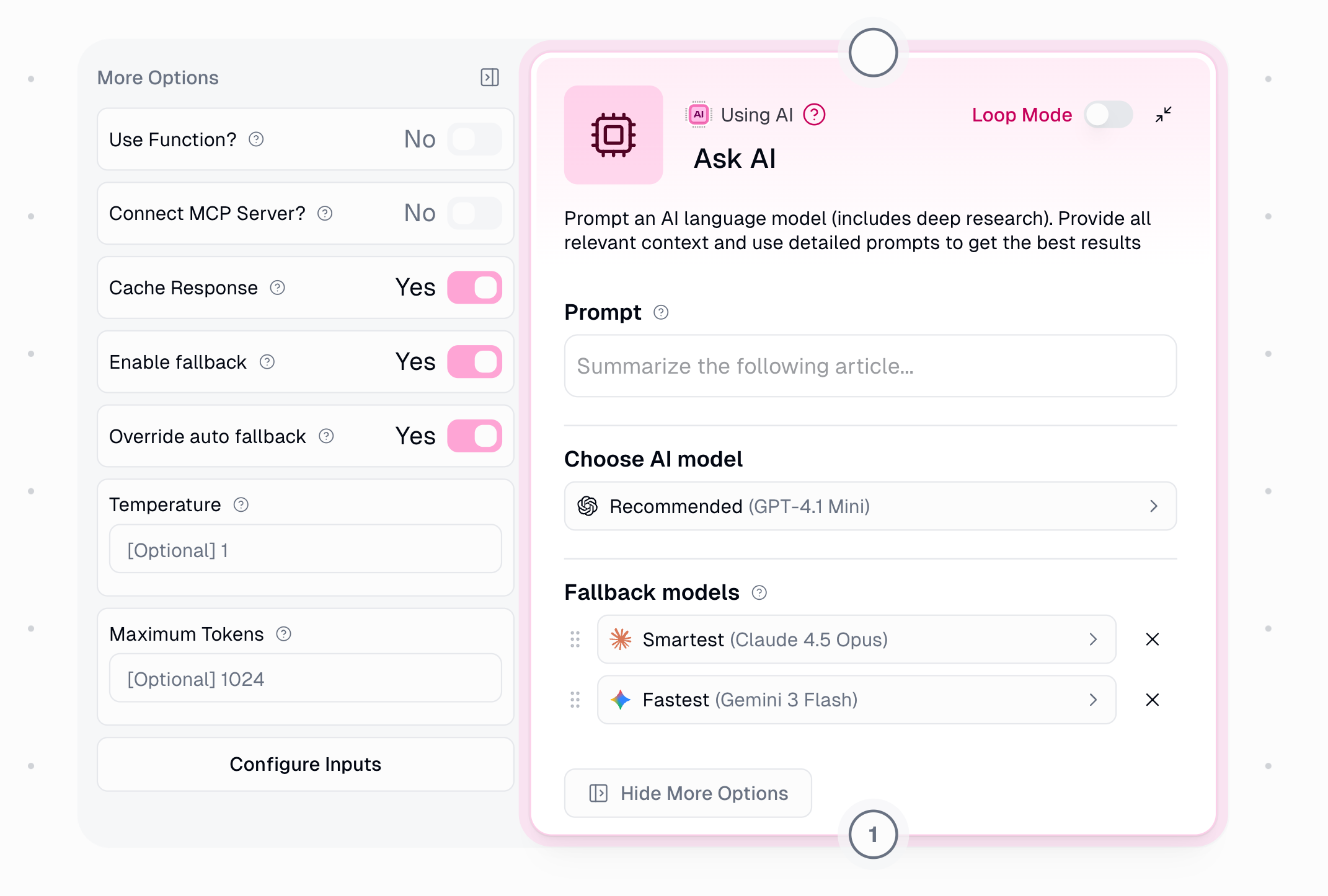 When an error occurs (rate limits, provider outages, timeouts), the system retries based on severity, then falls back to the next model. Fallback models are always from different providers for true redundancy.
| Error Type | Retries Before Fallback |
| ------------- | ----------------------- |
| Rate Limit | 2 |
| Provider 5xx | 1 |
| Network Error | 0 (immediate) |
| Timeout | 1 |
**Default (Auto):** The system automatically selects fallback models based on your primary model, always choosing from different providers for true redundancy.
**Override:** Enable to manually select up to 2 fallback models with drag-and-drop priority.
Disabling fallback means your node will fail if the primary model is unavailable.
### Dynamic Inputs (Show As Input)
You can configure certain parameters as dynamic inputs that can be set by previous nodes in your workflow:
| Parameter | Type | Example Values |
| -------------------- | ------ | ------------------------------------------------ |
| **prompt** | String | "Summarize this article" |
| **Model Preference** | String | "Claude 4.6 Sonnet", "GPT-5.5", "Gemini 3.1 Pro" |
| **Temperature** | Number | 0 to 1 |
| **Maximum Tokens** | Number | Any positive integer (e.g., 2000) |
| **Thinking Tokens** | Number | Minimum 1024 (Claude Extended Thinking only) |
When enabled as inputs, these parameters can be dynamically set by previous nodes. If not enabled, the values set in the node configuration will be used.
## Using Connected Node Data
When an error occurs (rate limits, provider outages, timeouts), the system retries based on severity, then falls back to the next model. Fallback models are always from different providers for true redundancy.
| Error Type | Retries Before Fallback |
| ------------- | ----------------------- |
| Rate Limit | 2 |
| Provider 5xx | 1 |
| Network Error | 0 (immediate) |
| Timeout | 1 |
**Default (Auto):** The system automatically selects fallback models based on your primary model, always choosing from different providers for true redundancy.
**Override:** Enable to manually select up to 2 fallback models with drag-and-drop priority.
Disabling fallback means your node will fail if the primary model is unavailable.
### Dynamic Inputs (Show As Input)
You can configure certain parameters as dynamic inputs that can be set by previous nodes in your workflow:
| Parameter | Type | Example Values |
| -------------------- | ------ | ------------------------------------------------ |
| **prompt** | String | "Summarize this article" |
| **Model Preference** | String | "Claude 4.6 Sonnet", "GPT-5.5", "Gemini 3.1 Pro" |
| **Temperature** | Number | 0 to 1 |
| **Maximum Tokens** | Number | Any positive integer (e.g., 2000) |
| **Thinking Tokens** | Number | Minimum 1024 (Claude Extended Thinking only) |
When enabled as inputs, these parameters can be dynamically set by previous nodes. If not enabled, the values set in the node configuration will be used.
## Using Connected Node Data
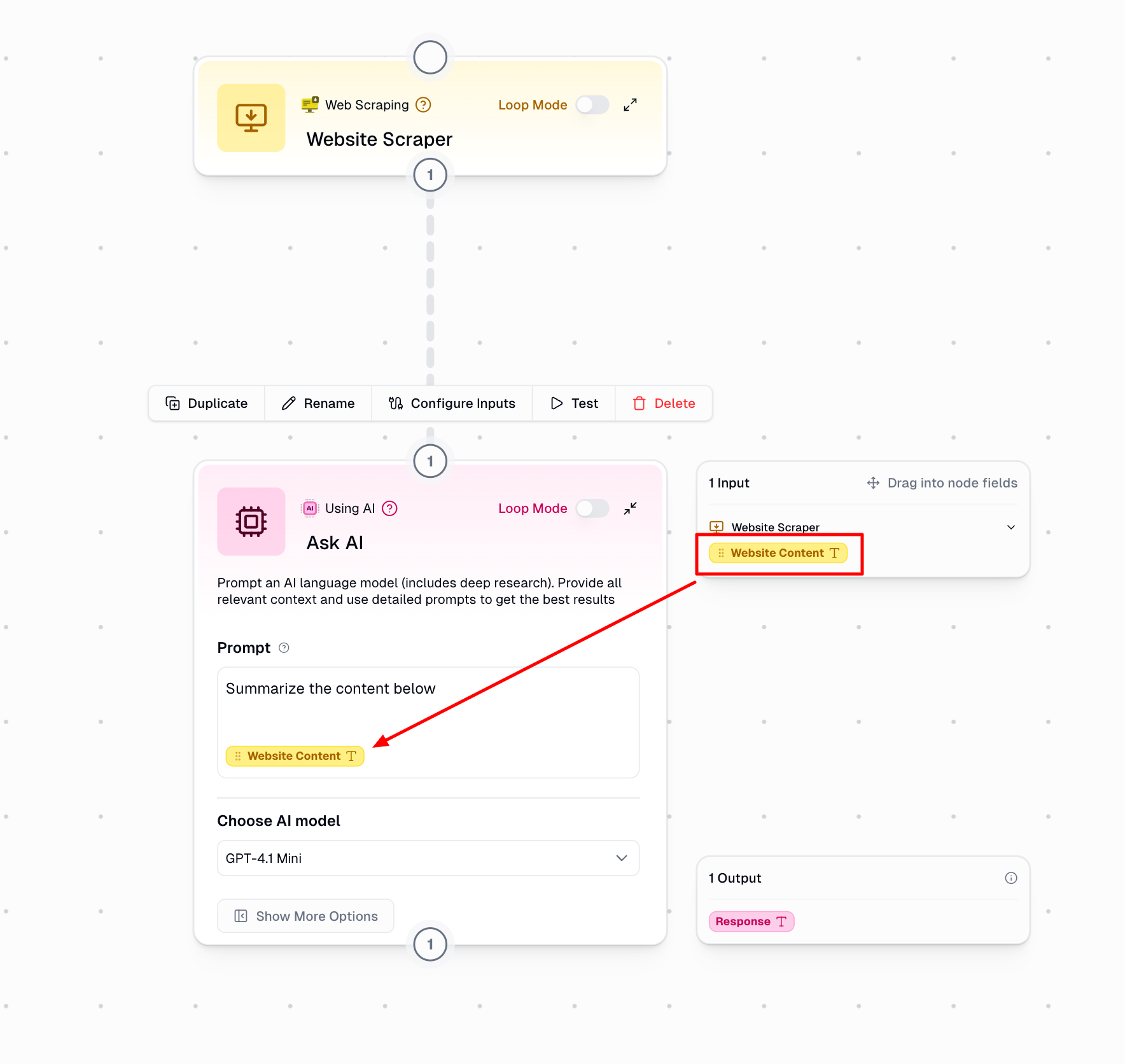 Gumloop's interface makes it simple to incorporate data from other nodes:
Drag a connection line between the source node and your Ask AI node
Available outputs from connected nodes appear automatically in the side menu
Simply drag the output badge from the side menu and drop it into your prompt field
Add text before and after the output badges to create well-structured prompts
## Available AI Models
Gumloop supports 30+ AI models across multiple providers. Pick the model that fits your task in the node's model dropdown, and see [AI Models](/core-concepts/ai_models) for the full list. **Auto-Select** (third-party routing that picks a model by cost and performance) and **Azure OpenAI** (with your own credentials) are also available.
### Deep Research Models
Comprehensive deep research capabilities with real-time web access for demanding analytical tasks.
Deep Research models perform comprehensive, multi-step reasoning and investigation. They're specifically designed for queries that require thorough research, fact-checking, and synthesizing information from multiple angles.
## AI Model Selection Guide
Balance quality, speed, and cost when choosing a model:
* Smaller, faster models cost less per token and respond quicker, which suits everyday tasks like classification, short answers, and simple analysis.
* Larger frontier models deliver higher quality on complex reasoning, coding, and detailed or long-form analysis, at a higher cost and slower response.
**About Auto-Select:** Uses a third-party model routing service that automatically chooses models based on cost, performance, and availability. Not ideal when consistent model behavior is required.
### When to Use Deep Research Models
Deep Research models are designed for tasks that require comprehensive investigation and analysis:
**Perfect use cases for Deep Research:**
* **Market Research**: Analyzing industry trends, competitor landscapes, and market opportunities
* **Due Diligence**: Investigating companies, technologies, or business proposals
* **Fact-Checking**: Verifying claims across multiple sources and perspectives
* **Literature Review**: Synthesizing information from multiple documents or sources
* **Competitive Analysis**: Deep comparison of products, services, or strategies
* **Complex Report Generation**: Creating comprehensive reports that require thorough investigation
* **Multi-Perspective Analysis**: Examining topics from different angles and viewpoints
**When to use other models instead:**
* **Simple Content Creation**: Use standard models for straightforward writing tasks
* **Quick Q\&A**: Use advanced models for faster responses to direct questions
* **Real-Time Interactions**: Deep Research takes longer; use standard models for speed
* **Code Generation**: Use thinking or expert models for better code-specific performance
* **Creative Writing**: Use standard or advanced models for creative tasks
* **Routine Data Processing**: Use standard models for repetitive, straightforward tasks
**Deep Research Process:**
Deep Research models approach tasks differently than standard AI models:
1. **Query Understanding**: Thoroughly analyzes your prompt to identify key research questions
2. **Multi-Step Investigation**: Breaks down complex queries into smaller research tasks
3. **Information Synthesis**: Combines findings from multiple reasoning paths
4. **Verification**: Cross-checks information for consistency and accuracy
5. **Comprehensive Response**: Delivers well-researched, thorough answers
This process takes significantly longer than standard models but provides more thorough, well-researched responses for complex analytical tasks.
### Deep Research Model Comparison
**Best for:** Comprehensive research tasks
* Real-time web access for up-to-date information
* Multi-step investigation and synthesis
* Best for research requiring current data
* Longer processing time
### Additional Selection Factors
Consider these factors when choosing a model:
* Task complexity and required accuracy
* Response time requirements
* Cost considerations
* Consistency needs across runs
* Specialized knowledge requirements
* Need for comprehensive investigation vs. quick answers
For more information on advanced AI models:
* [Anthropic Models Overview](https://docs.anthropic.com/en/docs/models-overview)
* [Anthropic Extended Thinking Documentation](https://docs.anthropic.com/en/docs/build-with-claude/extended-thinking)
* [OpenAI Reasoning Guide](https://platform.openai.com/docs/guides/reasoning)
* [OpenAI GPT-5 Models](https://openai.com/index/gpt-5/)
## Node Output
**Response**: The AI's generated answer or output based on your prompt and configured parameters.
## Common Use Cases
```text theme={"dark"}
Prompt: "Write a blog post about [drag Topic input badge here]"
```
Perfect for generating articles, social media posts, marketing copy, and other written content at scale.
```text theme={"dark"}
Prompt: "Analyze these sales figures and provide key insights:
[drag Sales Data input badge here]"
```
Extract insights, identify trends, and generate summaries from structured or unstructured data.
```text theme={"dark"}
Prompt: "Answer this customer question professionally according to our company policies:
Customer Question: [drag Customer Query input badge here]"
```
Automate responses to common questions while maintaining brand voice and policy compliance.
```text theme={"dark"}
Prompt: "Research the competitive landscape for SaaS project management tools, including:
- Top 5 competitors
- Their pricing models
- Key differentiating features
- Market positioning
[drag Market Segment input badge here]"
Model: OpenAI O3 Deep Research or O4 Mini Deep Research
```
Use Deep Research models when you need comprehensive investigation, fact-checking across multiple angles, or thorough analysis of complex topics.
## Loop Mode Pattern
When processing multiple items in Loop Mode, the Ask AI node analyzes each item individually:
```text theme={"dark"}
Input: List of articles
Prompt: "Analyze and find key patterns in this article: [drag Current Article output badge here]"
Result: Analysis generated for each article in the list
```
In Loop Mode, your workflow runs once for each item in the input list, allowing batch processing of multiple documents, queries, or data points.
## Credit Costs
The Ask AI node is billed by **token usage**, the same way agents are. The cost of a run depends on the model you pick and how many input and output tokens it uses, so a short prompt costs far less than a long-context one. There are no fixed per-run tiers.
* Smaller, faster models cost less per token than frontier models. See [AI Models](/core-concepts/ai_models).
* Keeping your prompt and inputs lean lowers the cost.
Add your own provider API key on the [Connectors page](https://www.gumloop.com/personal/connectors) to run this node's AI calls for **50% fewer credits** (Pro plan or higher).
## Important Considerations
The 'Use Function' option enables structured output formatting and is only available for OpenAI models.
Learn more in the [OpenAI Function Calling Documentation](https://platform.openai.com/docs/guides/function-calling).
Consider task complexity when selecting models. For reasoning-heavy tasks, consider thinking-enabled or specialized reasoning models. For straightforward content generation, standard models are often sufficient and more cost-effective.
* Drag output badges from the side menu directly into your prompt
* Format text around badges for better prompting
* All outputs from connected nodes appear in the side menu
* No need for separate Combine Text nodes
The Ask AI node is text-based only:
* To analyze images, use the [Analyze Image node](https://docs.gumloop.com/nodes/using_ai/analyze_image)
* To create images, use the [Generate Image node](https://docs.gumloop.com/nodes/using_ai/generate_image)
***
The Ask AI node is your interface to leading AI models, helping you automate text processing and generation tasks with customizable control over output style and format. With Gumloop's improved UI, you can easily incorporate data from connected nodes directly into your prompts, creating powerful automated workflows without complex configuration.
Gumloop's interface makes it simple to incorporate data from other nodes:
Drag a connection line between the source node and your Ask AI node
Available outputs from connected nodes appear automatically in the side menu
Simply drag the output badge from the side menu and drop it into your prompt field
Add text before and after the output badges to create well-structured prompts
## Available AI Models
Gumloop supports 30+ AI models across multiple providers. Pick the model that fits your task in the node's model dropdown, and see [AI Models](/core-concepts/ai_models) for the full list. **Auto-Select** (third-party routing that picks a model by cost and performance) and **Azure OpenAI** (with your own credentials) are also available.
### Deep Research Models
Comprehensive deep research capabilities with real-time web access for demanding analytical tasks.
Deep Research models perform comprehensive, multi-step reasoning and investigation. They're specifically designed for queries that require thorough research, fact-checking, and synthesizing information from multiple angles.
## AI Model Selection Guide
Balance quality, speed, and cost when choosing a model:
* Smaller, faster models cost less per token and respond quicker, which suits everyday tasks like classification, short answers, and simple analysis.
* Larger frontier models deliver higher quality on complex reasoning, coding, and detailed or long-form analysis, at a higher cost and slower response.
**About Auto-Select:** Uses a third-party model routing service that automatically chooses models based on cost, performance, and availability. Not ideal when consistent model behavior is required.
### When to Use Deep Research Models
Deep Research models are designed for tasks that require comprehensive investigation and analysis:
**Perfect use cases for Deep Research:**
* **Market Research**: Analyzing industry trends, competitor landscapes, and market opportunities
* **Due Diligence**: Investigating companies, technologies, or business proposals
* **Fact-Checking**: Verifying claims across multiple sources and perspectives
* **Literature Review**: Synthesizing information from multiple documents or sources
* **Competitive Analysis**: Deep comparison of products, services, or strategies
* **Complex Report Generation**: Creating comprehensive reports that require thorough investigation
* **Multi-Perspective Analysis**: Examining topics from different angles and viewpoints
**When to use other models instead:**
* **Simple Content Creation**: Use standard models for straightforward writing tasks
* **Quick Q\&A**: Use advanced models for faster responses to direct questions
* **Real-Time Interactions**: Deep Research takes longer; use standard models for speed
* **Code Generation**: Use thinking or expert models for better code-specific performance
* **Creative Writing**: Use standard or advanced models for creative tasks
* **Routine Data Processing**: Use standard models for repetitive, straightforward tasks
**Deep Research Process:**
Deep Research models approach tasks differently than standard AI models:
1. **Query Understanding**: Thoroughly analyzes your prompt to identify key research questions
2. **Multi-Step Investigation**: Breaks down complex queries into smaller research tasks
3. **Information Synthesis**: Combines findings from multiple reasoning paths
4. **Verification**: Cross-checks information for consistency and accuracy
5. **Comprehensive Response**: Delivers well-researched, thorough answers
This process takes significantly longer than standard models but provides more thorough, well-researched responses for complex analytical tasks.
### Deep Research Model Comparison
**Best for:** Comprehensive research tasks
* Real-time web access for up-to-date information
* Multi-step investigation and synthesis
* Best for research requiring current data
* Longer processing time
### Additional Selection Factors
Consider these factors when choosing a model:
* Task complexity and required accuracy
* Response time requirements
* Cost considerations
* Consistency needs across runs
* Specialized knowledge requirements
* Need for comprehensive investigation vs. quick answers
For more information on advanced AI models:
* [Anthropic Models Overview](https://docs.anthropic.com/en/docs/models-overview)
* [Anthropic Extended Thinking Documentation](https://docs.anthropic.com/en/docs/build-with-claude/extended-thinking)
* [OpenAI Reasoning Guide](https://platform.openai.com/docs/guides/reasoning)
* [OpenAI GPT-5 Models](https://openai.com/index/gpt-5/)
## Node Output
**Response**: The AI's generated answer or output based on your prompt and configured parameters.
## Common Use Cases
```text theme={"dark"}
Prompt: "Write a blog post about [drag Topic input badge here]"
```
Perfect for generating articles, social media posts, marketing copy, and other written content at scale.
```text theme={"dark"}
Prompt: "Analyze these sales figures and provide key insights:
[drag Sales Data input badge here]"
```
Extract insights, identify trends, and generate summaries from structured or unstructured data.
```text theme={"dark"}
Prompt: "Answer this customer question professionally according to our company policies:
Customer Question: [drag Customer Query input badge here]"
```
Automate responses to common questions while maintaining brand voice and policy compliance.
```text theme={"dark"}
Prompt: "Research the competitive landscape for SaaS project management tools, including:
- Top 5 competitors
- Their pricing models
- Key differentiating features
- Market positioning
[drag Market Segment input badge here]"
Model: OpenAI O3 Deep Research or O4 Mini Deep Research
```
Use Deep Research models when you need comprehensive investigation, fact-checking across multiple angles, or thorough analysis of complex topics.
## Loop Mode Pattern
When processing multiple items in Loop Mode, the Ask AI node analyzes each item individually:
```text theme={"dark"}
Input: List of articles
Prompt: "Analyze and find key patterns in this article: [drag Current Article output badge here]"
Result: Analysis generated for each article in the list
```
In Loop Mode, your workflow runs once for each item in the input list, allowing batch processing of multiple documents, queries, or data points.
## Credit Costs
The Ask AI node is billed by **token usage**, the same way agents are. The cost of a run depends on the model you pick and how many input and output tokens it uses, so a short prompt costs far less than a long-context one. There are no fixed per-run tiers.
* Smaller, faster models cost less per token than frontier models. See [AI Models](/core-concepts/ai_models).
* Keeping your prompt and inputs lean lowers the cost.
Add your own provider API key on the [Connectors page](https://www.gumloop.com/personal/connectors) to run this node's AI calls for **50% fewer credits** (Pro plan or higher).
## Important Considerations
The 'Use Function' option enables structured output formatting and is only available for OpenAI models.
Learn more in the [OpenAI Function Calling Documentation](https://platform.openai.com/docs/guides/function-calling).
Consider task complexity when selecting models. For reasoning-heavy tasks, consider thinking-enabled or specialized reasoning models. For straightforward content generation, standard models are often sufficient and more cost-effective.
* Drag output badges from the side menu directly into your prompt
* Format text around badges for better prompting
* All outputs from connected nodes appear in the side menu
* No need for separate Combine Text nodes
The Ask AI node is text-based only:
* To analyze images, use the [Analyze Image node](https://docs.gumloop.com/nodes/using_ai/analyze_image)
* To create images, use the [Generate Image node](https://docs.gumloop.com/nodes/using_ai/generate_image)
***
The Ask AI node is your interface to leading AI models, helping you automate text processing and generation tasks with customizable control over output style and format. With Gumloop's improved UI, you can easily incorporate data from connected nodes directly into your prompts, creating powerful automated workflows without complex configuration.