> ## Documentation Index
> Fetch the complete documentation index at: https://docs.gumloop.com/llms.txt
> Use this file to discover all available pages before exploring further.
# Slack Block Kit Sender
The **Slack Block Kit Sender** node sends richly formatted, interactive messages using Slack's Block Kit framework.
## Channel Access Requirements
To send Block Kit messages to a channel, you must be a member of that channel AND the Gumloop bot must be invited to the channel (unless using "Send as user" mode).
Go to the [Connectors page](https://www.gumloop.com/personal/connectors) and connect your Slack workspace.
Make sure you're a member of the channel where you want to send messages. Private channels require an invite from an existing member.
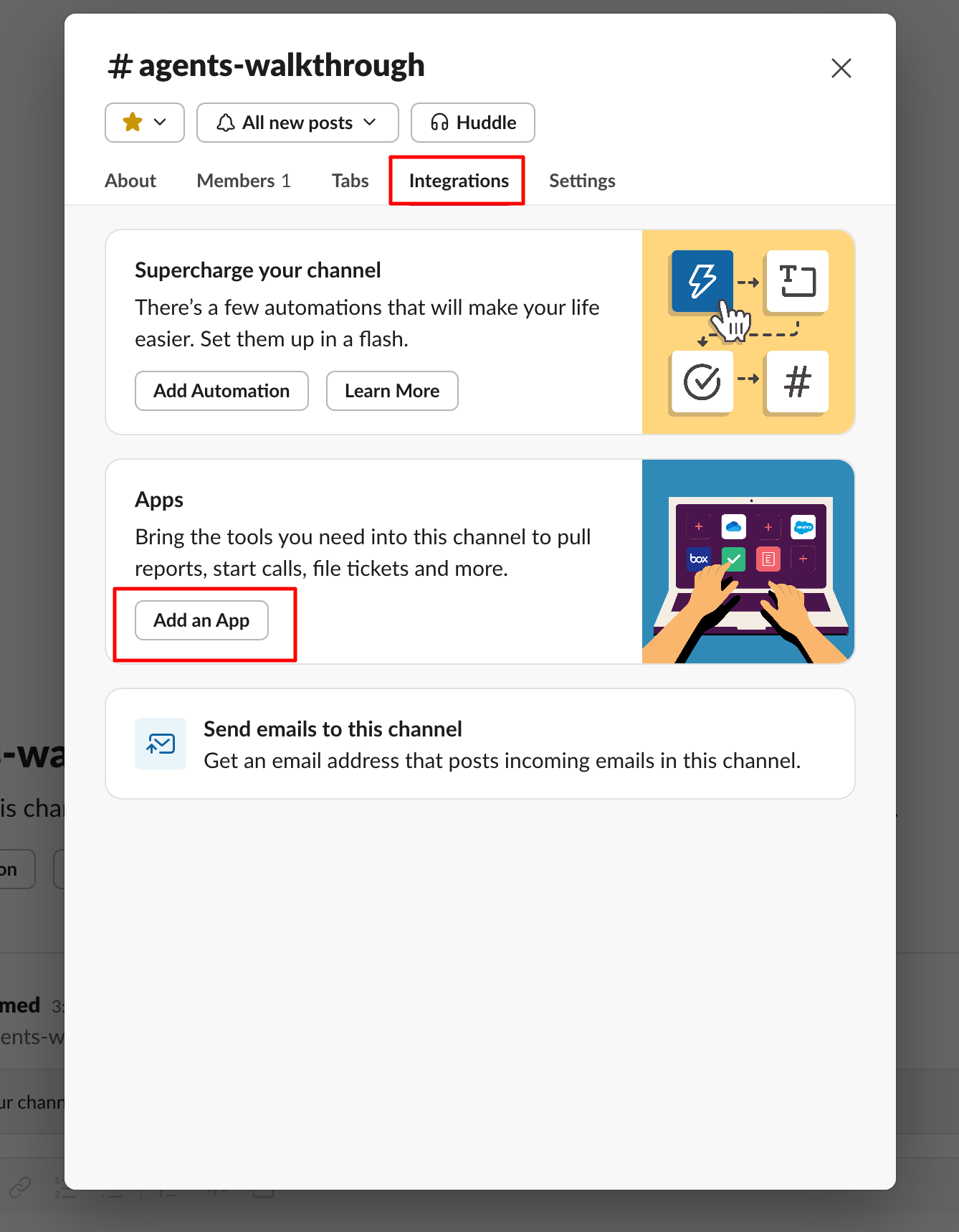
Type `/invite @Gumloop` in the channel, or click the channel name and select Add integrations/Add app to search for "Gumloop".
The channel will now appear in the dropdown menu in the node configuration.
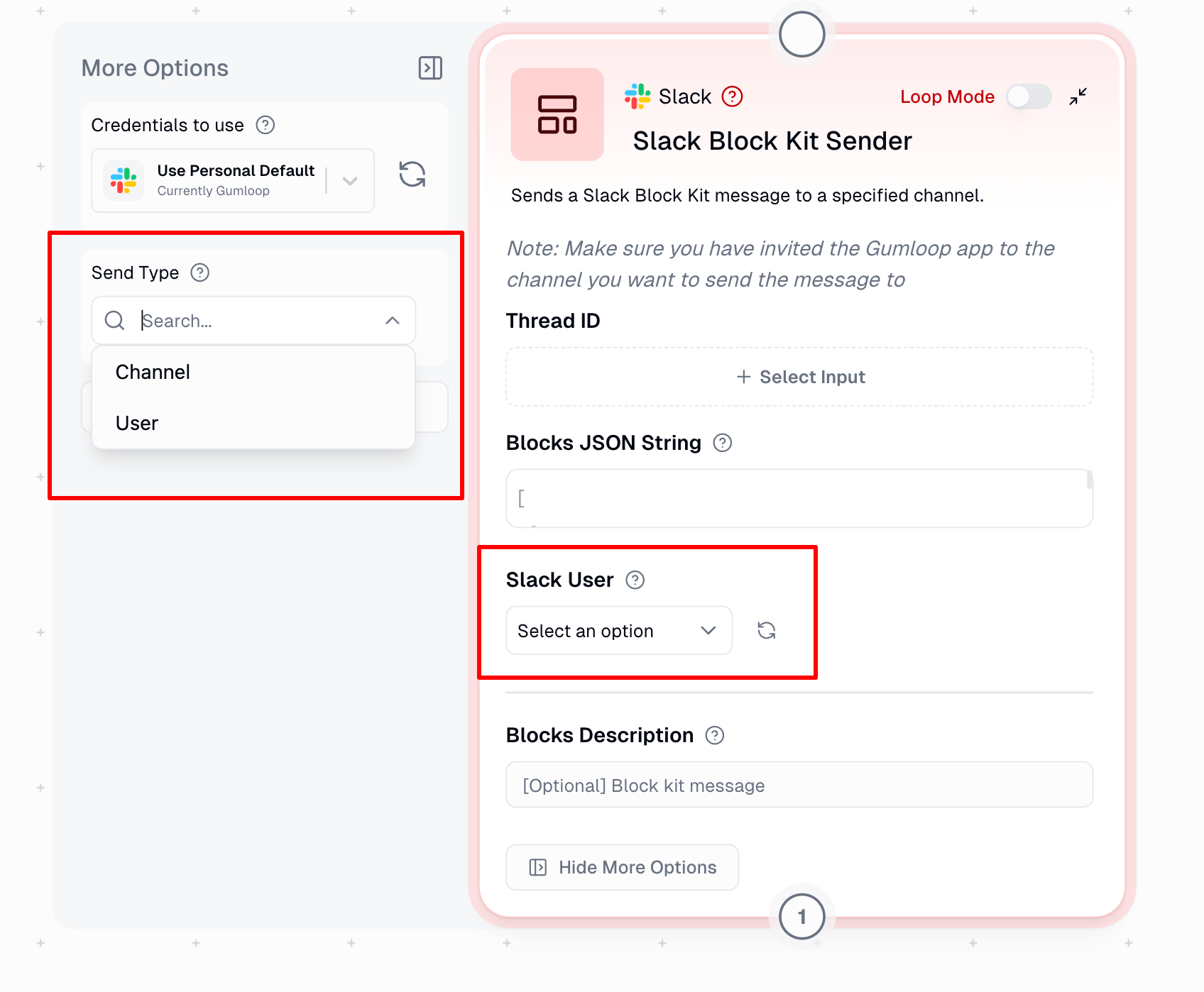
If you enable **"Send as user profile"** in the node options, the Gumloop bot does not need to be in the channel. The message will be sent using your personal Slack token instead. You still need to be a member of the channel.
### Direct Messages (DMs)
You can send Block Kit messages directly to users by selecting a user from the dropdown or using their user ID.
## When to Use
The Block Kit Sender is ideal for:
| Use Case | Example |
| ------------------------ | ---------------------------------------------------------------- |
| **Structured Messages** | Visually appealing messages with headers, sections, and dividers |
| **Interactive Elements** | Buttons, hyperlinks, and embedded images |
| **Status Updates** | Rich formatting for project updates and alerts |
| **Message Templates** | Consistent, reusable message formats |
## Node Inputs
| Input | Description |
| --------------------------------- | ------------------------------------------------------------------------------------------------------------- |
| **Channel** | The Slack channel where the message will be sent |
| **Blocks JSON String** | JSON-formatted Block Kit content defining your message layout |
| **Blocks Description** (Optional) | Text description for accessibility/notifications and mobile push alerts |
| **Thread ID** (Optional) | For replying in specific threads. Fetch from [Slack Message Reader](/nodes/integrations/slack_message_reader) |
If you have raw content that needs to be converted to Slack Markdown for Block Kit, use the [Generate Report](/nodes/using_ai/generate_report) node to automatically format your content.
### Send as User Profile
When enabled under "Show More Options", this uses your personal Slack token to send messages:
* The message appears as sent by you, not the Gumloop bot
* **The Gumloop bot does not need to be in the channel**
* You still need to be a member of the channel
* Useful for personal messaging or when you want messages to appear from your account
## Node Output
| Output | Description |
| -------------------- | ------------------------------------------------ |
| **Posted Thread ID** | The unique identifier of the sent message thread |
| **Message Status** | Success/failure of message delivery |
## Example Implementations
### 1. Project Update Template
Perfect for regular team updates with clear progress indicators.
```json theme={"dark"}
[
{
"type": "header",
"text": {
"type": "plain_text",
"text": "🚀 Project Update",
"emoji": true
}
},
{
"type": "section",
"text": {
"type": "mrkdwn",
"text": "Hello <#C05QUSA4CC9>! Here's your weekly project status:"
}
},
{
"type": "section",
"text": {
"type": "mrkdwn",
"text": "*Current Progress:*\n• Phase 1: ✅ Complete\n• Phase 2: 🚧 In Progress `(75%)`\n• Phase 3: ⏳ Pending"
}
},
{
"type": "context",
"elements": [
{
"type": "mrkdwn",
"text": "📅 Next review: Monday at 10 AM"
}
]
}
]
```
**Preview**:
> 🚀 Project Update
>
> Hello #project-team! Here's your weekly project status:
>
> **Current Progress:**
>
> • Phase 1: ✅ Complete
>
> • Phase 2: 🚧 In Progress `(75%)`
>
> • Phase 3: ⏳ Pending
>
> 📅 Next review: Monday at 10 AM
### 2. Interactive Support Ticket
Useful for creating actionable support tickets with response options.
````json theme={"dark"}
[
{
"type": "header",
"text": {
"type": "plain_text",
"text": "🎫 New Support Ticket",
"emoji": true
}
},
{
"type": "section",
"text": {
"type": "mrkdwn",
"text": "*Ticket ID:* #1234\n*Priority:* High\n*Reported by:* <@U07L10GLL80>"
}
},
{
"type": "section",
"text": {
"type": "mrkdwn",
"text": "*Issue Description:*\n```Unable to access production database. Error occurs during authentication.```"
}
},
{
"type": "actions",
"elements": [
{
"type": "button",
"text": {
"type": "plain_text",
"text": "View Details",
"emoji": true
},
"url": "https://www.gumloop.com/",
"value": "view_1234"
}
]
},
{
"type": "context",
"elements": [
{
"type": "mrkdwn",
"text": "🕐 Reported: 2024-11-26 14:30 UTC"
}
]
}
]
````
**Preview**:
> 🎫 New Support Ticket
>
> **Ticket ID:** #1234
>
> **Priority:** High
>
> **Reported by:** @Sarah
>
> **Issue Description:**
> `Unable to access production database. Error occurs during authentication.`
>
> \[View Details]
>
> 🕐 Reported: 2024-11-26 14:30 UTC
### 3. Performance Report Template
Great for sharing metrics and achievements in a structured format.
````json theme={"dark"}
[
{
"type": "header",
"text": {
"type": "plain_text",
"text": "📊 Q4 Performance Report",
"emoji": true
}
},
{
"type": "section",
"text": {
"type": "mrkdwn",
"text": "*Team Lead:* <@U07L10GLL80> | *Department:* <#C05QUSA4CC9>"
},
"accessory": {
"type": "image",
"image_url": "https://i.sstatic.net/JOiNx.png",
"alt_text": "Team performance graph"
}
},
{
"type": "divider"
},
{
"type": "section",
"text": {
"type": "mrkdwn",
"text": "*Key Metrics:*\n```• Revenue: $1.2M (+15%)\n• Customer Growth: 2.5k (+30%)\n• Response Time: 2h (-50%)```"
}
},
{
"type": "section",
"text": {
"type": "mrkdwn",
"text": "*Team Achievements:*\n• Launched 5 major features\n• Reduced bug backlog by 40%\n• Achieved 99.9% uptime"
}
}
]
````
**Preview**:
> 📊 Q4 Performance Report
>
> **Team Lead:** @Sarah | **Department:** #sales-team \[Graph Image]
>
> **Key Metrics:**
>
> ```
> • Revenue: $1.2M (+15%)
> • Customer Growth: 2.5k (+30%)
> • Response Time: 2h (-50%)
> ```
>
> **Team Achievements:**
>
> • Launched 5 major features
>
> • Reduced bug backlog by 40%
>
> • Achieved 99.9% uptime
## Common Use Cases
1. **Automated Alerts**
* System status updates
* Performance monitoring alerts
* Security notifications
* Deployment status messages
2. **Team Communication**
* Sprint updates
* Meeting summaries
* Project milestones
* Team announcements
3. **Interactive Workflows**
* Approval requests
* Incident management
* Task assignments
4. **Data Visualization**
* Performance metrics via graphs
* Analytics reports
* Usage statistics
* Health checks
## Important Considerations
1. **Authentication**: Set up Slack authentication in the [Connectors page](https://www.gumloop.com/personal/connectors)
2. **Channel Membership**: You must be a member of the channel for it to appear in the dropdown
3. **Gumloop Bot Required**: The Gumloop bot must be invited to the channel using `/invite @Gumloop` (unless using "Send as user profile")
4. **Send as User**: When enabled, the bot is not required - messages are sent using your personal token
5. **JSON Testing**: Validate layouts in [Block Kit Builder](https://app.slack.com/block-kit-builder)
6. **Loop Mode**: Use Loop Mode for sending multiple messages
## Advanced Slack Features
Need more advanced Slack capabilities like managing channels, uploading files, or adding reactions? Use the [Slack MCP node](/nodes/mcp/slack) to create custom Slack integrations with natural language prompts.
## Learn More
* [Block Kit Overview](https://api.slack.com/block-kit)
* [Block Kit Builder](https://app.slack.com/block-kit-builder)
* [Block Kit Reference](https://api.slack.com/reference/block-kit/blocks)