> ## Documentation Index
> Fetch the complete documentation index at: https://docs.gumloop.com/llms.txt
> Use this file to discover all available pages before exploring further.
# Choose the Right AI Model
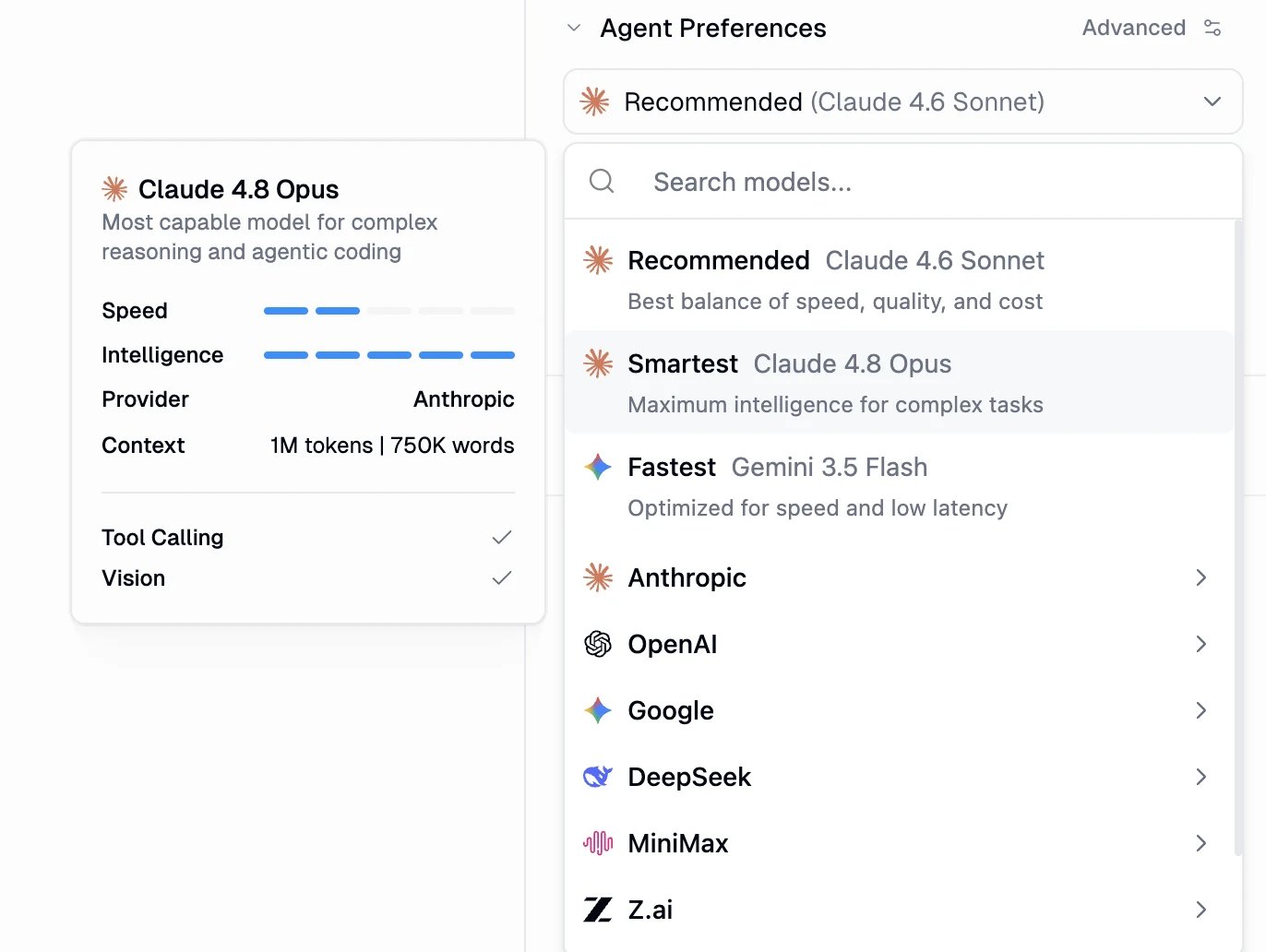
Change the model in **Agent Preferences** at the top of the agent. Start with **Recommended** unless you already know you need more reasoning or more speed.
Models change often. New ones usually appear in Gumloop within a day of release. The in-product picker is the source of truth. The catalog on [AI Models](/core-concepts/ai_models) is a snapshot.
## Where to change it
1. Open the [agent](https://www.gumloop.com/agents).
2. Open **Agent Preferences**.
3. Open the model dropdown.
 ## What to pick
| Preset | Use it when |
| --------------- | -------------------------------------------------------------------- |
| **Recommended** | Everyday agent work. Default for new agents. Currently **Grok 4.6**. |
| **Smartest** | Hard reasoning, long research, or multi-step tool use |
| **Fastest** | Short, high-volume tasks where latency matters |
Each preset points at a current best-in-class model that Gumloop updates for you. On **Enterprise**, admins can change which model each preset uses and hide models a [custom role](/enterprise-features/user_groups#models-tab) is not allowed to pick.
To choose a specific model, search by name or browse by provider (Anthropic, OpenAI, Google, DeepSeek, MiniMax, Z.ai, and others).
Need vision (screenshots, images)? Pick a model whose card shows **Vision**. Almost every current agent model supports tool calling.
## Cost
Agent model cost is token-based. You pay for the tokens in the conversation, plus compute and an orchestration fee. Open **Chat Details** on any run to see the exact spend. Full breakdown: [Credits](/core-concepts/credits).
To send model calls through your own provider key, see [Use your own LLM key](/help/connectors/use-your-own-llm-key).
## Related
Current catalog, vision support, and BYOK
How chats are billed
## What to pick
| Preset | Use it when |
| --------------- | -------------------------------------------------------------------- |
| **Recommended** | Everyday agent work. Default for new agents. Currently **Grok 4.6**. |
| **Smartest** | Hard reasoning, long research, or multi-step tool use |
| **Fastest** | Short, high-volume tasks where latency matters |
Each preset points at a current best-in-class model that Gumloop updates for you. On **Enterprise**, admins can change which model each preset uses and hide models a [custom role](/enterprise-features/user_groups#models-tab) is not allowed to pick.
To choose a specific model, search by name or browse by provider (Anthropic, OpenAI, Google, DeepSeek, MiniMax, Z.ai, and others).
Need vision (screenshots, images)? Pick a model whose card shows **Vision**. Almost every current agent model supports tool calling.
## Cost
Agent model cost is token-based. You pay for the tokens in the conversation, plus compute and an orchestration fee. Open **Chat Details** on any run to see the exact spend. Full breakdown: [Credits](/core-concepts/credits).
To send model calls through your own provider key, see [Use your own LLM key](/help/connectors/use-your-own-llm-key).
## Related
Current catalog, vision support, and BYOK
How chats are billed