> ## Documentation Index
> Fetch the complete documentation index at: https://docs.gumloop.com/llms.txt
> Use this file to discover all available pages before exploring further.
# Custom, Proxied, and Hosted MCP
Gumloop already has 50+ built-in connectors. Use one of these only when the server is **not** in the catalog.
| | Custom MCP | Proxied MCP | Hosted MCP |
| ---------------- | ------------------------ | ----------------------------------- | -------------------------------------- |
| What you provide | An MCP URL | An MCP URL | A GitHub repo |
| Who sets it up | Any user | Org admin | Org admin |
| Where it runs | Your server | The third party's server | Gumloop |
| Plan | Any | Enterprise | Enterprise |
| Best for | One URL you already host | A governed, audited external server | Your own server code, no extra hosting |
## Custom MCP
1. Go to [Connectors](https://www.gumloop.com/personal/connectors?provider=mcp%20server).
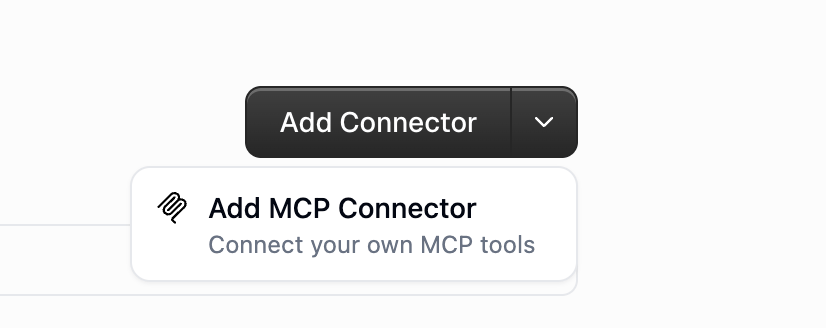
2. Open the arrow next to **Add Connector** and choose **Add MCP Connector**.
3. Pick **Public URL** (HTTPS) or **Private (via tunnel)** on Enterprise.
4. Enter the server URL and click **Connect**.
5. Confirm the detected auth. If it is OAuth, click **Authenticate**. Otherwise add a token, API key, or custom header.
6. Open the agent → **Connectors** → **Add Connector**, then search for the server you just added.
 The server must speak Streamable HTTP or SSE over HTTPS. `localhost` and STDIO are not supported. On Enterprise, [Managed Tunnels](/enterprise-features/managed_tunnels) can reach a server inside your network.
## Proxied MCP
An admin registers one external URL at [Organization → Proxied MCPs](https://www.gumloop.com/settings/organization/proxied-mcps). Gumloop proxies traffic so the org gets activity logs and tool access control without deploying code.
Auth is **None**, **API Key**, or **OAuth 2.0**. None / API Key shares one org secret. OAuth makes each person sign in.
Full setup: [Proxied MCPs](/enterprise-features/proxied_mcps).
## Hosted MCP
An admin connects GitHub at [Organization → Hosted MCPs](https://www.gumloop.com/settings/organization/hosted-mcps). Gumloop builds, deploys, and routes the server. Access is gated by [custom roles](/enterprise-features/user_groups).
Full setup: [Hosted MCPs](/enterprise-features/hosted_mcps).
## Whose credentials run on a shared agent
Gumloop does not silently share one person's personal login.
| Server type | Who is authenticated | What the teammate must do |
| ----------------------------- | --------------------------------- | ------------------------------------------- |
| Custom MCP (personal) | That teammate's own copy | Each person adds the custom MCP |
| Custom MCP (team connector) | The shared team connection | Nothing |
| Proxied, auth None or API Key | The org-level secret | Nothing |
| Proxied, auth OAuth | Each user's OAuth token | Each user connects once |
| Hosted MCP | Each user's downstream connectors | Each user connects the apps the server uses |
## FAQ
One URL you already host → **Custom**. Org wants one governed external server → **Proxied**. Org wants to run its own server code without extra hosting → **Hosted**.
Gumloop must reach the server over the public internet (or an Enterprise managed tunnel). Deploy it, or expose it with Cloudflare Tunnel / ngrok.
Adding it in Connectors is not enough. Open the agent and add that custom MCP under **Connectors**.
## Related
URL, headers, and OAuth
Deploy from GitHub
The server must speak Streamable HTTP or SSE over HTTPS. `localhost` and STDIO are not supported. On Enterprise, [Managed Tunnels](/enterprise-features/managed_tunnels) can reach a server inside your network.
## Proxied MCP
An admin registers one external URL at [Organization → Proxied MCPs](https://www.gumloop.com/settings/organization/proxied-mcps). Gumloop proxies traffic so the org gets activity logs and tool access control without deploying code.
Auth is **None**, **API Key**, or **OAuth 2.0**. None / API Key shares one org secret. OAuth makes each person sign in.
Full setup: [Proxied MCPs](/enterprise-features/proxied_mcps).
## Hosted MCP
An admin connects GitHub at [Organization → Hosted MCPs](https://www.gumloop.com/settings/organization/hosted-mcps). Gumloop builds, deploys, and routes the server. Access is gated by [custom roles](/enterprise-features/user_groups).
Full setup: [Hosted MCPs](/enterprise-features/hosted_mcps).
## Whose credentials run on a shared agent
Gumloop does not silently share one person's personal login.
| Server type | Who is authenticated | What the teammate must do |
| ----------------------------- | --------------------------------- | ------------------------------------------- |
| Custom MCP (personal) | That teammate's own copy | Each person adds the custom MCP |
| Custom MCP (team connector) | The shared team connection | Nothing |
| Proxied, auth None or API Key | The org-level secret | Nothing |
| Proxied, auth OAuth | Each user's OAuth token | Each user connects once |
| Hosted MCP | Each user's downstream connectors | Each user connects the apps the server uses |
## FAQ
One URL you already host → **Custom**. Org wants one governed external server → **Proxied**. Org wants to run its own server code without extra hosting → **Hosted**.
Gumloop must reach the server over the public internet (or an Enterprise managed tunnel). Deploy it, or expose it with Cloudflare Tunnel / ngrok.
Adding it in Connectors is not enough. Open the agent and add that custom MCP under **Connectors**.
## Related
URL, headers, and OAuth
Deploy from GitHub