> ## Documentation Index
> Fetch the complete documentation index at: https://docs.gumloop.com/llms.txt
> Use this file to discover all available pages before exploring further.
# What Can a User See on My Agent?
Exactly what you let them see. Open the agent, go to **Access → User Permissions**, and flip the eight switches.
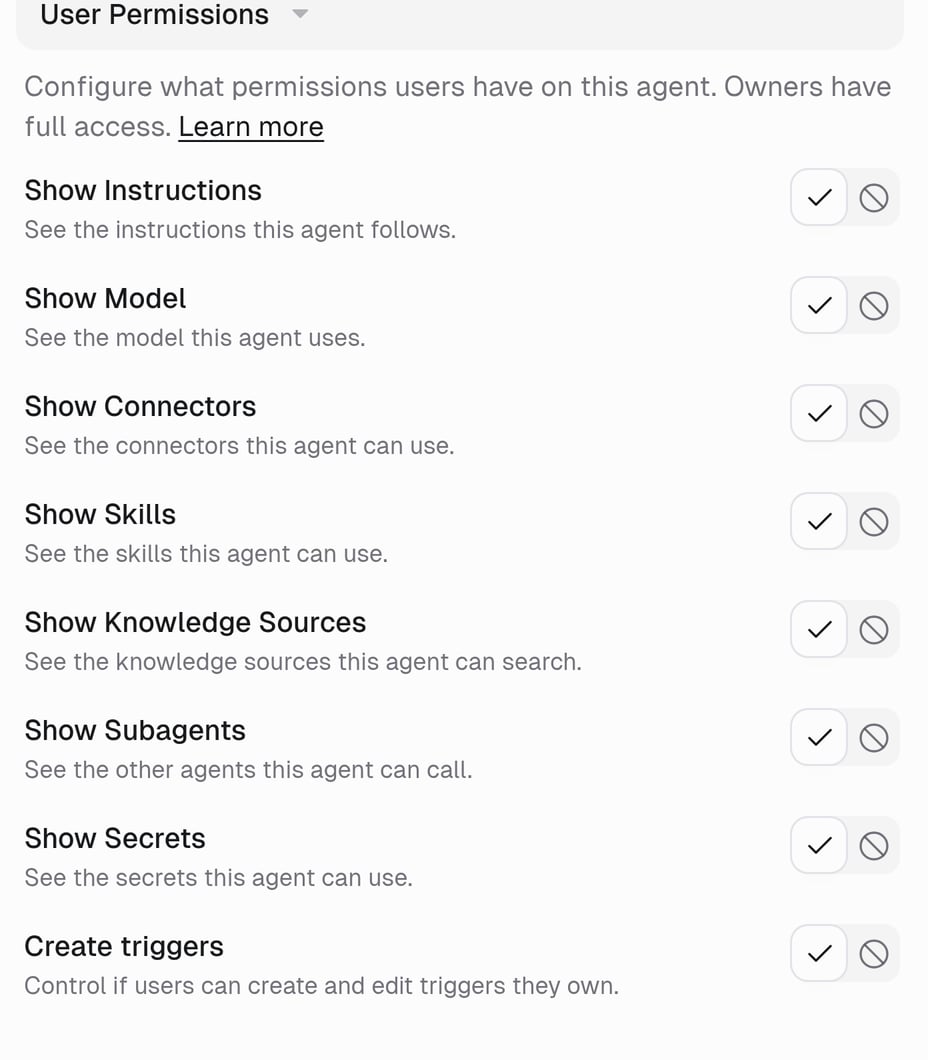 | Setting | Show means they can see |
| -------------------------- | ----------------------------------------------------------------------------------------- |
| **Show Instructions** | The instructions the agent follows |
| **Show Model** | Which model it runs on |
| **Show Connectors** | The apps it can use |
| **Show Skills** | The skills it can use |
| **Show Knowledge Sources** | The knowledge sources it can search |
| **Show Subagents** | The other agents it can call |
| **Show Secrets** | The names of its secrets |
| **Create triggers** | Not visibility — whether they can create their own triggers (**Allow** / **Don't allow**) |
Owners always see everything.
## Two things people get wrong
* **Show does not mean edit.** A User can read the instructions when *Show Instructions* is on, but only an Owner can change them.
* **Hide does not mean off.** Hiding Connectors does not stop the agent from using Gmail; it just does not list Gmail for Users.
Tasks are separate: see [Who can see tasks on this agent?](/help/sharing/who-can-see-tasks)
## Example
A support agent everyone in the company can use, where the prompt is yours to tune:
* General Access: **Organization**
* Show Instructions: **Hide**
* Show Connectors: **Show** — so people know it reads Zendesk
* Create triggers: **Don't allow**
## FAQ
No. The settings apply to every User on the agent. If one person needs more, make them an Owner.
Every visibility setting starts on **Show** and **Create triggers** on **Allow**, unless your org admin set different [agent defaults](/enterprise-features/agent_default_settings).
They see the artifacts from tasks they can see. That follows Task Visibility and [File Sharing](/core-concepts/agent_access#file-sharing), not these switches.
## Related
Full reference
The trigger switch in detail
| Setting | Show means they can see |
| -------------------------- | ----------------------------------------------------------------------------------------- |
| **Show Instructions** | The instructions the agent follows |
| **Show Model** | Which model it runs on |
| **Show Connectors** | The apps it can use |
| **Show Skills** | The skills it can use |
| **Show Knowledge Sources** | The knowledge sources it can search |
| **Show Subagents** | The other agents it can call |
| **Show Secrets** | The names of its secrets |
| **Create triggers** | Not visibility — whether they can create their own triggers (**Allow** / **Don't allow**) |
Owners always see everything.
## Two things people get wrong
* **Show does not mean edit.** A User can read the instructions when *Show Instructions* is on, but only an Owner can change them.
* **Hide does not mean off.** Hiding Connectors does not stop the agent from using Gmail; it just does not list Gmail for Users.
Tasks are separate: see [Who can see tasks on this agent?](/help/sharing/who-can-see-tasks)
## Example
A support agent everyone in the company can use, where the prompt is yours to tune:
* General Access: **Organization**
* Show Instructions: **Hide**
* Show Connectors: **Show** — so people know it reads Zendesk
* Create triggers: **Don't allow**
## FAQ
No. The settings apply to every User on the agent. If one person needs more, make them an Owner.
Every visibility setting starts on **Show** and **Create triggers** on **Allow**, unless your org admin set different [agent defaults](/enterprise-features/agent_default_settings).
They see the artifacts from tasks they can see. That follows Task Visibility and [File Sharing](/core-concepts/agent_access#file-sharing), not these switches.
## Related
Full reference
The trigger switch in detail