> ## Documentation Index
> Fetch the complete documentation index at: https://docs.gumloop.com/llms.txt
> Use this file to discover all available pages before exploring further.
# How do I see what the agent is doing in the browser?
The **Browser** panel doesn't open on its own. When the agent starts using the browser, a **Browser** bar appears just above the message box. Click it to open the panel.
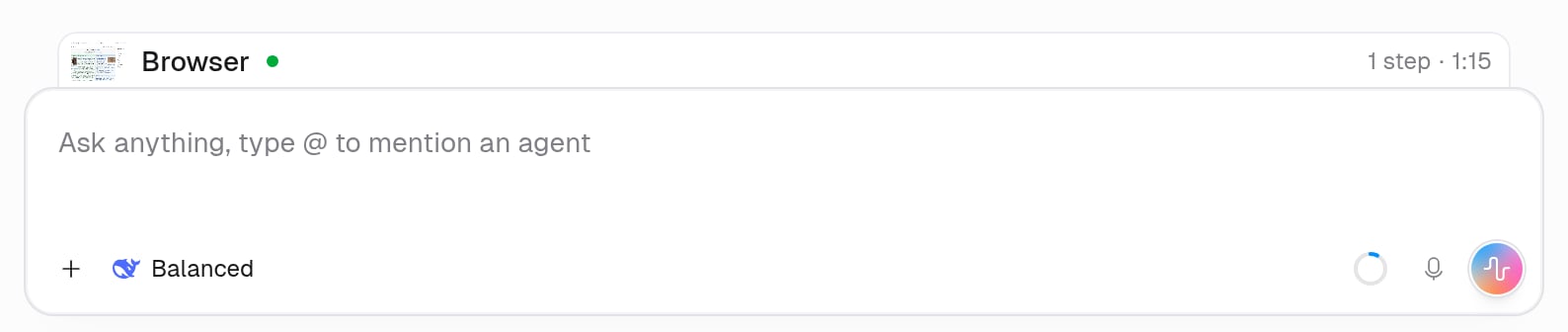 | What you want | Where to find it |
| - | - |
| Watch the browser live | Click the **Browser** bar, then choose **Live** at the bottom of the panel |
| Rewatch what the agent did | Choose **Replay** in the panel, or click **Browser replay** under the agent's message |
| Hide the panel | Click **X** on the panel. The bar stays, so you can reopen it |
The panel opens for you only when the agent hands you the browser to sign in, enter a code, or solve a CAPTCHA. See [When does the agent ask me for help?](/core-concepts/agent_browser#when-does-the-agent-ask-me-for-help).
No bar means the agent hasn't used the browser in this chat. See [Why is the browser turned off for me?](/help/browser/why-is-the-browser-turned-off).
Replays are added when the agent's turn finishes, so a running or paused turn doesn't show one yet.
| What you want | Where to find it |
| - | - |
| Watch the browser live | Click the **Browser** bar, then choose **Live** at the bottom of the panel |
| Rewatch what the agent did | Choose **Replay** in the panel, or click **Browser replay** under the agent's message |
| Hide the panel | Click **X** on the panel. The bar stays, so you can reopen it |
The panel opens for you only when the agent hands you the browser to sign in, enter a code, or solve a CAPTCHA. See [When does the agent ask me for help?](/core-concepts/agent_browser#when-does-the-agent-ask-me-for-help).
No bar means the agent hasn't used the browser in this chat. See [Why is the browser turned off for me?](/help/browser/why-is-the-browser-turned-off).
Replays are added when the agent's turn finishes, so a running or paused turn doesn't show one yet.