> ## Documentation Index
> Fetch the complete documentation index at: https://docs.gumloop.com/llms.txt
> Use this file to discover all available pages before exploring further.
# How do I delete my Gumloop account?
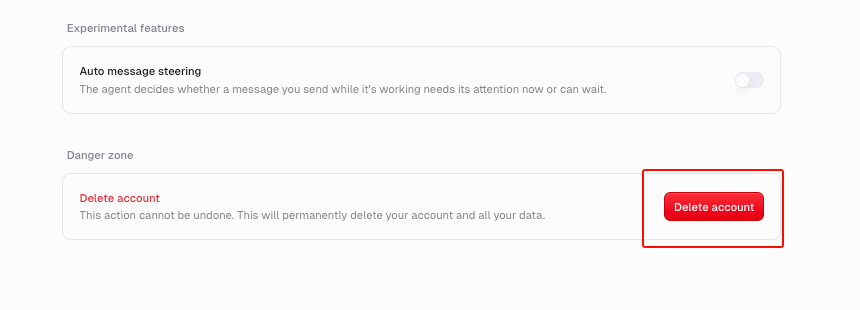
Go to [Settings > Profile > General](https://www.gumloop.com/settings/profile/general), scroll to **Danger zone**, and select **Delete account**. Deletion is permanent and can't be undone.
Only want to stop paying? [Cancel your plan or trial](/help/account-billing/cancel-plan-or-trial) instead. Your work stays in your account.
## Steps
1. Open [Settings > Profile > General](https://www.gumloop.com/settings/profile/general).
2. Scroll to **Danger zone** and select **Delete account**.
3. Confirm it's you:
* **Email and password:** enter your current password.
* **Google, Microsoft, or SSO:** sign in again in the pop-up with the same account.
4. Select **Delete Account**. You're signed out and see "Your account has been successfully deleted."
 **Seeing the trial or subscription screen instead?** You don't need to start a trial or subscribe to delete your account. Scroll to the bottom of the screen and click **Delete account**, just below **Sign out**. Then follow steps 3 and 4 above to complete the deletion.
## What gets deleted
Your account and the data you own: agents you created (including ones your teammates use), chats, skills, triggers, files, and Brain sources. You're also removed from your organization.
## What happens to my subscription
Any subscription billed to you is cancelled, so you won't be charged again. You don't need to cancel first. If you're the last member of your organization, the organization's plan is cancelled too. Otherwise, it keeps billing until an Admin cancels it.
## Can I sign up again with the same email?
No. A deleted account's email can't be used to sign up again on your own. If you need it, [contact support](https://portal.usepylon.com/gumloop/forms/help) **before** you delete.
## Troubleshooting
| Message | What to do |
| - | - |
| "Invalid password" | Enter your current Gumloop password. |
| "Popup blocked" | Allow pop-ups for gumloop.com and try again. |
| "User mismatch" | Sign in with the same account you use for Gumloop. |
| "We couldn't cancel your subscription before deleting your account..." | Nothing was deleted. Try again in a few minutes. |
| "This account can't be deleted. Contact your organization admin." | Enterprise accounts are managed by your organization admin. |
Don't see **Danger zone**? Your account is part of an Enterprise organization. Ask your organization admin.
**Seeing the trial or subscription screen instead?** You don't need to start a trial or subscribe to delete your account. Scroll to the bottom of the screen and click **Delete account**, just below **Sign out**. Then follow steps 3 and 4 above to complete the deletion.
## What gets deleted
Your account and the data you own: agents you created (including ones your teammates use), chats, skills, triggers, files, and Brain sources. You're also removed from your organization.
## What happens to my subscription
Any subscription billed to you is cancelled, so you won't be charged again. You don't need to cancel first. If you're the last member of your organization, the organization's plan is cancelled too. Otherwise, it keeps billing until an Admin cancels it.
## Can I sign up again with the same email?
No. A deleted account's email can't be used to sign up again on your own. If you need it, [contact support](https://portal.usepylon.com/gumloop/forms/help) **before** you delete.
## Troubleshooting
| Message | What to do |
| - | - |
| "Invalid password" | Enter your current Gumloop password. |
| "Popup blocked" | Allow pop-ups for gumloop.com and try again. |
| "User mismatch" | Sign in with the same account you use for Gumloop. |
| "We couldn't cancel your subscription before deleting your account..." | Nothing was deleted. Try again in a few minutes. |
| "This account can't be deleted. Contact your organization admin." | Enterprise accounts are managed by your organization admin. |
Don't see **Danger zone**? Your account is part of an Enterprise organization. Ask your organization admin.