> ## Documentation Index
> Fetch the complete documentation index at: https://docs.gumloop.com/llms.txt
> Use this file to discover all available pages before exploring further.
# How Do I Cancel My Plan or Free Trial?
You can cancel your paid plan or 14-day Pro trial from **Manage Subscription** on the [Usage & Limits page](https://www.gumloop.com/settings/organization/limits) (Settings > Organization > Usage & Limits).
1. Open the [Usage & Limits page](https://www.gumloop.com/settings/organization/limits).
2. In the **Plan** card, select **Manage Subscription**. This opens the Stripe billing portal in a new tab.
3. Select **Cancel plan**, then confirm the cancellation.
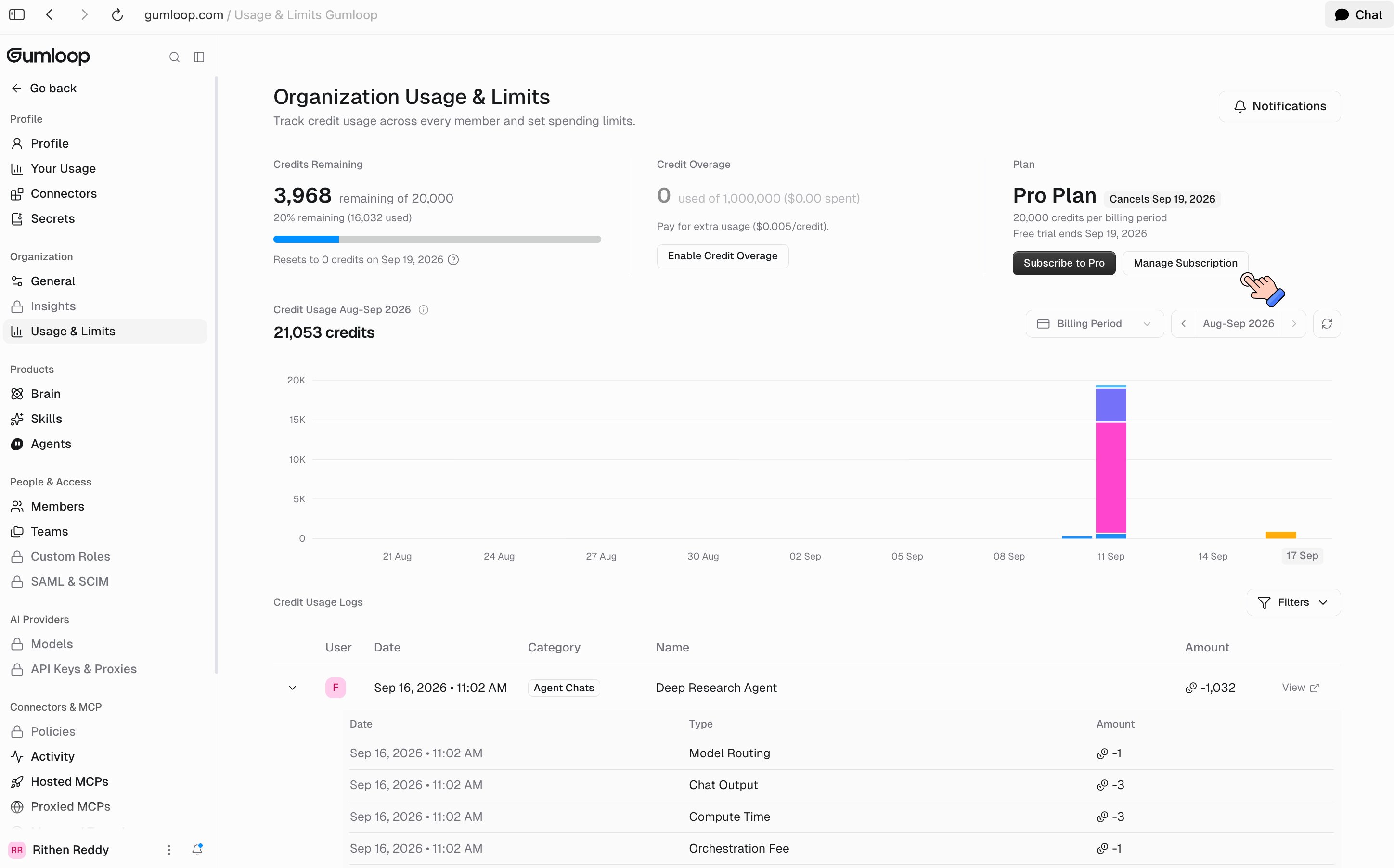 Cancelling is never immediate: you keep access until the end of the current billing period or trial, and the Plan card shows a **Cancels** badge with that date.
You can also reach the billing portal from the **Manage your subscription** link at the bottom of any Gumloop receipt email.
## Cancelling the free trial
Every new account starts with a [14-day free trial of Pro](/core-concepts/credits). It requires a card and rolls into a paid Pro subscription when it ends, unless you cancel first.
Cancel any time before the trial ends using the steps above. Your card is not charged, and you keep Pro access for the rest of the trial. The Plan card shows when the trial ends, for example "Free trial ends Sep 19, 2026".
## What happens when your cancellation takes effect
Until your cancellation date, you can keep using Gumloop normally, including any remaining credits on your plan or trial. After that date:
* **Plan access ends:** Your Pro subscription or trial ends, and agents and workflows can no longer run unless you resubscribe.
* **Credits stop renewing:** Any remaining credits are available until the cancellation date. After that, your credit balance no longer resets.
* **Your work isn't deleted:** Your agents, workflows, skills, Brain sources, chats, and other workspace data stay in your account when you cancel.
* **You can resubscribe anytime:** Restart a subscription from the [Usage & Limits page](https://www.gumloop.com/settings/organization/limits) or the [pricing page](https://www.gumloop.com/pricing).
Deleting your account also cancels any subscription tied to it, so you will not be charged after the account is deleted.
## Refunds
Under our [Terms of Service](https://www.gumloop.com/tos), paid subscription fees are non-refundable except where required by law. The reliable way to avoid an unwanted charge is to cancel before the trial ends or before your next renewal date.
## Who can cancel
In an organization, only the [Admin](/core-concepts/organization_user_roles) role can open the billing portal. If you do not see **Manage Subscription**, ask an org admin.
Enterprise plans are invoiced by contract, so the self-serve portal does not apply. Email [accounting@gumloop.com](mailto:accounting@gumloop.com) for plan changes.
## Related
Payment methods, billing details, and invoices
Get a PDF invoice or receipt
Plans, included credits, and overage
Contact accounting about billing
Cancelling is never immediate: you keep access until the end of the current billing period or trial, and the Plan card shows a **Cancels** badge with that date.
You can also reach the billing portal from the **Manage your subscription** link at the bottom of any Gumloop receipt email.
## Cancelling the free trial
Every new account starts with a [14-day free trial of Pro](/core-concepts/credits). It requires a card and rolls into a paid Pro subscription when it ends, unless you cancel first.
Cancel any time before the trial ends using the steps above. Your card is not charged, and you keep Pro access for the rest of the trial. The Plan card shows when the trial ends, for example "Free trial ends Sep 19, 2026".
## What happens when your cancellation takes effect
Until your cancellation date, you can keep using Gumloop normally, including any remaining credits on your plan or trial. After that date:
* **Plan access ends:** Your Pro subscription or trial ends, and agents and workflows can no longer run unless you resubscribe.
* **Credits stop renewing:** Any remaining credits are available until the cancellation date. After that, your credit balance no longer resets.
* **Your work isn't deleted:** Your agents, workflows, skills, Brain sources, chats, and other workspace data stay in your account when you cancel.
* **You can resubscribe anytime:** Restart a subscription from the [Usage & Limits page](https://www.gumloop.com/settings/organization/limits) or the [pricing page](https://www.gumloop.com/pricing).
Deleting your account also cancels any subscription tied to it, so you will not be charged after the account is deleted.
## Refunds
Under our [Terms of Service](https://www.gumloop.com/tos), paid subscription fees are non-refundable except where required by law. The reliable way to avoid an unwanted charge is to cancel before the trial ends or before your next renewal date.
## Who can cancel
In an organization, only the [Admin](/core-concepts/organization_user_roles) role can open the billing portal. If you do not see **Manage Subscription**, ask an org admin.
Enterprise plans are invoiced by contract, so the self-serve portal does not apply. Email [accounting@gumloop.com](mailto:accounting@gumloop.com) for plan changes.
## Related
Payment methods, billing details, and invoices
Get a PDF invoice or receipt
Plans, included credits, and overage
Contact accounting about billing