> ## Documentation Index
> Fetch the complete documentation index at: https://docs.gumloop.com/llms.txt
> Use this file to discover all available pages before exploring further.
# Outbound Webhooks
> Have Gumloop POST organization events to your own endpoint
Outbound webhooks let Gumloop notify **your** systems when something happens in your organization. Instead of polling an export, you register an HTTPS endpoint and Gumloop posts a signed JSON payload to it as events occur.
Outbound webhooks require an Enterprise subscription and permission to export organization data. Find them under **Settings → Organization → [Data Export](https://www.gumloop.com/settings/organization/data_export) → Webhooks**. The **Webhooks** tab is available to organization Admin, Manager, and Analytics roles, subject to your organization's access policies. Personal-export permission alone does not provide webhook access.
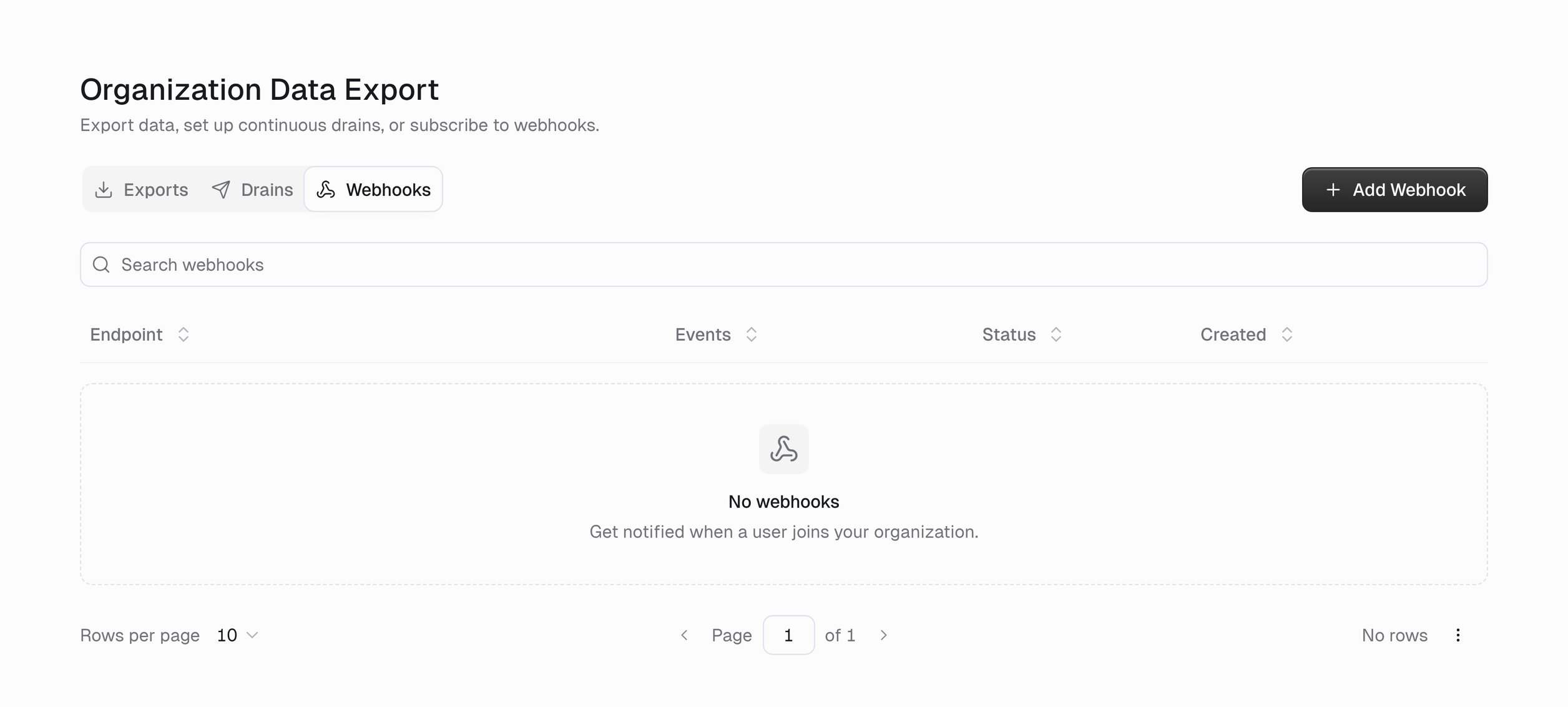 The table lists each webhook's **Endpoint**, the **Events** it subscribes to, its **Status**, when it was **Created**, and per-row actions. Search and paging help once you have a few.
## Add a webhook
The table lists each webhook's **Endpoint**, the **Events** it subscribes to, its **Status**, when it was **Created**, and per-row actions. Search and paging help once you have a few.
## Add a webhook
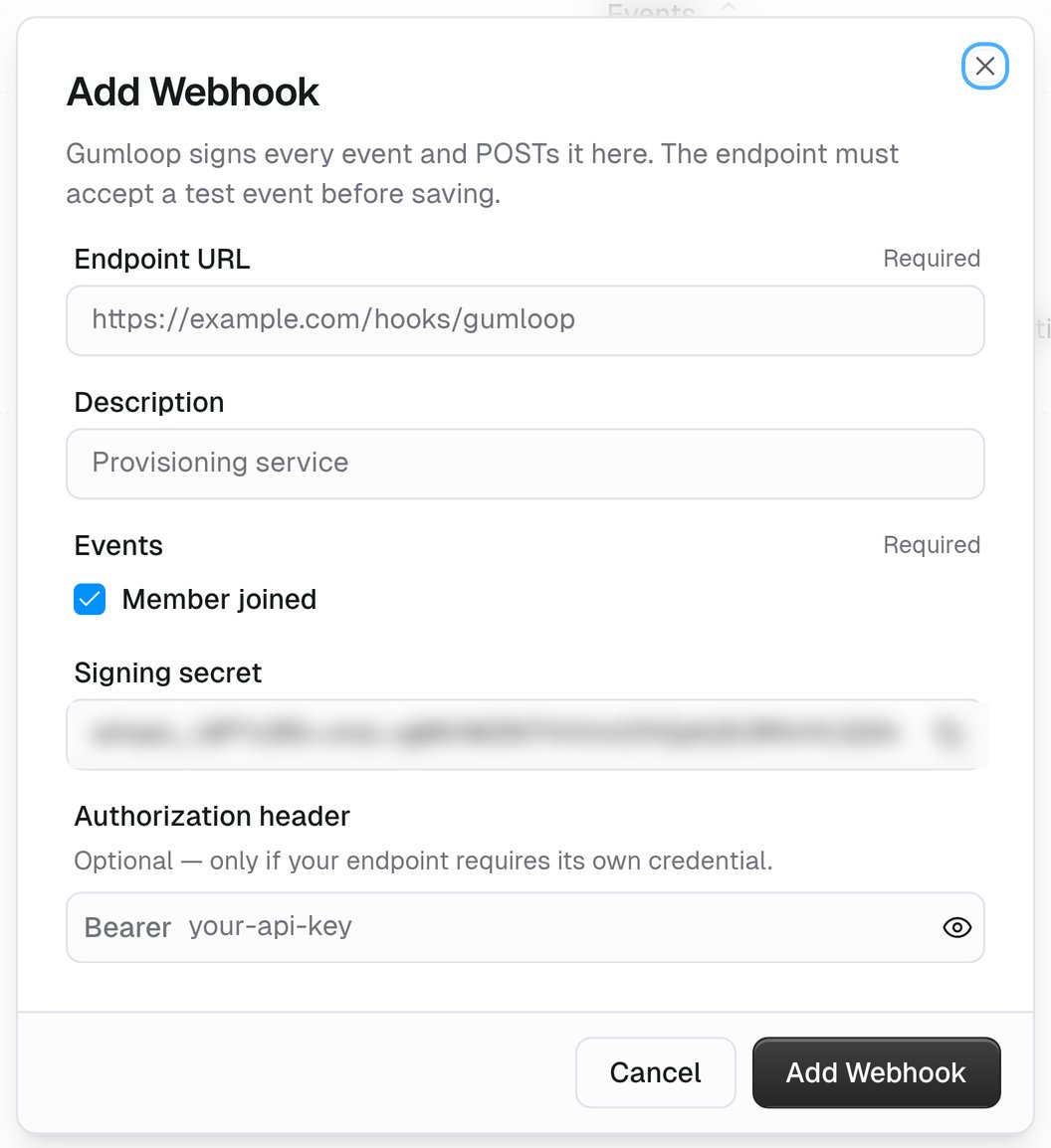 Must be **HTTPS**. This is where Gumloop POSTs each event. The URL must be public, must not embed credentials, and must accept a test event with a `2xx` response.
A note for your teammates, such as *Posts to our internal provisioning service*.
Today that is **Member joined** (`organization.member.joined`). It reports a newly established organization membership, including accepted invitations, domain-based enrollment, and SCIM provisioning. Sending an invitation alone does not trigger it, and adding roles to an existing member does not trigger a second joined event.
Gumloop generates a secret starting with `whsec_`. Copy it before saving or closing the dialog. It is shown during creation and replacement, but is not available in the Edit dialog afterward. If you lose it, use **Replace credentials** to generate a new one.
Only use this field if your endpoint requires a bearer token. Enter the token alone, without `Bearer `. Gumloop adds the prefix and sends `Authorization: Bearer ` on each delivery.
Gumloop sends a **test event** (`webhook.ping`) first and only saves the webhook if your endpoint accepts it. If saving fails, check the validation message as well as endpoint reachability and the test response.
## What a delivery looks like
Each delivery is an HTTP `POST` with a JSON body and these headers:
| Header | Value |
| ------------------- | ------------------------------------------------------------------------------------------ |
| `Content-Type` | `application/json` |
| `User-Agent` | Identifies Gumloop as the sender |
| `webhook-id` | Event ID, also present as `id` in the JSON body. Retries of the same event retain this ID. |
| `webhook-timestamp` | Unix timestamp of this attempt |
| `webhook-signature` | Present when the webhook has a signing secret |
| `Authorization` | Present only if you configured one |
Make your receiver idempotent: record successfully handled event IDs and do not repeat their side effects when the same event is delivered again. A retry retains the event ID and body, but its `webhook-timestamp` and signature are generated for that attempt.
Each JSON body contains:
* `id`: the event ID, matching `webhook-id`.
* `type`: `organization.member.joined`, or `webhook.ping` for a test.
* `timestamp`: when the event envelope was created, as an ISO 8601 UTC timestamp.
* `api_version`: currently `2026-09-10`.
* `data`: the event-specific payload.
For `organization.member.joined`, `data` contains:
* `organization`: `id` and `name`.
* `user`: `id`, `email`, `first_name`, and `last_name`.
* `membership`: `join_method`, `roles`, and `projects`, where each project has `id` and `name`.
* `actor`: an optional object containing the acting user's `email`.
Names can be `null` when unavailable. `projects` can be an empty array, and `actor` is omitted when no acting user can be resolved.
A `webhook.ping` uses the same envelope, with `data: {"organization": {"id": ""}}`. Your receiver must accept this test event as well as member-joined events.
Return any `2xx` status as soon as you have accepted the payload. Do the slow work asynchronously.
## Verify the signature
Gumloop follows the [Standard Webhooks](https://www.standardwebhooks.com/) scheme. Remove the `whsec_` prefix from your signing secret and **base64-decode** the remaining value to obtain the HMAC key bytes. Compute HMAC-SHA256 over `..`, base64-encode the digest, and compare it in constant time with the `v1` signature in `webhook-signature`.
```python Python theme={"dark"}
import base64
import hashlib
import hmac
import time
def verify(secret: str, headers: dict, raw_body: bytes) -> bool:
try:
timestamp = int(headers["webhook-timestamp"])
if abs(time.time() - timestamp) > 300:
return False
signed = f"{headers['webhook-id']}.{headers['webhook-timestamp']}.".encode() + raw_body
key = base64.b64decode(secret.removeprefix("whsec_"), validate=True)
expected = base64.b64encode(hmac.new(key, signed, hashlib.sha256).digest()).decode()
received = headers["webhook-signature"].split(",", 1)[1]
return hmac.compare_digest(expected, received)
except (KeyError, ValueError, IndexError):
return False
```
Use the **raw** request body, byte for byte — re-serializing the JSON changes the signature. Signature validity alone does not prevent replay. Enforce a timestamp tolerance in your receiver, for example reject requests more than five minutes in the past or future, and deduplicate already processed event IDs. The five-minute tolerance is a receiver policy, not a Gumloop delivery deadline.
Anyone with the signing secret can forge deliveries that look like Gumloop. Treat it like an API key, and rotate it if it leaks.
## Delivery failures and retries
Gumloop uses a 10-second HTTP timeout and does not follow redirects.
For queued event deliveries, a network error or non-`2xx` response normally triggers up to three retries, after delays of 30, 120, and 480 seconds — up to four attempts including the initial request.
`410 Gone` is permanent: Gumloop marks the delivery failed and changes the endpoint to **Error** immediately. An endpoint also enters **Error** after 10 consecutive failed attempts. An endpoint that is **Paused** or **Error** does not receive queued deliveries.
After fixing the receiver, use **Resume** to reactivate the endpoint. Resuming does not replay deliveries already marked failed.
The test performed while creating a webhook or changing its destination or credentials must succeed before the change is saved. These preflight tests are separate from queued-event retries.
## Manage a webhook
| Action | What it does |
| ----------------------- | ----------------------------------------------------------------------------------------------------------------------------------------------------------------------------------------------------------------------------------------------------------------------------------------------------------------------------------------------------- |
| **Edit** | Change the endpoint, description, or subscribed events. |
| **Replace credentials** | Generates a new signing secret and replaces the optional bearer token. Install the new signing secret at your receiver before clicking **Replace** so the test event can succeed. Re-enter the bearer token if it is still required; leaving it blank removes it from the replacement credentials. The endpoint ID and delivery history are retained. |
| **Pause / resume** | Stop deliveries without deleting the configuration. The **Status** column shows the current state. |
| **Send test event** | Send a `webhook.ping` to check the current endpoint and credentials. |
| **Delivery history** | Review recent attempts and their responses when debugging. Click the row. |
| **Delete** | Remove the webhook permanently. |
## Troubleshooting
Check the validation message as well as endpoint reachability and the test response. The URL must be public HTTPS, must not embed credentials, and the endpoint must accept the test event with a `2xx` response. If your endpoint sits behind an allowlist, see [Static Egress IPs](/enterprise-features/static_egress_ips).
Decode the secret after the `whsec_` prefix. Verify against the raw bytes you received, include the `webhook-id` and `webhook-timestamp` in the signed string, and compare the `v1` signature in constant time.
Only the events listed in the Add Webhook dialog are available. For broader data, use [Usage Data Export](/enterprise-features/organization_data_export) exports or drains.
## Related
One-time exports and continuous drains.
A full record of activity in your organization.
Must be **HTTPS**. This is where Gumloop POSTs each event. The URL must be public, must not embed credentials, and must accept a test event with a `2xx` response.
A note for your teammates, such as *Posts to our internal provisioning service*.
Today that is **Member joined** (`organization.member.joined`). It reports a newly established organization membership, including accepted invitations, domain-based enrollment, and SCIM provisioning. Sending an invitation alone does not trigger it, and adding roles to an existing member does not trigger a second joined event.
Gumloop generates a secret starting with `whsec_`. Copy it before saving or closing the dialog. It is shown during creation and replacement, but is not available in the Edit dialog afterward. If you lose it, use **Replace credentials** to generate a new one.
Only use this field if your endpoint requires a bearer token. Enter the token alone, without `Bearer `. Gumloop adds the prefix and sends `Authorization: Bearer ` on each delivery.
Gumloop sends a **test event** (`webhook.ping`) first and only saves the webhook if your endpoint accepts it. If saving fails, check the validation message as well as endpoint reachability and the test response.
## What a delivery looks like
Each delivery is an HTTP `POST` with a JSON body and these headers:
| Header | Value |
| ------------------- | ------------------------------------------------------------------------------------------ |
| `Content-Type` | `application/json` |
| `User-Agent` | Identifies Gumloop as the sender |
| `webhook-id` | Event ID, also present as `id` in the JSON body. Retries of the same event retain this ID. |
| `webhook-timestamp` | Unix timestamp of this attempt |
| `webhook-signature` | Present when the webhook has a signing secret |
| `Authorization` | Present only if you configured one |
Make your receiver idempotent: record successfully handled event IDs and do not repeat their side effects when the same event is delivered again. A retry retains the event ID and body, but its `webhook-timestamp` and signature are generated for that attempt.
Each JSON body contains:
* `id`: the event ID, matching `webhook-id`.
* `type`: `organization.member.joined`, or `webhook.ping` for a test.
* `timestamp`: when the event envelope was created, as an ISO 8601 UTC timestamp.
* `api_version`: currently `2026-09-10`.
* `data`: the event-specific payload.
For `organization.member.joined`, `data` contains:
* `organization`: `id` and `name`.
* `user`: `id`, `email`, `first_name`, and `last_name`.
* `membership`: `join_method`, `roles`, and `projects`, where each project has `id` and `name`.
* `actor`: an optional object containing the acting user's `email`.
Names can be `null` when unavailable. `projects` can be an empty array, and `actor` is omitted when no acting user can be resolved.
A `webhook.ping` uses the same envelope, with `data: {"organization": {"id": ""}}`. Your receiver must accept this test event as well as member-joined events.
Return any `2xx` status as soon as you have accepted the payload. Do the slow work asynchronously.
## Verify the signature
Gumloop follows the [Standard Webhooks](https://www.standardwebhooks.com/) scheme. Remove the `whsec_` prefix from your signing secret and **base64-decode** the remaining value to obtain the HMAC key bytes. Compute HMAC-SHA256 over `..`, base64-encode the digest, and compare it in constant time with the `v1` signature in `webhook-signature`.
```python Python theme={"dark"}
import base64
import hashlib
import hmac
import time
def verify(secret: str, headers: dict, raw_body: bytes) -> bool:
try:
timestamp = int(headers["webhook-timestamp"])
if abs(time.time() - timestamp) > 300:
return False
signed = f"{headers['webhook-id']}.{headers['webhook-timestamp']}.".encode() + raw_body
key = base64.b64decode(secret.removeprefix("whsec_"), validate=True)
expected = base64.b64encode(hmac.new(key, signed, hashlib.sha256).digest()).decode()
received = headers["webhook-signature"].split(",", 1)[1]
return hmac.compare_digest(expected, received)
except (KeyError, ValueError, IndexError):
return False
```
Use the **raw** request body, byte for byte — re-serializing the JSON changes the signature. Signature validity alone does not prevent replay. Enforce a timestamp tolerance in your receiver, for example reject requests more than five minutes in the past or future, and deduplicate already processed event IDs. The five-minute tolerance is a receiver policy, not a Gumloop delivery deadline.
Anyone with the signing secret can forge deliveries that look like Gumloop. Treat it like an API key, and rotate it if it leaks.
## Delivery failures and retries
Gumloop uses a 10-second HTTP timeout and does not follow redirects.
For queued event deliveries, a network error or non-`2xx` response normally triggers up to three retries, after delays of 30, 120, and 480 seconds — up to four attempts including the initial request.
`410 Gone` is permanent: Gumloop marks the delivery failed and changes the endpoint to **Error** immediately. An endpoint also enters **Error** after 10 consecutive failed attempts. An endpoint that is **Paused** or **Error** does not receive queued deliveries.
After fixing the receiver, use **Resume** to reactivate the endpoint. Resuming does not replay deliveries already marked failed.
The test performed while creating a webhook or changing its destination or credentials must succeed before the change is saved. These preflight tests are separate from queued-event retries.
## Manage a webhook
| Action | What it does |
| ----------------------- | ----------------------------------------------------------------------------------------------------------------------------------------------------------------------------------------------------------------------------------------------------------------------------------------------------------------------------------------------------- |
| **Edit** | Change the endpoint, description, or subscribed events. |
| **Replace credentials** | Generates a new signing secret and replaces the optional bearer token. Install the new signing secret at your receiver before clicking **Replace** so the test event can succeed. Re-enter the bearer token if it is still required; leaving it blank removes it from the replacement credentials. The endpoint ID and delivery history are retained. |
| **Pause / resume** | Stop deliveries without deleting the configuration. The **Status** column shows the current state. |
| **Send test event** | Send a `webhook.ping` to check the current endpoint and credentials. |
| **Delivery history** | Review recent attempts and their responses when debugging. Click the row. |
| **Delete** | Remove the webhook permanently. |
## Troubleshooting
Check the validation message as well as endpoint reachability and the test response. The URL must be public HTTPS, must not embed credentials, and the endpoint must accept the test event with a `2xx` response. If your endpoint sits behind an allowlist, see [Static Egress IPs](/enterprise-features/static_egress_ips).
Decode the secret after the `whsec_` prefix. Verify against the raw bytes you received, include the `webhook-id` and `webhook-timestamp` in the signed string, and compare the `v1` signature in constant time.
Only the events listed in the Add Webhook dialog are available. For broader data, use [Usage Data Export](/enterprise-features/organization_data_export) exports or drains.
## Related
One-time exports and continuous drains.
A full record of activity in your organization.