> ## Documentation Index
> Fetch the complete documentation index at: https://docs.gumloop.com/llms.txt
> Use this file to discover all available pages before exploring further.
# Audit Logging
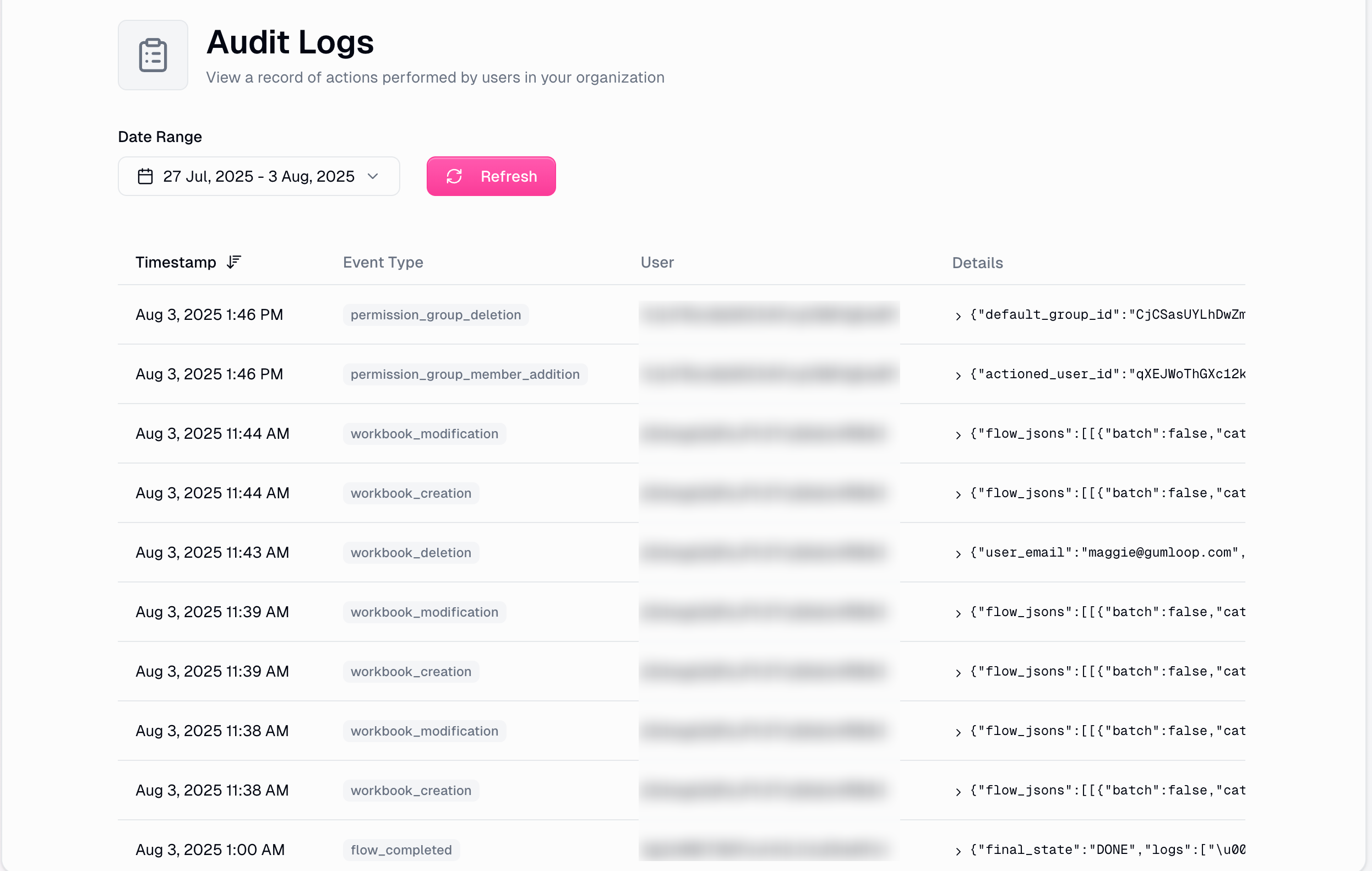
Audit Logging provides comprehensive tracking and monitoring of user actions across your Gumloop organization. This feature enables administrators to maintain security, compliance, and operational oversight by recording detailed logs of all significant activities within the platform.
## Overview
Audit logging automatically captures and stores detailed records of user activities, system events, and administrative actions within your organization.
Track unauthorized access attempts and suspicious activities
Meet regulatory standards for data access and modification tracking
Monitor workflow executions and system usage patterns
Investigate issues by reviewing historical activity patterns
Access audit logs at: [gumloop.com/settings/organization/audit-logging](https://gumloop.com/settings/organization/audit-logging)
### Filtering by Event Type
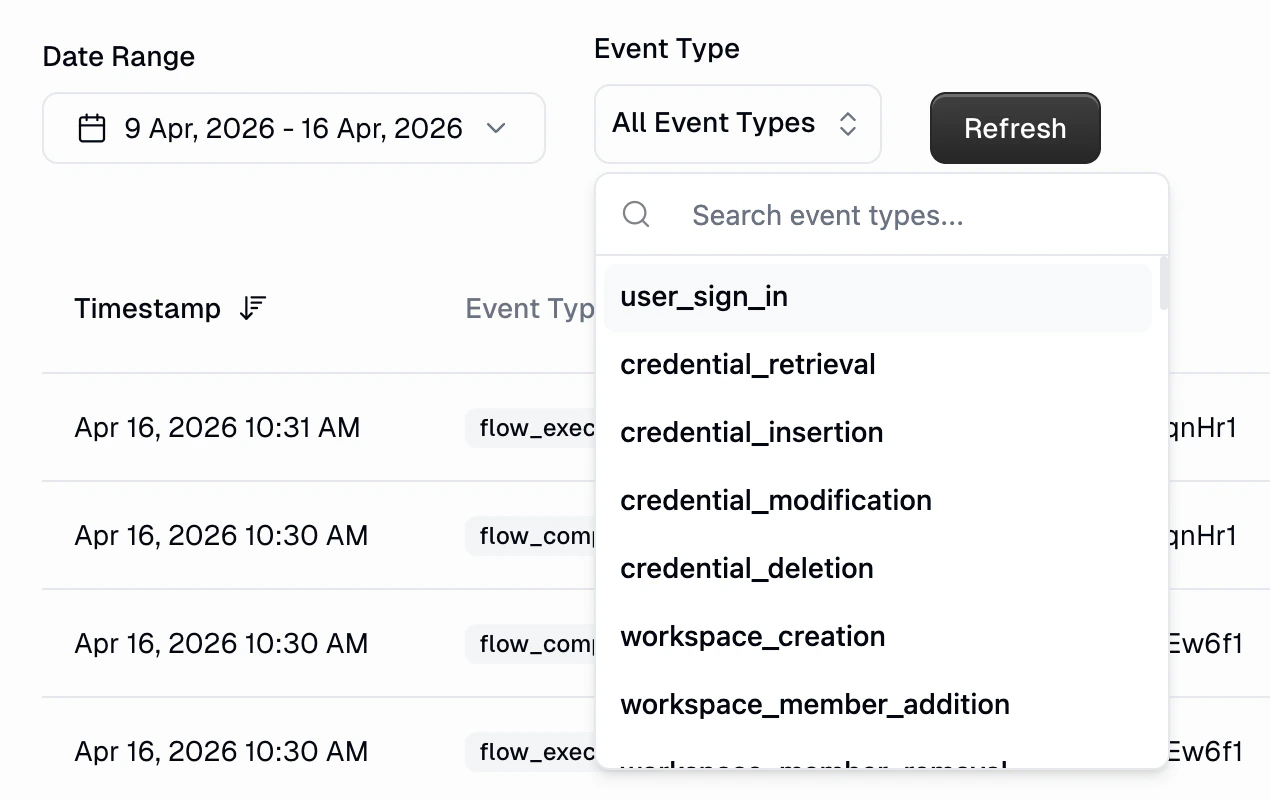
You can filter audit logs by event type to quickly find specific activities. Use the **Event Type** dropdown to select from available event types, or search for a specific type.
 ## Tracked Events
The audit logging system captures a comprehensive range of activities across the platform including:
* **User Sign-ins**: Records when users authenticate to the platform
* **Session Management**: Tracks session creation and termination
* **Credential Creation**: New API keys, OAuth connections, and service integrations
* **Credential Modification**: Updates to existing authentication credentials
* **Credential Deletion**: Removal of credentials from the system
* **Credential Retrieval**: Access to stored credentials for workflow execution
* **Team Creation**: New team setup and configuration
* **Member Management**: Adding or removing users from teams
* **Team Deletion**: Permanent removal of teams
* **Team Renaming**: Changes to team names and metadata
* **Member Addition/Removal**: Changes to organization membership
* **Domain Configuration**: Updates to organization domain settings
* **Metadata Updates**: Changes to organization settings and configuration
* **Role Creation**: New [custom roles](/enterprise-features/user_groups) and access controls
* **Member Changes**: Adding or removing users from a custom role
* **Role Deletion**: Removal of custom roles
* **Workflow Execution**: Workflow runs and automation triggers
* **Workflow Termination**: Manual or automatic stopping of workflows
* **Workflow Completion**: Successful workflow completions
* **Run Retrieval**: Access to workflow execution results and logs
* **File Uploads**: Documents and data uploaded to the platform
* **File Downloads**: Access to stored files and documents
* **File Deletion**: Removal of files from the system
All changes to agent triggers and skills are logged, including the user who made the change, the affected agent, and the workspace context.
**Trigger events:**
* **Trigger Creation**: A new trigger added to an agent, including trigger type and name
* **Trigger Update**: Changes to an existing trigger's configuration
* **Trigger Activation**: A previously disabled trigger re-enabled
* **Trigger Deactivation**: An active trigger disabled
* **Trigger Deletion**: A trigger removed from an agent
**Skill events:**
* **Skill Attach**: A skill linked to an agent
* **Skill Detach**: A skill removed from an agent
Each log entry includes the `agent_id`, `agent_name`, `trigger_id` or `skill_id`, the operation performed, and the `workspace_id` when the agent belongs to a team workspace.
## Audit Log Data Structure
Each audit log entry contains comprehensive metadata and contextual information to provide complete visibility into platform activities.
### Example: Workbook Creation Log
```json theme={"dark"}
{
"flow_jsons": [
[
{
"batch": false,
"category": "Using AI",
"dynamic_inputs": [],
"dynamic_outputs": [],
"id": "eEovMC652wM7Mvzo31G4xM",
"input_errors": {},
"inputs": {},
"is_collapsed": false,
"operator": "Ask AI",
"parameter_errors": {
"Azure Cognitive Services Account": "",
"Azure Deployment": "",
"Azure Resource Group": "",
"Azure Subscription": "",
"Cache Response": "",
"Connect MCP Server?": "",
"MCP Servers": "",
"Maximum Tokens": "",
"Reasoning Effort": "",
"Temperature": "",
"Thinking Tokens": "",
"Use Function?": "",
"azure_cognitive_services_map": "",
"azure_deployment_map": "",
"azure_resource_groups_map": "",
"azure_subscription_map": "",
"model_preference": "",
"prompt": "",
"servers_setup_map": ""
},
"parameter_input_errors": {},
"parameter_inputs": {},
"parameters": {
"Azure Cognitive Services Account": null,
"Azure Deployment": null,
"Azure Resource Group": null,
"Azure Subscription": null,
"Cache Response": null,
"Connect MCP Server?": null,
"MCP Servers": null,
"Maximum Tokens": null,
"Reasoning Effort": null,
"Temperature": null,
"Thinking Tokens": null,
"Use Function?": null,
"azure_cognitive_services_map": null,
"azure_deployment_map": null,
"azure_resource_groups_map": null,
"azure_subscription_map": null,
"model_preference": null,
"prompt": null,
"servers_setup_map": null
},
"position": {
"x": 945.508855591821,
"y": 137.38119073725161
},
"version": "v0_11"
}
]
],
"pl_config_info": [
{
"pl_config_hash": "{ID}"
}
],
"saved_items_info": [
{
"saved_item_id": "{ID}",
"saved_item_ref": "{ID}"
}
],
"user_email": "admin@gumloop.com",
"workbook_id": "{ID}",
"workbook_name": "New Workbook",
"workspace_id": null
}
```
### Log Entry Components
* Event ID (unique identifier)
* Timestamp (ISO format)
* Event Type (action categorization)
* User ID (who performed the action)
* Source IP Address
* Session Information
* Authentication context
* Action-specific JSON data
* Resource identifiers
* Configuration parameters
* Team IDs
* Workflow IDs
* Affected entities
## API Access
Access audit logs programmatically using the REST API for integration with external monitoring, SIEM systems, or custom reporting tools.
### Quick Reference
```
GET /api/v1/get_audit_logs
```
* `organization_id` (string): Organization ID
* `user_id` (string): Your user ID (admin required)
* `start_time` (datetime): Start timestamp (ISO format)
* `end_time` (datetime): End timestamp (ISO format)
* `event_type` (string): Filter logs by a specific event type (e.g., `"user_sign_in"`, `"credential_retrieval"`, `"flow_execution"`)
* `page` (integer): Page number (default: 1)
* `page_size` (integer): Records per page (default: 50)
Include your API key in the Authorization header
### Example Request
```bash theme={"dark"}
curl --request GET \
--url 'https://api.gumloop.com/api/v1/get_audit_logs?page=1&page_size=50&start_time=2025-01-01T00%3A00%3A00&end_time=2025-01-02T00%3A00%3A00&user_id=user_abc123&organization_id=org_xyz789' \
--header 'Authorization: Bearer your_api_key_here'
```
For complete API documentation and advanced usage, see: [Gumloop API Reference](https://docs.gumloop.com/api-reference/organization/get-audit-logs)
## Data Privacy and Security
* **Encryption**: All audit logs are encrypted at rest and in transit using industry-standard protocols
* **Access Control**: Logs are accessible only to organization administrators with proper authentication
* **Data Isolation**: Organization audit logs are completely isolated from other organizations through strict multi-tenancy controls
* **Data Retention**: Audit logs are retained according to Enterprise agreement terms
* **Compliance Standards**: Meets SOC2 Type II and GDPR requirements for audit trail management
* **Data Export**: Full export capabilities for compliance audits and backup purposes
Only users with the **Admin** [organization role](/core-concepts/organization_user_roles#admin) can access audit logs. Security, Manager, and other feature roles do not grant audit log access. Ensure appropriate role assignments to maintain security controls.
## Related Resources
Configure granular permissions and access controls
Export comprehensive platform usage data
Understand organizational structure
View our security certifications
## Tracked Events
The audit logging system captures a comprehensive range of activities across the platform including:
* **User Sign-ins**: Records when users authenticate to the platform
* **Session Management**: Tracks session creation and termination
* **Credential Creation**: New API keys, OAuth connections, and service integrations
* **Credential Modification**: Updates to existing authentication credentials
* **Credential Deletion**: Removal of credentials from the system
* **Credential Retrieval**: Access to stored credentials for workflow execution
* **Team Creation**: New team setup and configuration
* **Member Management**: Adding or removing users from teams
* **Team Deletion**: Permanent removal of teams
* **Team Renaming**: Changes to team names and metadata
* **Member Addition/Removal**: Changes to organization membership
* **Domain Configuration**: Updates to organization domain settings
* **Metadata Updates**: Changes to organization settings and configuration
* **Role Creation**: New [custom roles](/enterprise-features/user_groups) and access controls
* **Member Changes**: Adding or removing users from a custom role
* **Role Deletion**: Removal of custom roles
* **Workflow Execution**: Workflow runs and automation triggers
* **Workflow Termination**: Manual or automatic stopping of workflows
* **Workflow Completion**: Successful workflow completions
* **Run Retrieval**: Access to workflow execution results and logs
* **File Uploads**: Documents and data uploaded to the platform
* **File Downloads**: Access to stored files and documents
* **File Deletion**: Removal of files from the system
All changes to agent triggers and skills are logged, including the user who made the change, the affected agent, and the workspace context.
**Trigger events:**
* **Trigger Creation**: A new trigger added to an agent, including trigger type and name
* **Trigger Update**: Changes to an existing trigger's configuration
* **Trigger Activation**: A previously disabled trigger re-enabled
* **Trigger Deactivation**: An active trigger disabled
* **Trigger Deletion**: A trigger removed from an agent
**Skill events:**
* **Skill Attach**: A skill linked to an agent
* **Skill Detach**: A skill removed from an agent
Each log entry includes the `agent_id`, `agent_name`, `trigger_id` or `skill_id`, the operation performed, and the `workspace_id` when the agent belongs to a team workspace.
## Audit Log Data Structure
Each audit log entry contains comprehensive metadata and contextual information to provide complete visibility into platform activities.
### Example: Workbook Creation Log
```json theme={"dark"}
{
"flow_jsons": [
[
{
"batch": false,
"category": "Using AI",
"dynamic_inputs": [],
"dynamic_outputs": [],
"id": "eEovMC652wM7Mvzo31G4xM",
"input_errors": {},
"inputs": {},
"is_collapsed": false,
"operator": "Ask AI",
"parameter_errors": {
"Azure Cognitive Services Account": "",
"Azure Deployment": "",
"Azure Resource Group": "",
"Azure Subscription": "",
"Cache Response": "",
"Connect MCP Server?": "",
"MCP Servers": "",
"Maximum Tokens": "",
"Reasoning Effort": "",
"Temperature": "",
"Thinking Tokens": "",
"Use Function?": "",
"azure_cognitive_services_map": "",
"azure_deployment_map": "",
"azure_resource_groups_map": "",
"azure_subscription_map": "",
"model_preference": "",
"prompt": "",
"servers_setup_map": ""
},
"parameter_input_errors": {},
"parameter_inputs": {},
"parameters": {
"Azure Cognitive Services Account": null,
"Azure Deployment": null,
"Azure Resource Group": null,
"Azure Subscription": null,
"Cache Response": null,
"Connect MCP Server?": null,
"MCP Servers": null,
"Maximum Tokens": null,
"Reasoning Effort": null,
"Temperature": null,
"Thinking Tokens": null,
"Use Function?": null,
"azure_cognitive_services_map": null,
"azure_deployment_map": null,
"azure_resource_groups_map": null,
"azure_subscription_map": null,
"model_preference": null,
"prompt": null,
"servers_setup_map": null
},
"position": {
"x": 945.508855591821,
"y": 137.38119073725161
},
"version": "v0_11"
}
]
],
"pl_config_info": [
{
"pl_config_hash": "{ID}"
}
],
"saved_items_info": [
{
"saved_item_id": "{ID}",
"saved_item_ref": "{ID}"
}
],
"user_email": "admin@gumloop.com",
"workbook_id": "{ID}",
"workbook_name": "New Workbook",
"workspace_id": null
}
```
### Log Entry Components
* Event ID (unique identifier)
* Timestamp (ISO format)
* Event Type (action categorization)
* User ID (who performed the action)
* Source IP Address
* Session Information
* Authentication context
* Action-specific JSON data
* Resource identifiers
* Configuration parameters
* Team IDs
* Workflow IDs
* Affected entities
## API Access
Access audit logs programmatically using the REST API for integration with external monitoring, SIEM systems, or custom reporting tools.
### Quick Reference
```
GET /api/v1/get_audit_logs
```
* `organization_id` (string): Organization ID
* `user_id` (string): Your user ID (admin required)
* `start_time` (datetime): Start timestamp (ISO format)
* `end_time` (datetime): End timestamp (ISO format)
* `event_type` (string): Filter logs by a specific event type (e.g., `"user_sign_in"`, `"credential_retrieval"`, `"flow_execution"`)
* `page` (integer): Page number (default: 1)
* `page_size` (integer): Records per page (default: 50)
Include your API key in the Authorization header
### Example Request
```bash theme={"dark"}
curl --request GET \
--url 'https://api.gumloop.com/api/v1/get_audit_logs?page=1&page_size=50&start_time=2025-01-01T00%3A00%3A00&end_time=2025-01-02T00%3A00%3A00&user_id=user_abc123&organization_id=org_xyz789' \
--header 'Authorization: Bearer your_api_key_here'
```
For complete API documentation and advanced usage, see: [Gumloop API Reference](https://docs.gumloop.com/api-reference/organization/get-audit-logs)
## Data Privacy and Security
* **Encryption**: All audit logs are encrypted at rest and in transit using industry-standard protocols
* **Access Control**: Logs are accessible only to organization administrators with proper authentication
* **Data Isolation**: Organization audit logs are completely isolated from other organizations through strict multi-tenancy controls
* **Data Retention**: Audit logs are retained according to Enterprise agreement terms
* **Compliance Standards**: Meets SOC2 Type II and GDPR requirements for audit trail management
* **Data Export**: Full export capabilities for compliance audits and backup purposes
Only users with the **Admin** [organization role](/core-concepts/organization_user_roles#admin) can access audit logs. Security, Manager, and other feature roles do not grant audit log access. Ensure appropriate role assignments to maintain security controls.
## Related Resources
Configure granular permissions and access controls
Export comprehensive platform usage data
Understand organizational structure
View our security certifications