> ## Documentation Index
> Fetch the complete documentation index at: https://docs.gumloop.com/llms.txt
> Use this file to discover all available pages before exploring further.
# User Roles
> Composable organization and team roles that determine what each member can do in Gumloop.
Organization roles are available on the **Pro plan and above**. Some feature roles and capabilities require the **Enterprise plan**.
Gumloop's roles are **additive**. A member can hold **multiple roles per scope** (organization or team), and their effective permissions are the **union** of every role they hold. Every member implicitly holds the baseline **Member** role; layer additional roles on top to grant access to specific areas.
For granular, feature-by-feature restrictions (app allowlists, node denylists, concurrency limits), see [Custom Roles](/enterprise-features/user_groups). That is a separate, complementary system that restricts what organization roles grant. A user can hold multiple custom roles at the same time.
## How it works
A user with `{Member, Analytics}` can do everything Member and Analytics allow. Revoking one role does not remove permissions granted by another.
Every org member automatically holds **Member**. It is not shown in the Manage Roles picker and cannot be removed without removing the user from the org.
Organization roles apply across the org. Team roles apply inside a single team. A user can be a Team Admin on one team and a Team Member on another.
**Admin roles** (Admin, Manager) grant broad authority. **Feature roles** (Security, Developer, Analytics) grant scoped access to one area.
## Organization Roles
Full control: billing, SSO, members, and every feature area.
Member operations, credentials, and analytics. No billing or security.
Implicit baseline. Use agents, skills, flowbooks, and personal credentials.
Custom roles, app policies, AI model access, and [App Activity](/enterprise-features/app_activity).
[Hosted MCPs](/enterprise-features/hosted_mcps) and [Proxied MCPs](/enterprise-features/proxied_mcps). Requires Enterprise.
Organization analytics, usage, and data export.
***
### Admin
**Role ID:** `admin` · **Group:** Admin · **Scope:** Organization
* Billing, subscription, and credit limits
* SSO, SAML, and SCIM
* All member operations
* Organization credentials
* Team access and team settings
* Audit logs
* AI model access, app policies, custom roles
* Analytics, usage, and data export
* [App Activity](/enterprise-features/app_activity), [Hosted MCPs](/enterprise-features/hosted_mcps), and [Proxied MCPs](/enterprise-features/proxied_mcps) (when enabled)
Admin, Manager, Security, Developer, Analytics.
**Cannot do:** Nothing. Admin has full authority, so treat it as a break-glass role.
**When to assign:** Organization owners, finance leads, and IT admins. Keep the count small since Admin includes billing and SSO.
***
### Manager
**Role ID:** `manager` · **Group:** Admin · **Scope:** Organization
* Invite, remove, and manage members
* Organization credentials
* Analytics, usage, and data export
Analytics, Member.
**Cannot do:** Change billing, SSO, AI model access, app policies, custom roles, or audit logs. Cannot grant Admin, Manager, Security, or Developer.
**When to assign:** Team leads and ops managers who handle day-to-day onboarding and need usage visibility without billing or security authority.
***
### Member
**Role ID:** `member` · **Group:** Feature · **Scope:** Organization and Team · **Baseline:** Yes
* Create and use agents, skills, flowbooks, and custom operators
* Read organization metadata
* Create teams
* Manage personal credentials
* Leave the organization or a team
Nothing.
**Cannot do:** Any management action: billing, members, credentials, analytics, or security controls.
**When to assign:** Automatic. Every organization member holds Member implicitly. It cannot be removed without removing the user from the organization.
***
### Security
**Role ID:** `security` · **Group:** Feature · **Scope:** Organization · **Plan:** Enterprise
* [Custom Roles](/enterprise-features/user_groups)
* [App Policies](/enterprise-features/app-policies/overview)
* [AI Model Access Controls](/enterprise-features/ai_model_control)
* [App Activity](/enterprise-features/app_activity), [Hosted MCPs](/enterprise-features/hosted_mcps), and [Proxied MCPs](/enterprise-features/proxied_mcps) (on enabled orgs)
Developer.
**Cannot do:** Billing, SSO, member management, or audit logs. Cannot grant Admin, Manager, or Security.
**When to assign:** Security engineers, platform leads, and compliance owners who configure guardrails without taking on billing or SSO.
***
### Developer
**Role ID:** `developer` · **Group:** Feature · **Scope:** Organization · **Requires:** Enterprise
* [Hosted MCPs](/enterprise-features/hosted_mcps) and [Proxied MCPs](/enterprise-features/proxied_mcps)
* [App Activity](/enterprise-features/app_activity) for their own servers and tools
* Standard content (agents, skills, flowbooks, custom operators) via Member
Nothing.
**Cannot do:** Any organization management action. Cannot view audit logs or organization-wide [App Activity](/enterprise-features/app_activity).
**When to assign:** Builders and integration engineers who need to develop and test [Hosted MCPs](/enterprise-features/hosted_mcps) and [Proxied MCPs](/enterprise-features/proxied_mcps). Granted by Admin or Security.
Developer is hidden in the Manage Roles UI if Hosted MCPs and Proxied MCPs are not enabled on the organization.
***
### Analytics
**Role ID:** `analytics` · **Group:** Feature · **Scope:** Organization · **Plan:** Enterprise
* Organization analytics dashboard
* Usage limits and credit consumption
* Data export
Nothing.
**Cannot do:** Member management, credentials, security controls, or billing.
**When to assign:** Finance, FP\&A, and data analysts who need usage visibility without member management authority. Granted by Admin or Manager.
## Team Roles
Teams use a simpler two-role system.
### Team Admin
**Role ID:** `admin` (team scope) · **Scope:** Team
* All team content (agents, flowbooks, skills, custom operators)
* Team credentials
* Team analytics
* Team membership
Team Admin, Team Member.
**Cannot do:** Anything outside the team. Team roles do not grant organization-level authority.
**When to assign:** People who own a team's content end-to-end, including onboarding teammates and managing credentials.
### Team Member
**Role ID:** `member` (team scope) · **Scope:** Team · **Baseline:** Yes
Read access to team content.
Nothing.
**Cannot do:** Manage team membership, credentials, or team roles.
**When to assign:** Automatic. Every team member holds Team Member implicitly.
**Organization ceiling:** org **Admins** hold `organization:manage_team_access`, which lets them manage team memberships and team roles on every team in the organization, regardless of their team-level role. This is how org admins unblock access issues.
## Managing Roles
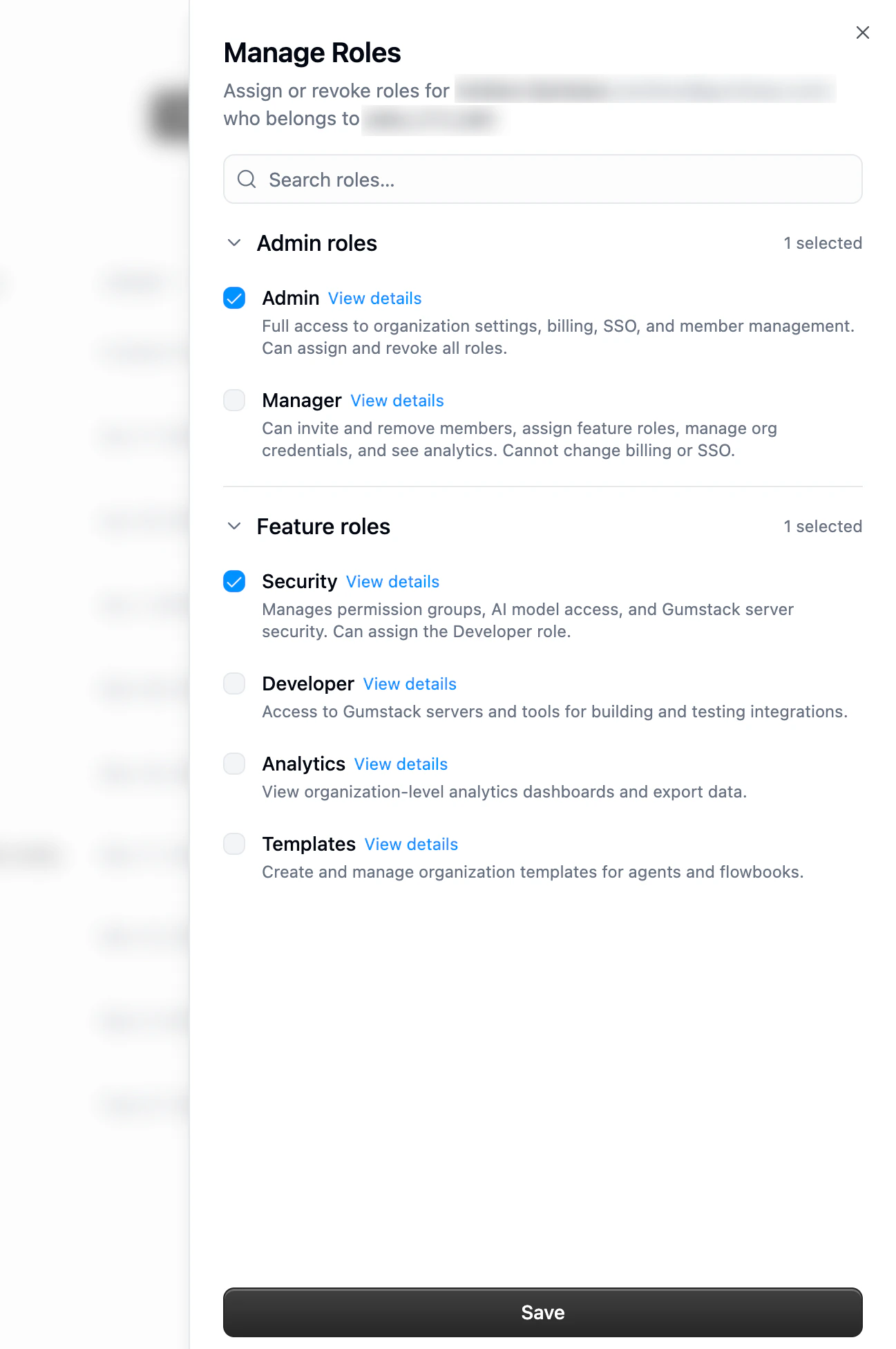
Roles are assigned and revoked individually from the **Manage Roles** sheet. You pick the exact combination of roles the user should hold. This is not a promote or demote action.
 Go to [Organization Members](https://www.gumloop.com/settings/organization/members) or a team's **Members** tab.
Click the three-dot menu next to the member and choose **Manage Roles**. The sheet opens with every role the member currently holds pre-selected.
Check or uncheck any available role and click **Save**. Roles you are not authorized to assign are hidden. Effective permissions update immediately.
### Adding a new member with roles
Pre-assign organization roles when you invite someone so they land with the right permissions as soon as they accept.
Go to [Organization Members](https://www.gumloop.com/settings/organization/members) or a team's **Members** tab.
Click the three-dot menu next to the member and choose **Manage Roles**. The sheet opens with every role the member currently holds pre-selected.
Check or uncheck any available role and click **Save**. Roles you are not authorized to assign are hidden. Effective permissions update immediately.
### Adding a new member with roles
Pre-assign organization roles when you invite someone so they land with the right permissions as soon as they accept.
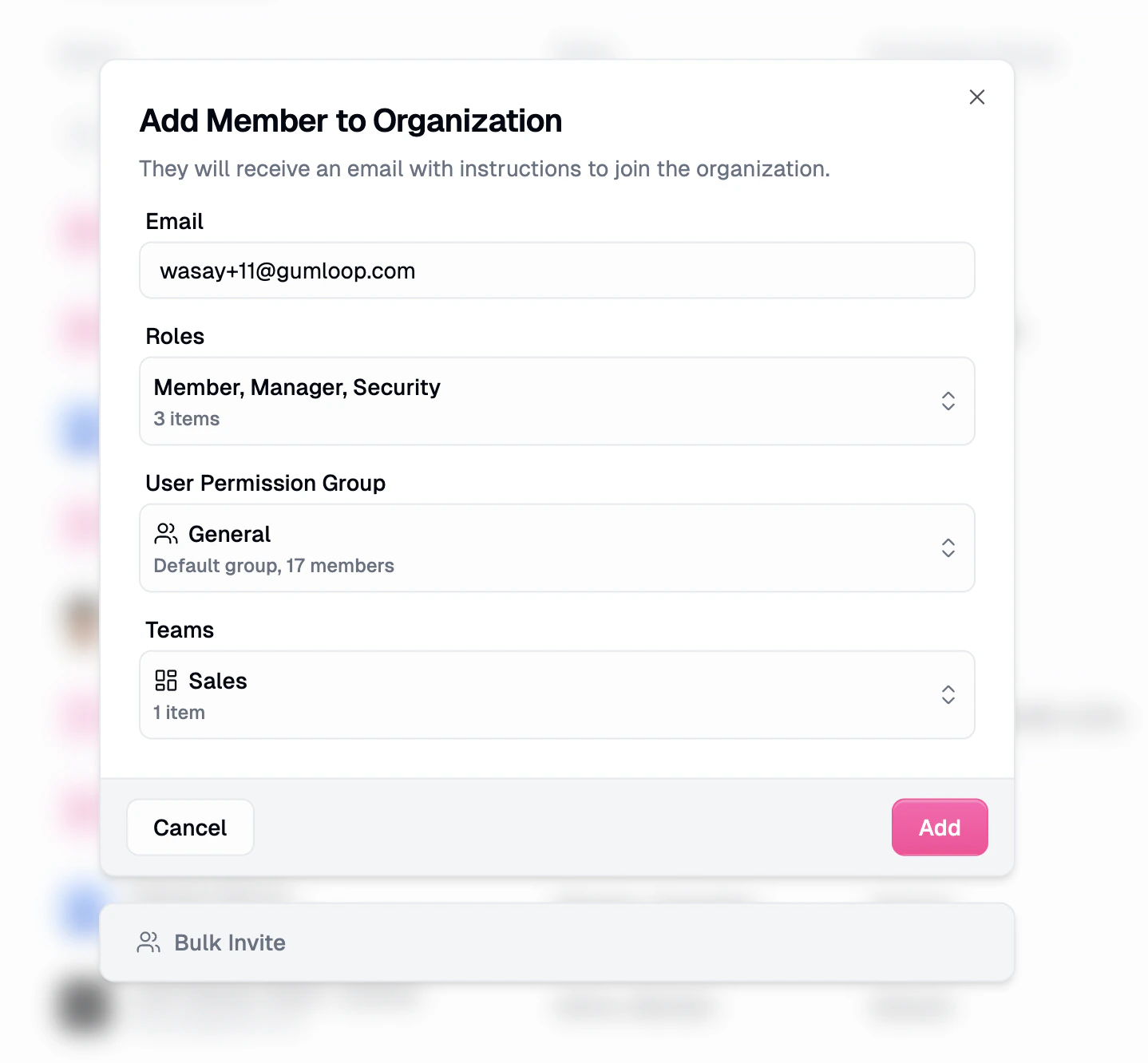 * **Roles** is a multi-select. Every invitee gets **Member** implicitly; pick any additional roles your own role lets you assign.
* **Custom Roles** picks one or more [Custom Roles](/enterprise-features/user_groups) that apply subtractive restrictions on top of the organization roles. New invitees automatically join the default custom role; you can layer additional custom roles on top.
* **Teams** adds the invitee to one or more [teams](/core-concepts/teams).
### Best practices
Every user starts as Member automatically. Add the narrowest additional roles that match their responsibilities. You can always add more later.
If someone only needs analytics visibility, grant **Analytics**, not Manager. Keep the high-authority list short.
Custom roles, app policies, and AI model access no longer require Admin. Grant **Security** so platform and security teams can own guardrails without billing or SSO.
Additive roles make it easy to accumulate extras. Run a quarterly review and remove roles that are no longer needed.
## How permissions resolve
When someone takes an action, Gumloop checks three things. The action goes through only if all three agree.
The union of everything your organization and team roles grant at the relevant scope. This is the ceiling on what you can do.
For a specific agent, flowbook, or skill, the owner can grant you **Editor**, **Viewer**, or **Use only**. Sharing overrides the default per item.
Your [Custom Roles](/enterprise-features/user_groups) can subtract from what roles and sharing allow. For example, they can block certain apps or nodes. A user can hold multiple custom roles, and the effective restriction is composed across all of them.
In short: organization and team roles set the ceiling, sharing adjusts access per item, and custom roles can subtract on top.
## Role Comparison
Users with multiple roles get the **union** of the "Yes" columns.
| Capability | Admin | Manager | Security | Developer | Analytics | Member |
| -------------------------------------------------- | ----- | ----------------- | --------- | --------- | --------- | ------ |
| Billing and subscription | Yes | No | No | No | No | No |
| SSO / SAML / SCIM | Yes | No | No | No | No | No |
| Add and remove members | Yes | Yes | No | No | No | No |
| Assign roles | All | Analytics, Member | Developer | No | No | No |
| Audit logs | Yes | No | No | No | No | No |
| AI model access controls | Yes | No | Yes | No | No | No |
| App policies | Yes | No | Yes | No | No | No |
| Custom roles | Yes | No | Yes | No | No | No |
| Organization credentials | Yes | Yes | No | No | No | No |
| Org analytics, usage, data export | Yes | Yes | No | No | Yes | No |
| Create agents, skills, flowbooks, custom operators | Yes | Yes | Yes | Yes | Yes | Yes |
| Create teams | Yes | Yes | Yes | Yes | Yes | Yes |
| App Activity & MCP management (Enterprise) | Yes | No | Yes | Yes | No | No |
Team Admin can assign Team Admin and Team Member inside the team. Team Member is implicit and has read access to team content.
## Related Resources
Additive restriction roles that subtract from what organization roles grant.
Allow or block specific apps for users.
Restrict which AI models users can call.
Track every administrative action.
Group users and content for shared access.
* **Roles** is a multi-select. Every invitee gets **Member** implicitly; pick any additional roles your own role lets you assign.
* **Custom Roles** picks one or more [Custom Roles](/enterprise-features/user_groups) that apply subtractive restrictions on top of the organization roles. New invitees automatically join the default custom role; you can layer additional custom roles on top.
* **Teams** adds the invitee to one or more [teams](/core-concepts/teams).
### Best practices
Every user starts as Member automatically. Add the narrowest additional roles that match their responsibilities. You can always add more later.
If someone only needs analytics visibility, grant **Analytics**, not Manager. Keep the high-authority list short.
Custom roles, app policies, and AI model access no longer require Admin. Grant **Security** so platform and security teams can own guardrails without billing or SSO.
Additive roles make it easy to accumulate extras. Run a quarterly review and remove roles that are no longer needed.
## How permissions resolve
When someone takes an action, Gumloop checks three things. The action goes through only if all three agree.
The union of everything your organization and team roles grant at the relevant scope. This is the ceiling on what you can do.
For a specific agent, flowbook, or skill, the owner can grant you **Editor**, **Viewer**, or **Use only**. Sharing overrides the default per item.
Your [Custom Roles](/enterprise-features/user_groups) can subtract from what roles and sharing allow. For example, they can block certain apps or nodes. A user can hold multiple custom roles, and the effective restriction is composed across all of them.
In short: organization and team roles set the ceiling, sharing adjusts access per item, and custom roles can subtract on top.
## Role Comparison
Users with multiple roles get the **union** of the "Yes" columns.
| Capability | Admin | Manager | Security | Developer | Analytics | Member |
| -------------------------------------------------- | ----- | ----------------- | --------- | --------- | --------- | ------ |
| Billing and subscription | Yes | No | No | No | No | No |
| SSO / SAML / SCIM | Yes | No | No | No | No | No |
| Add and remove members | Yes | Yes | No | No | No | No |
| Assign roles | All | Analytics, Member | Developer | No | No | No |
| Audit logs | Yes | No | No | No | No | No |
| AI model access controls | Yes | No | Yes | No | No | No |
| App policies | Yes | No | Yes | No | No | No |
| Custom roles | Yes | No | Yes | No | No | No |
| Organization credentials | Yes | Yes | No | No | No | No |
| Org analytics, usage, data export | Yes | Yes | No | No | Yes | No |
| Create agents, skills, flowbooks, custom operators | Yes | Yes | Yes | Yes | Yes | Yes |
| Create teams | Yes | Yes | Yes | Yes | Yes | Yes |
| App Activity & MCP management (Enterprise) | Yes | No | Yes | Yes | No | No |
Team Admin can assign Team Admin and Team Member inside the team. Team Member is implicit and has read access to team content.
## Related Resources
Additive restriction roles that subtract from what organization roles grant.
Allow or block specific apps for users.
Restrict which AI models users can call.
Track every administrative action.
Group users and content for shared access.