> ## Documentation Index
> Fetch the complete documentation index at: https://docs.gumloop.com/llms.txt
> Use this file to discover all available pages before exploring further.
# Credits
Credits are the currency that powers your agents on Gumloop. Every agent conversation spends credits based on the AI model it uses, the tools it calls, and how long it runs.
Agent credit costs are **variable**. The same agent might cost 2 credits for a quick question and 200 for a deep research task. The cost depends on what the agent actually does, not a fixed per-message price.
## What you pay for
Every agent conversation is billed in real time. The total is made up of three things:
| Component | What it covers |
| -------------------- | ----------------------------------------------------------------------------------------------------------------------------------------------- |
| **Chat & Reasoning** | The AI model reading your message, thinking, and writing a response. Priced on the tokens used. This is the biggest part of most conversations. |
| **Tool Calls** | Credits some integrations charge when the agent uses them, either per call or per result returned. |
| **Workflows** | If the agent runs a workflow, that workflow's full cost is added to the chat. See [Workflow credits](#workflow-credits) below. |
**Most tool calls are free.** Reading and writing to apps like [Slack](https://www.gumloop.com/mcp/slack), [Google Sheets](https://www.gumloop.com/mcp/gsheets), and [Gmail](https://www.gumloop.com/mcp/gmail) adds no tool credits. The tools that charge are usually ones that enrich or fetch external data, such as [Apollo](https://www.gumloop.com/mcp/apollo) lead enrichment or [Firecrawl](https://www.gumloop.com/mcp/firecrawl) web scraping. Each tool's [MCP catalog](https://www.gumloop.com/mcp) page notes whether it costs credits.
A few things drive the Chat & Reasoning cost:
* **The model you pick.** Faster, smaller models cost less per token than frontier models. See [AI Models](/core-concepts/ai_models).
* **Conversation length.** Every message carries the earlier conversation as context, so longer chats cost more per message.
* **How many tools are connected.** Each tool adds its definition to the prompt, which adds tokens.
One message can trigger several AI steps. When an agent uses tools, it loops: decide which tool to call, read the result, then respond. Each step is billed separately, which is why a chat that uses tools costs more than a simple question.
### Example: researching a lead
You ask an agent to research a sales lead with Apollo, then summarize whether they are a good fit. Here is how that one task maps to credits:
| What the agent does | Credit type |
| ---------------------------------------------------------------------------------- | --------------------------------------------- |
| Pulls the lead's data with [Apollo](https://www.gumloop.com/mcp/apollo) enrichment | **Tool Call** (Apollo charges for enrichment) |
| Reads that data and writes the summary | **Chat & Reasoning** (your model's tokens) |
Had the agent only read a [Google Sheet](https://www.gumloop.com/mcp/gsheets) and summarized it, there would be no tool cost at all, just Chat & Reasoning, since Google Sheets is free.
To lower this chat's cost, run the agent on a cheaper model or add your own API key (BYOK). Both reduce the Chat & Reasoning portion. The Apollo charge stays the same, since it is a third-party cost passed straight through.
## Where to see what a chat cost
The running credit cost of a conversation appears as a badge with a coins icon in the **chat header**, next to the agent's name. It updates live as the conversation goes.
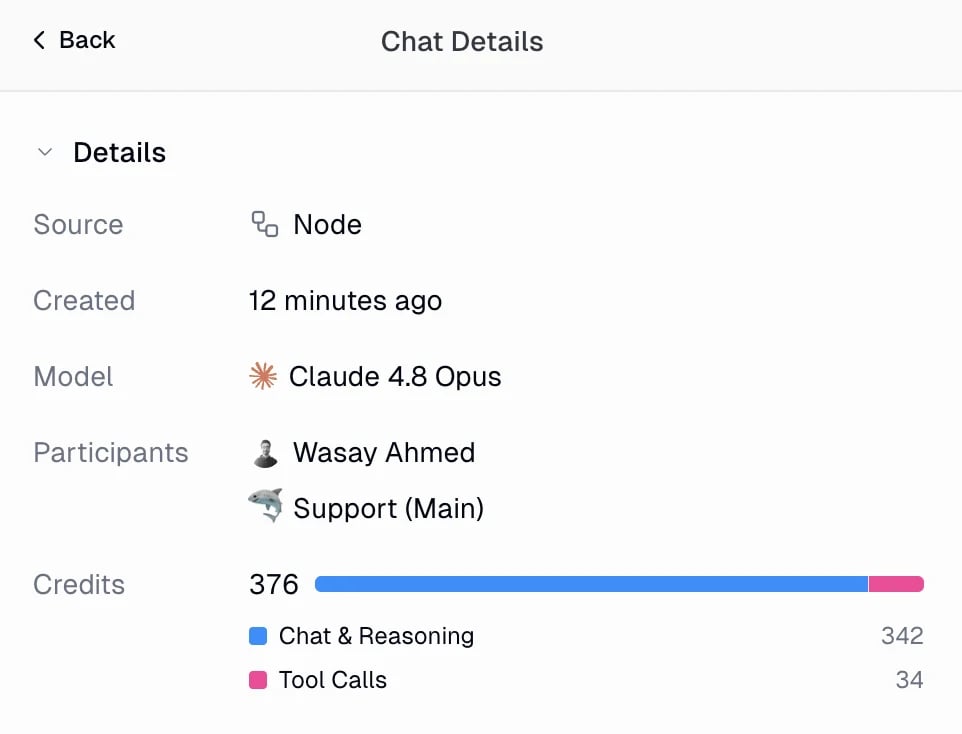
For the full breakdown, open the **Chat Details** panel from the chat header. It splits the cost into **Chat & Reasoning** and **Tool Calls** (plus **Workflows** when the agent ran one), alongside the model and source of the chat.
 ## Tracking usage over time
### Insights dashboard
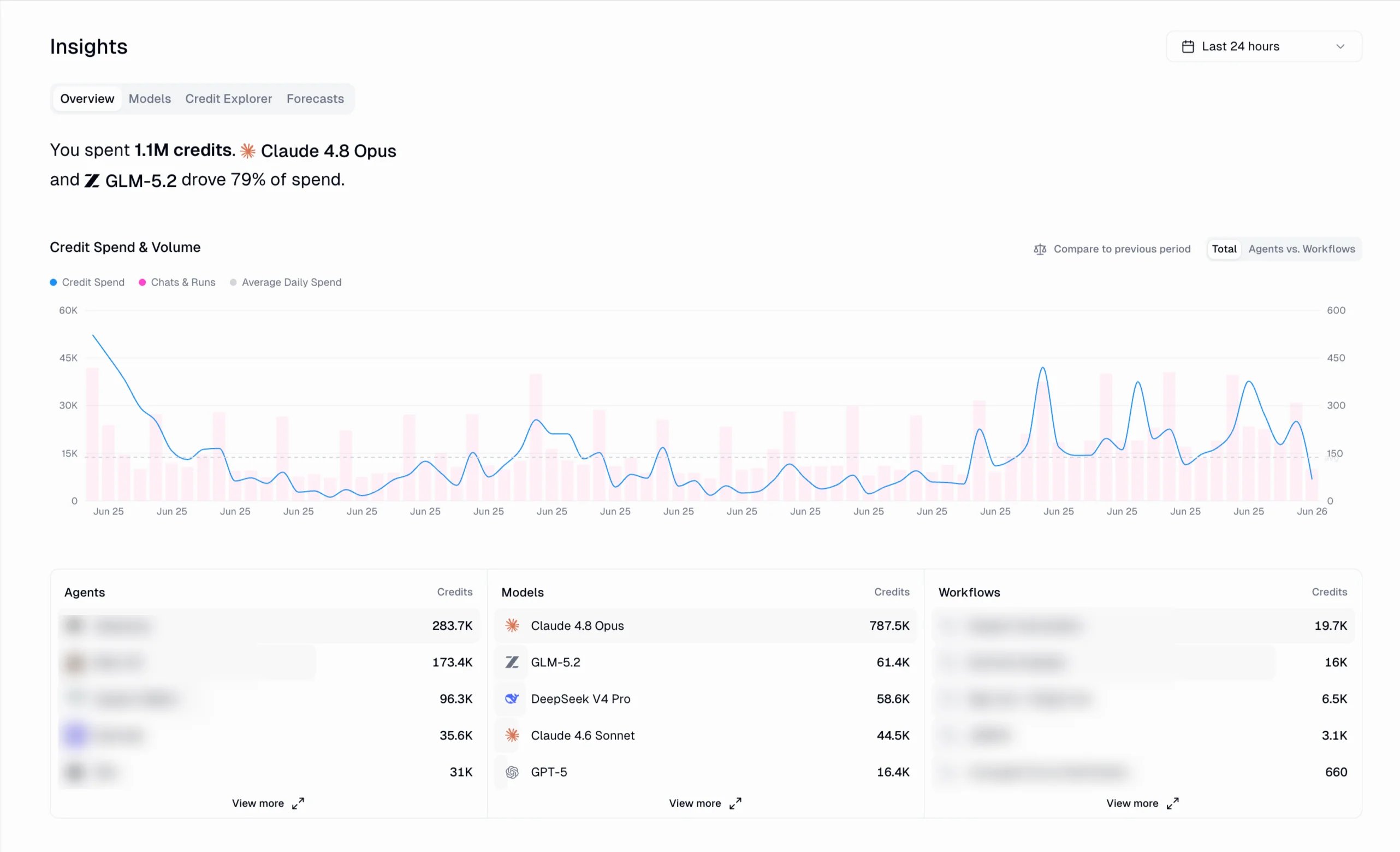
The [Insights dashboard](https://www.gumloop.com/settings/organization/insights) (Settings > Organization > Insights) is the best place to see credit spend across all your agents and workflows. It shows total credits spent for the selected period, a credit spend and volume chart, and leaderboards of your top agents, models, and workflows.
## Tracking usage over time
### Insights dashboard
The [Insights dashboard](https://www.gumloop.com/settings/organization/insights) (Settings > Organization > Insights) is the best place to see credit spend across all your agents and workflows. It shows total credits spent for the selected period, a credit spend and volume chart, and leaderboards of your top agents, models, and workflows.
 The Insights dashboard is an **Enterprise** feature.
The tabs let you dig deeper: **Models** breaks spend down by AI model, **Credit Explorer** lets you slice usage, and **Forecasts** projects where your spend is heading.
### Credit logs
For a transaction-level view, open [Settings > Profile > Usage & Limits](https://www.gumloop.com/settings/profile/usage-limits). The credit logs table lists every credit event in your account:
* **Grouped view** (default): one row per agent conversation or workflow run, showing its total. Expand a row to see the individual charges inside it (AI steps, tool calls, workflow costs).
* **Detailed view**: one row per individual charge, with the exact type and amount.
Filter by category to focus on **Agent Chats** or **Workflow Runs**. Many rows include a **View** link that jumps straight to the source conversation or run. Organization admins and managers can see usage across all users at [Settings > Organization > Usage & Limits](https://www.gumloop.com/settings/organization/limits), which adds a **User** column.
### Ask the analytics agent
You can also ask about credit usage in plain language. The [analytics agent](/enterprise-features/organization_analytics) answers questions like "how many credits did we spend in the last 30 days, broken down by user?" and returns tables, charts, or CSV exports. It is available on the Organization Analytics page and in Slack.
### Export
Export credit logs as CSV from [Settings > Organization > Data Export](https://www.gumloop.com/settings/organization/data_export) for external analysis or compliance.
## Reducing credit costs
* **Pick the right model.** Start with the **Recommended** preset in Agent Preferences. Use **Fastest** for simple, high-volume tasks, and only reach for **Smartest** when a task needs deep reasoning. See [AI Models](/core-concepts/ai_models).
* **Bring your own key (BYOK).** Use your own provider API key and AI model calls consume **50% fewer credits**, in both agents (the Chat & Reasoning portion) and workflow AI nodes (Pro plan or higher).
* **Start fresh conversations.** A new chat for a new topic avoids carrying old context that inflates token costs.
* **Connect only the tools you need.** Every tool definition adds tokens to the prompt.
When you bring your own provider API key, your **AI model calls consume 50% fewer credits**, since they run on your key instead of ours. In agents this applies to the **Chat & Reasoning** portion of every conversation, and in workflows it applies to **AI nodes**.
The reduction applies to AI model calls only. **Tool Call** credits and the fixed per-node costs of non-AI workflow nodes are separate and are not affected.
Requires Pro plan or higher and your own OpenAI, Anthropic, Google AI, Perplexity, or SpaceXAI account.
Add a key under **personal credentials** at [Connectors page](https://www.gumloop.com/personal/connectors), or add a **shared team key** for the whole team. Enterprise admins can set organization-level keys. See [AI Models](/core-concepts/ai_models#bring-your-own-key-byok) for details.
## Interactive artifact costs
When you open an [interactive artifact](/core-concepts/agent_artifacts#interactive-artifacts-live-data) that pulls live data, a Python script runs in a secure sandbox. This is billed at roughly **1 credit per 55 seconds** of runtime, with a minimum of 1 credit per run. The **viewer** pays, not the creator. Most scripts finish in seconds, so the typical cost is 1 credit per load.
## Credit Notification Preferences
Gumloop can email you when your organization's credit usage crosses key thresholds. Manage these on your [Subscription page](https://www.gumloop.com/settings/organization/subscription).
The Insights dashboard is an **Enterprise** feature.
The tabs let you dig deeper: **Models** breaks spend down by AI model, **Credit Explorer** lets you slice usage, and **Forecasts** projects where your spend is heading.
### Credit logs
For a transaction-level view, open [Settings > Profile > Usage & Limits](https://www.gumloop.com/settings/profile/usage-limits). The credit logs table lists every credit event in your account:
* **Grouped view** (default): one row per agent conversation or workflow run, showing its total. Expand a row to see the individual charges inside it (AI steps, tool calls, workflow costs).
* **Detailed view**: one row per individual charge, with the exact type and amount.
Filter by category to focus on **Agent Chats** or **Workflow Runs**. Many rows include a **View** link that jumps straight to the source conversation or run. Organization admins and managers can see usage across all users at [Settings > Organization > Usage & Limits](https://www.gumloop.com/settings/organization/limits), which adds a **User** column.
### Ask the analytics agent
You can also ask about credit usage in plain language. The [analytics agent](/enterprise-features/organization_analytics) answers questions like "how many credits did we spend in the last 30 days, broken down by user?" and returns tables, charts, or CSV exports. It is available on the Organization Analytics page and in Slack.
### Export
Export credit logs as CSV from [Settings > Organization > Data Export](https://www.gumloop.com/settings/organization/data_export) for external analysis or compliance.
## Reducing credit costs
* **Pick the right model.** Start with the **Recommended** preset in Agent Preferences. Use **Fastest** for simple, high-volume tasks, and only reach for **Smartest** when a task needs deep reasoning. See [AI Models](/core-concepts/ai_models).
* **Bring your own key (BYOK).** Use your own provider API key and AI model calls consume **50% fewer credits**, in both agents (the Chat & Reasoning portion) and workflow AI nodes (Pro plan or higher).
* **Start fresh conversations.** A new chat for a new topic avoids carrying old context that inflates token costs.
* **Connect only the tools you need.** Every tool definition adds tokens to the prompt.
When you bring your own provider API key, your **AI model calls consume 50% fewer credits**, since they run on your key instead of ours. In agents this applies to the **Chat & Reasoning** portion of every conversation, and in workflows it applies to **AI nodes**.
The reduction applies to AI model calls only. **Tool Call** credits and the fixed per-node costs of non-AI workflow nodes are separate and are not affected.
Requires Pro plan or higher and your own OpenAI, Anthropic, Google AI, Perplexity, or SpaceXAI account.
Add a key under **personal credentials** at [Connectors page](https://www.gumloop.com/personal/connectors), or add a **shared team key** for the whole team. Enterprise admins can set organization-level keys. See [AI Models](/core-concepts/ai_models#bring-your-own-key-byok) for details.
## Interactive artifact costs
When you open an [interactive artifact](/core-concepts/agent_artifacts#interactive-artifacts-live-data) that pulls live data, a Python script runs in a secure sandbox. This is billed at roughly **1 credit per 55 seconds** of runtime, with a minimum of 1 credit per run. The **viewer** pays, not the creator. Most scripts finish in seconds, so the typical cost is 1 credit per load.
## Credit Notification Preferences
Gumloop can email you when your organization's credit usage crosses key thresholds. Manage these on your [Subscription page](https://www.gumloop.com/settings/organization/subscription).
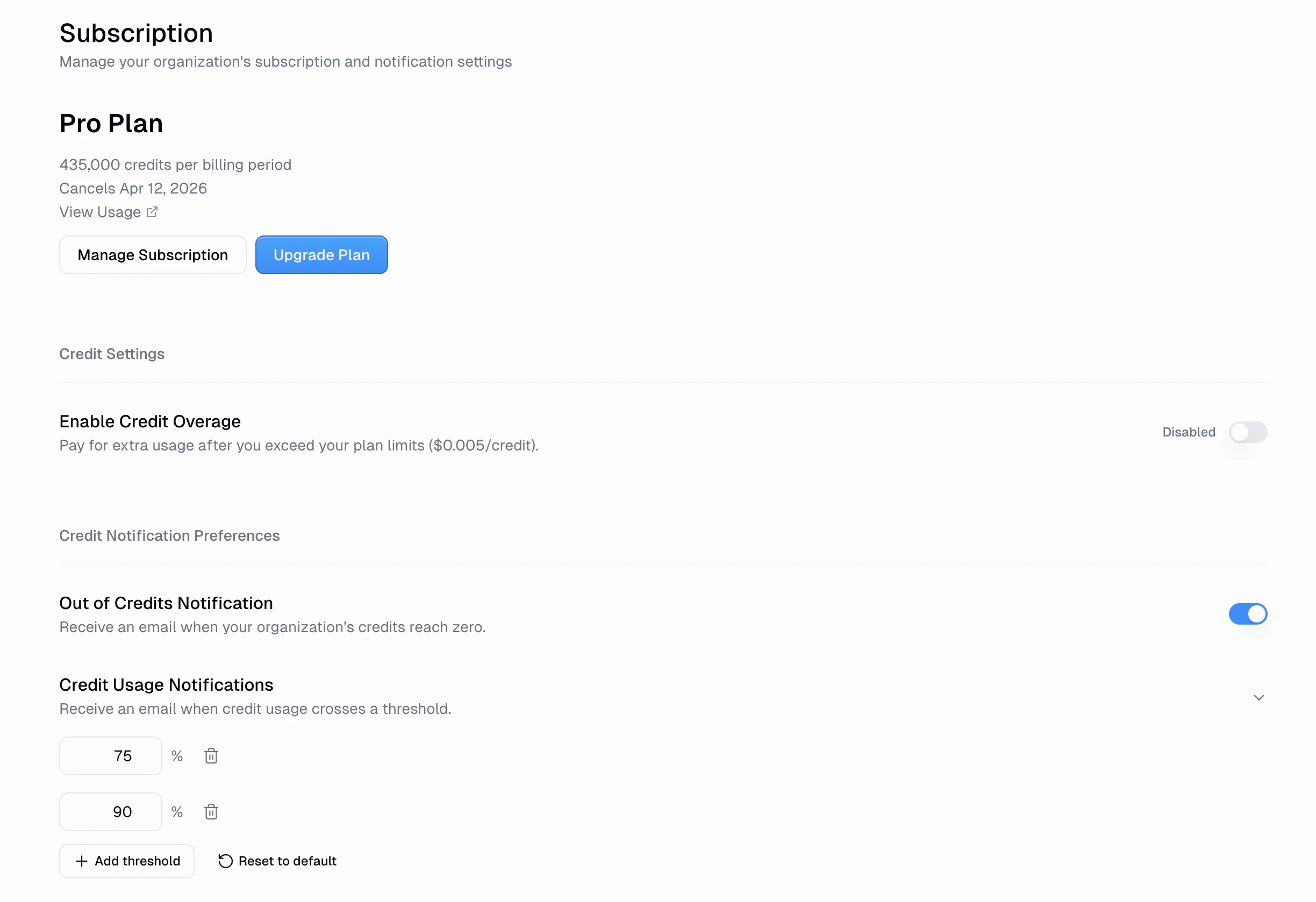 * **Out of Credits Notification**: an email when credits reach zero. On by default.
* **Credit Usage Notifications**: an email when usage crosses a threshold. Defaults to **75%** and **90%**. Add, remove, or reset thresholds as needed.
Set these up early so you have time to top up before running out.
### Per-Chat Credit Warnings
Admins and Security role holders can also set **per-chat credit warnings** through [Custom Roles](/enterprise-features/user_groups#per-chat-credit-warnings). When a single chat's credit spend crosses a configured threshold (e.g. 5,000 or 10,000 credits), the agent pauses and creates an [Action Request](/core-concepts/human_in_the_loop) for approval before continuing. This prevents any one conversation from consuming an unexpected amount of credits.
## Getting more credits
* Buy more credits anytime from the [pricing page](https://www.gumloop.com/pricing).
* Seeing consistent usage? Buy a credit bundle, upgrade to a higher tier on the [pricing page](https://www.gumloop.com/pricing), or enable [credit overage](https://www.gumloop.com/settings/organization/subscription).
**Credits don't roll over** month to month (except Enterprise plans).
***
## Workflow Credits
Most workflow nodes have **fixed, per-node costs** you can calculate before running. AI nodes are the exception: they are billed by **token usage**, the same way agents are.
### AI Nodes
AI nodes (such as Ask AI, Analyze Image, and Generate Report) are billed by **token usage**, the same way agents are, based on the model you pick and how many input and output tokens each call uses. There are no fixed per-call tiers, so a short prompt costs far less than a long-context one. With **BYOK**, AI node calls cost **50% fewer credits** (Pro plan or higher). See the full per-node breakdown below.
```text theme={"dark"}
Total Cost = 1 credit (base) + Node costs
```
Every workflow costs **1 credit** to execute, plus the cost of each node that runs.
Most native Gumloop nodes cost **nothing**:
* Text manipulation (Combine Text, Text Formatter, Find & Replace)
* Logic (If/Else, Switch, Router)
* Loops (For Each, Loop Mode)
* Data transformation (Filter, Join, Split)
* Most integrations (Google Sheets, Slack, Gmail, Airtable, Salesforce, etc.)
* Input/Output nodes
AI nodes (such as Ask AI, Analyze Image, and Generate Report) are billed by **token usage**, the same way agents are. The cost of a call depends on the model you pick and how many input and output tokens it uses, so a short prompt costs far less than a long-context one. There are no fixed per-call tiers.
* **Pick the right model.** Smaller, faster models cost less per token than frontier models. See [AI Models](/core-concepts/ai_models).
* **Keep inputs lean.** Fewer tokens in and out means a lower cost.
* **Bring your own key (BYOK).** Run AI node calls on your own provider key for **50% fewer credits** (Pro plan or higher).
**Image generation** is billed at a flat **30 credits per image** (15 with BYOK), regardless of size, quality, or model. **Audio transcription** is billed by audio length at a small per-minute rate that depends on the model (roughly 1 to 2 credits per minute), and BYOK halves it.
**Data Enrichment:**
* Enrich Contact Information: 60 credits
* Enrich Company Information: 60 credits
* Search Companies: 30 credits
* Email Validator: 10 credits
**Web Scraping:**
* Web Agent Scraper: 10 credits
* Website Crawler: 10 credits
* Advanced Web Search: 5 credits
* Advanced Website Scraper: 2 credits
* Web Search: 2 credits
* Website Scraper: 1 credit
**Custom & MCP Nodes:** 3 credits each
These nodes run in isolated virtual environments for security, which incurs infrastructure costs.
**Simple Workflow (1 credit total):** Read Google Sheet, filter rows, send Slack message. Only the 1 credit base cost, since all three nodes are free.
**AI-Powered Workflow:** Read emails (0), categorize with an AI node, update Airtable (0), plus the 1 credit base. The AI node is billed by the tokens it uses, so its cost depends on the model and how much text it processes.
**Custom Node Workflow:** Combine text (0), run an AI node (billed by tokens), plus a custom node (3) and the 1 credit base.
**Data Enrichment Workflow (121 credits total):** Read Airtable (0), enrich 2 contacts (60 each = 120), update Salesforce (0), plus the 1 credit base.
Enrichment nodes get expensive in loops. Enriching 100 contacts costs 6,001 credits (1 + 60x100).
Hover over any node's '?' icon to see its credit cost.
**Failed workflows:** if a workflow stops partway, you're only charged for the nodes that ran before the failure.
**Loop mode:** nodes in loop mode run once per item. Multiply the node cost by the number of items (e.g. a 60 credit Enrich Contact node over 10 contacts = 600 credits).
***
## Learn more
* [AI Models](/core-concepts/ai_models): choose the right model and set up BYOK
* [Pricing plans](https://www.gumloop.com/pricing): subscription tiers and credit bundles
* [Why we moved to credits](https://blog.gumloop.com/gumloop-credits/): the reasoning behind the model
* **Out of Credits Notification**: an email when credits reach zero. On by default.
* **Credit Usage Notifications**: an email when usage crosses a threshold. Defaults to **75%** and **90%**. Add, remove, or reset thresholds as needed.
Set these up early so you have time to top up before running out.
### Per-Chat Credit Warnings
Admins and Security role holders can also set **per-chat credit warnings** through [Custom Roles](/enterprise-features/user_groups#per-chat-credit-warnings). When a single chat's credit spend crosses a configured threshold (e.g. 5,000 or 10,000 credits), the agent pauses and creates an [Action Request](/core-concepts/human_in_the_loop) for approval before continuing. This prevents any one conversation from consuming an unexpected amount of credits.
## Getting more credits
* Buy more credits anytime from the [pricing page](https://www.gumloop.com/pricing).
* Seeing consistent usage? Buy a credit bundle, upgrade to a higher tier on the [pricing page](https://www.gumloop.com/pricing), or enable [credit overage](https://www.gumloop.com/settings/organization/subscription).
**Credits don't roll over** month to month (except Enterprise plans).
***
## Workflow Credits
Most workflow nodes have **fixed, per-node costs** you can calculate before running. AI nodes are the exception: they are billed by **token usage**, the same way agents are.
### AI Nodes
AI nodes (such as Ask AI, Analyze Image, and Generate Report) are billed by **token usage**, the same way agents are, based on the model you pick and how many input and output tokens each call uses. There are no fixed per-call tiers, so a short prompt costs far less than a long-context one. With **BYOK**, AI node calls cost **50% fewer credits** (Pro plan or higher). See the full per-node breakdown below.
```text theme={"dark"}
Total Cost = 1 credit (base) + Node costs
```
Every workflow costs **1 credit** to execute, plus the cost of each node that runs.
Most native Gumloop nodes cost **nothing**:
* Text manipulation (Combine Text, Text Formatter, Find & Replace)
* Logic (If/Else, Switch, Router)
* Loops (For Each, Loop Mode)
* Data transformation (Filter, Join, Split)
* Most integrations (Google Sheets, Slack, Gmail, Airtable, Salesforce, etc.)
* Input/Output nodes
AI nodes (such as Ask AI, Analyze Image, and Generate Report) are billed by **token usage**, the same way agents are. The cost of a call depends on the model you pick and how many input and output tokens it uses, so a short prompt costs far less than a long-context one. There are no fixed per-call tiers.
* **Pick the right model.** Smaller, faster models cost less per token than frontier models. See [AI Models](/core-concepts/ai_models).
* **Keep inputs lean.** Fewer tokens in and out means a lower cost.
* **Bring your own key (BYOK).** Run AI node calls on your own provider key for **50% fewer credits** (Pro plan or higher).
**Image generation** is billed at a flat **30 credits per image** (15 with BYOK), regardless of size, quality, or model. **Audio transcription** is billed by audio length at a small per-minute rate that depends on the model (roughly 1 to 2 credits per minute), and BYOK halves it.
**Data Enrichment:**
* Enrich Contact Information: 60 credits
* Enrich Company Information: 60 credits
* Search Companies: 30 credits
* Email Validator: 10 credits
**Web Scraping:**
* Web Agent Scraper: 10 credits
* Website Crawler: 10 credits
* Advanced Web Search: 5 credits
* Advanced Website Scraper: 2 credits
* Web Search: 2 credits
* Website Scraper: 1 credit
**Custom & MCP Nodes:** 3 credits each
These nodes run in isolated virtual environments for security, which incurs infrastructure costs.
**Simple Workflow (1 credit total):** Read Google Sheet, filter rows, send Slack message. Only the 1 credit base cost, since all three nodes are free.
**AI-Powered Workflow:** Read emails (0), categorize with an AI node, update Airtable (0), plus the 1 credit base. The AI node is billed by the tokens it uses, so its cost depends on the model and how much text it processes.
**Custom Node Workflow:** Combine text (0), run an AI node (billed by tokens), plus a custom node (3) and the 1 credit base.
**Data Enrichment Workflow (121 credits total):** Read Airtable (0), enrich 2 contacts (60 each = 120), update Salesforce (0), plus the 1 credit base.
Enrichment nodes get expensive in loops. Enriching 100 contacts costs 6,001 credits (1 + 60x100).
Hover over any node's '?' icon to see its credit cost.
**Failed workflows:** if a workflow stops partway, you're only charged for the nodes that ran before the failure.
**Loop mode:** nodes in loop mode run once per item. Multiply the node cost by the number of items (e.g. a 60 credit Enrich Contact node over 10 contacts = 600 credits).
***
## Learn more
* [AI Models](/core-concepts/ai_models): choose the right model and set up BYOK
* [Pricing plans](https://www.gumloop.com/pricing): subscription tiers and credit bundles
* [Why we moved to credits](https://blog.gumloop.com/gumloop-credits/): the reasoning behind the model