> ## Documentation Index
> Fetch the complete documentation index at: https://docs.gumloop.com/llms.txt
> Use this file to discover all available pages before exploring further.
# AI Models
Gumloop gives your agents access to the top models from every major provider. You choose the model in **Agent Preferences**, at the top of the agent's configuration.
AI models evolve rapidly. New models are usually available in Gumloop within a day of their public release, so you have the latest options even if this page has not caught up yet.
## Choosing a model
Open the model dropdown in **Agent Preferences**. The fastest way to choose is one of the three presets at the top:
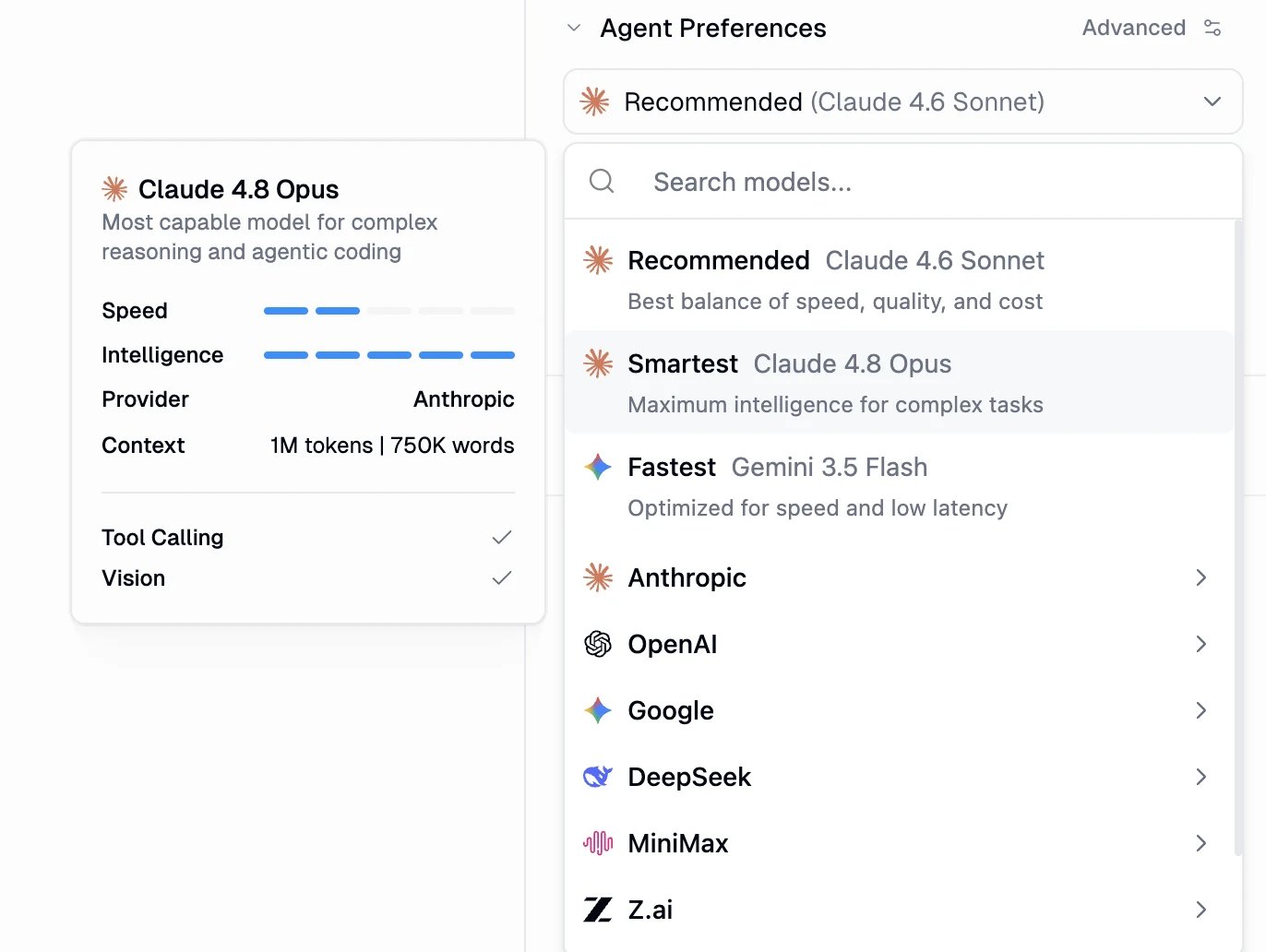 * **Recommended**: the best balance of speed, quality, and cost. This is the default for new agents.
* **Smartest**: maximum intelligence for complex reasoning and agentic work.
* **Fastest**: optimized for speed and low latency on simple, high-volume tasks.
Each preset maps to a current best-in-class model that Gumloop keeps up to date, so you do not have to track model releases yourself. On **Enterprise** plans, your organization can choose which model each preset points to, so you may see different models than the defaults. See [AI Model Governance & Configuration](/enterprise-features/ai_model_control).
To pick a specific model instead, search by name or browse by provider: **Anthropic**, **OpenAI**, **Google**, **DeepSeek**, **MiniMax**, **Z.ai**, and more.
Start with **Recommended** for most agents. Switch to **Smartest** when a task needs deeper reasoning, or **Fastest** for simple, high-volume runs where latency matters.
## Reading the model card
Selecting or hovering a model opens a detail card so you can compare options at a glance:
* **Description**: what the model is best at.
* **Speed** and **Intelligence**: relative ratings across the catalog.
* **Provider** and **Context**: who makes the model and how much it can read at once (in tokens and approximate words).
* **Tool Calling** and **Vision**: capability checks.
For agents that use apps, pick a model with **Tool Calling**. For agents that read images or screenshots, pick one with **Vision**.
## Available models
These are the models you can choose for an agent, grouped by provider. Every one supports tool calling, so it can use your apps and workflows. Models marked **Vision** can also read images and screenshots. New models are added continually, so the in-product picker is always the most up-to-date list.
| Provider | Model | Vision |
| --------- | ----------------- | ------ |
| Anthropic | Claude 4.8 Opus | Yes |
| Anthropic | Claude 4.7 Opus | Yes |
| Anthropic | Claude 4.6 Opus | Yes |
| Anthropic | Claude 4.6 Sonnet | Yes |
| Anthropic | Claude 4.5 Sonnet | Yes |
| Anthropic | Claude 4.5 Haiku | Yes |
| OpenAI | GPT-5.5 | Yes |
| OpenAI | GPT-5.4 | Yes |
| OpenAI | GPT-5.4 Mini | Yes |
| OpenAI | GPT-5.4 Nano | Yes |
| OpenAI | GPT-5.3 Codex | Yes |
| OpenAI | GPT-5.2 | Yes |
| OpenAI | GPT-5.2 Codex | Yes |
| Google | Gemini 3.1 Pro | Yes |
| Google | Gemini 3.5 Flash | Yes |
| Google | Gemini 3 Flash | Yes |
| DeepSeek | DeepSeek V4 Flash | No |
| DeepSeek | DeepSeek V4 Pro | No |
| MiniMax | MiniMax M3 | Yes |
| Qwen | Qwen3.5 397B | Yes |
| Moonshot | Kimi K2.7 Code | Yes |
| Moonshot | Kimi K2.6 | Yes |
| Z.ai | GLM-5.2 | No |
MiniMax M3, Qwen3.5 397B, Kimi K2.7 Code, Kimi K2.6, GLM-5.2 are exclusive to agents and are not available in workflow AI nodes.
## How agents are charged
In agents, model cost is **token-based and variable**. You are charged for the tokens each message uses, which depends on the model, the length of the conversation, and the tools available. There are no fixed per-message tiers. Open **Chat Details** on any conversation to see its exact usage, and see [Credits](/core-concepts/credits) for the full breakdown.
## Bring your own key (BYOK)
Provide your own provider API key to cut model costs. For agents, BYOK gives you **50% off** AI model credits, and it also applies to voice transcription.
**Requirements:** Pro plan or higher, and your own OpenAI, Anthropic, Google AI, Perplexity, or xAI account.
Add a key under your **personal credentials** at [Connectors page](https://www.gumloop.com/personal/connectors) so your own calls route through it, or add a **shared team key** so the whole team can use it without managing individual keys. Pro users cannot set keys at the organization level.
Admins can set **organization API keys** that override personal and team keys for everyone, and route all AI requests through a **custom proxy** at [gumloop.com/settings/organization/api-keys](https://gumloop.com/settings/organization/api-keys). See [AI Model Governance & Configuration](/enterprise-features/ai_model_control) for model access control, proxy setup, and model name mapping.
All open-source models (such as LLaMA, DeepSeek, Qwen, Kimi, MiniMax, and GLM) are accessed through US-based infrastructure under Zero Data Retention (ZDR) policies. Your data is never used for model training and is not stored after inference.
## Using these models in workflows
The same models power workflow AI nodes, but the cost model is different there.
Outside of agents, workflow AI nodes (such as Ask AI and Analyze Image) charge a **fixed credit cost per call** based on the model's tier. This per-call tiering applies to workflows, not agents.
Most capable models for complex reasoning.
**30 credits per call**
Strong performance for most use cases.
**20 credits per call**
Cost-effective for common tasks.
**2 credits per call**
* **Expert**: GPT-5.5, GPT-5.4, the GPT-5.x Codex models, Claude 4.8 / 4.7 / 4.6 Opus, Gemini 3.1 Pro, Grok 4, and more.
* **Advanced**: Claude 4.6 / 4.5 Sonnet, Grok 3, Perplexity Sonar Pro, and more.
* **Standard**: GPT-5.4 Mini / Nano, Claude 4.5 Haiku, Gemini 3.5 / 3 Flash, DeepSeek, and more.
The **Analyze Image** node offers vision-capable models across all three tiers. With **BYOK**, workflow AI node calls drop to **1 credit** regardless of tier.
For full workflow credit details, see [Credits](/core-concepts/credits).
* **Recommended**: the best balance of speed, quality, and cost. This is the default for new agents.
* **Smartest**: maximum intelligence for complex reasoning and agentic work.
* **Fastest**: optimized for speed and low latency on simple, high-volume tasks.
Each preset maps to a current best-in-class model that Gumloop keeps up to date, so you do not have to track model releases yourself. On **Enterprise** plans, your organization can choose which model each preset points to, so you may see different models than the defaults. See [AI Model Governance & Configuration](/enterprise-features/ai_model_control).
To pick a specific model instead, search by name or browse by provider: **Anthropic**, **OpenAI**, **Google**, **DeepSeek**, **MiniMax**, **Z.ai**, and more.
Start with **Recommended** for most agents. Switch to **Smartest** when a task needs deeper reasoning, or **Fastest** for simple, high-volume runs where latency matters.
## Reading the model card
Selecting or hovering a model opens a detail card so you can compare options at a glance:
* **Description**: what the model is best at.
* **Speed** and **Intelligence**: relative ratings across the catalog.
* **Provider** and **Context**: who makes the model and how much it can read at once (in tokens and approximate words).
* **Tool Calling** and **Vision**: capability checks.
For agents that use apps, pick a model with **Tool Calling**. For agents that read images or screenshots, pick one with **Vision**.
## Available models
These are the models you can choose for an agent, grouped by provider. Every one supports tool calling, so it can use your apps and workflows. Models marked **Vision** can also read images and screenshots. New models are added continually, so the in-product picker is always the most up-to-date list.
| Provider | Model | Vision |
| --------- | ----------------- | ------ |
| Anthropic | Claude 4.8 Opus | Yes |
| Anthropic | Claude 4.7 Opus | Yes |
| Anthropic | Claude 4.6 Opus | Yes |
| Anthropic | Claude 4.6 Sonnet | Yes |
| Anthropic | Claude 4.5 Sonnet | Yes |
| Anthropic | Claude 4.5 Haiku | Yes |
| OpenAI | GPT-5.5 | Yes |
| OpenAI | GPT-5.4 | Yes |
| OpenAI | GPT-5.4 Mini | Yes |
| OpenAI | GPT-5.4 Nano | Yes |
| OpenAI | GPT-5.3 Codex | Yes |
| OpenAI | GPT-5.2 | Yes |
| OpenAI | GPT-5.2 Codex | Yes |
| Google | Gemini 3.1 Pro | Yes |
| Google | Gemini 3.5 Flash | Yes |
| Google | Gemini 3 Flash | Yes |
| DeepSeek | DeepSeek V4 Flash | No |
| DeepSeek | DeepSeek V4 Pro | No |
| MiniMax | MiniMax M3 | Yes |
| Qwen | Qwen3.5 397B | Yes |
| Moonshot | Kimi K2.7 Code | Yes |
| Moonshot | Kimi K2.6 | Yes |
| Z.ai | GLM-5.2 | No |
MiniMax M3, Qwen3.5 397B, Kimi K2.7 Code, Kimi K2.6, GLM-5.2 are exclusive to agents and are not available in workflow AI nodes.
## How agents are charged
In agents, model cost is **token-based and variable**. You are charged for the tokens each message uses, which depends on the model, the length of the conversation, and the tools available. There are no fixed per-message tiers. Open **Chat Details** on any conversation to see its exact usage, and see [Credits](/core-concepts/credits) for the full breakdown.
## Bring your own key (BYOK)
Provide your own provider API key to cut model costs. For agents, BYOK gives you **50% off** AI model credits, and it also applies to voice transcription.
**Requirements:** Pro plan or higher, and your own OpenAI, Anthropic, Google AI, Perplexity, or xAI account.
Add a key under your **personal credentials** at [Connectors page](https://www.gumloop.com/personal/connectors) so your own calls route through it, or add a **shared team key** so the whole team can use it without managing individual keys. Pro users cannot set keys at the organization level.
Admins can set **organization API keys** that override personal and team keys for everyone, and route all AI requests through a **custom proxy** at [gumloop.com/settings/organization/api-keys](https://gumloop.com/settings/organization/api-keys). See [AI Model Governance & Configuration](/enterprise-features/ai_model_control) for model access control, proxy setup, and model name mapping.
All open-source models (such as LLaMA, DeepSeek, Qwen, Kimi, MiniMax, and GLM) are accessed through US-based infrastructure under Zero Data Retention (ZDR) policies. Your data is never used for model training and is not stored after inference.
## Using these models in workflows
The same models power workflow AI nodes, but the cost model is different there.
Outside of agents, workflow AI nodes (such as Ask AI and Analyze Image) charge a **fixed credit cost per call** based on the model's tier. This per-call tiering applies to workflows, not agents.
Most capable models for complex reasoning.
**30 credits per call**
Strong performance for most use cases.
**20 credits per call**
Cost-effective for common tasks.
**2 credits per call**
* **Expert**: GPT-5.5, GPT-5.4, the GPT-5.x Codex models, Claude 4.8 / 4.7 / 4.6 Opus, Gemini 3.1 Pro, Grok 4, and more.
* **Advanced**: Claude 4.6 / 4.5 Sonnet, Grok 3, Perplexity Sonar Pro, and more.
* **Standard**: GPT-5.4 Mini / Nano, Claude 4.5 Haiku, Gemini 3.5 / 3 Flash, DeepSeek, and more.
The **Analyze Image** node offers vision-capable models across all three tiers. With **BYOK**, workflow AI node calls drop to **1 credit** regardless of tier.
For full workflow credit details, see [Credits](/core-concepts/credits).