> ## Documentation Index
> Fetch the complete documentation index at: https://docs.gumloop.com/llms.txt
> Use this file to discover all available pages before exploring further.
# Loop Mode
Loop Mode allows nodes to process lists of inputs automatically, like a "for loop" in programming. Instead of processing one item at a time, nodes in Loop Mode can handle multiple items efficiently.
## Basic Concept
When you enable Loop Mode on a node:
* The node processes each item in the list individually
* The output is a list, with each item representing the corresponding input
### Example
```text theme={"dark"}
Summarizer Node:
Normal Mode: One email → One summary
Loop Mode: [email1, email2, email3] → [summary1, summary2, summary3]
```
## Concurrent Processing
Loop Mode can process multiple items simultaneously based on your plan:
* Free Plan: 2 concurrent items
* Pro Plan: 15 concurrent items
For example, with 15 concurrent steps:
```text theme={"dark"}
Input: 100 websites to scrape
Processing: 15 websites processed simultaneously
Result: Faster completion through parallel processing
```
## Best Practices
### 1. Error Protection
Always wrap nodes in Loop Mode with Error Shield to:
* Prevent entire workflow failure if one item fails
* Collect successfully processed items
* Track failed items for troubleshooting
Example:
```text theme={"dark"}
Web Scraper (Loop Mode) inside Error Shield
Input: [url1, url2, url3]
- Success: [content1, content3]
- Errors: [url2]
```
### 2. Handling List Size Mismatches
The problem occurs when:
1. Your node has multiple inputs
2. You're connecting values dynamically (from other nodes)
3. The connected lists have different sizes
**Example Problem:**
```text theme={"dark"}
Ask AI node with:
- Prompt from previous node: [Single Prompt]
- Articles from sheet: [Article1, Article2, Article3]
❌ Error! Lists don't match (1 ≠ 3)
```
**Solution:**
Use the [Duplicate](https://docs.gumloop.com/nodes/list_operations/duplicate) node to match list sizes:
1. Connect your smaller list to a Duplicate node
2. Connect your larger list size to the `list size to match` input of the duplicate node
3. Connect the result to your node
```text theme={"dark"}
[Single Prompt] → Duplicate (count: 3) → Ask AI
[Article1, Article2, Article3] → Ask AI
Output: AI response for all three Articles
```
## Additional Tips
1. Use [subflows](https://docs.gumloop.com/core-concepts/subflows) to avoid "list of lists" issues
2. Consider concurrent processing limits for your plan for large loop operations
## Example Workflow
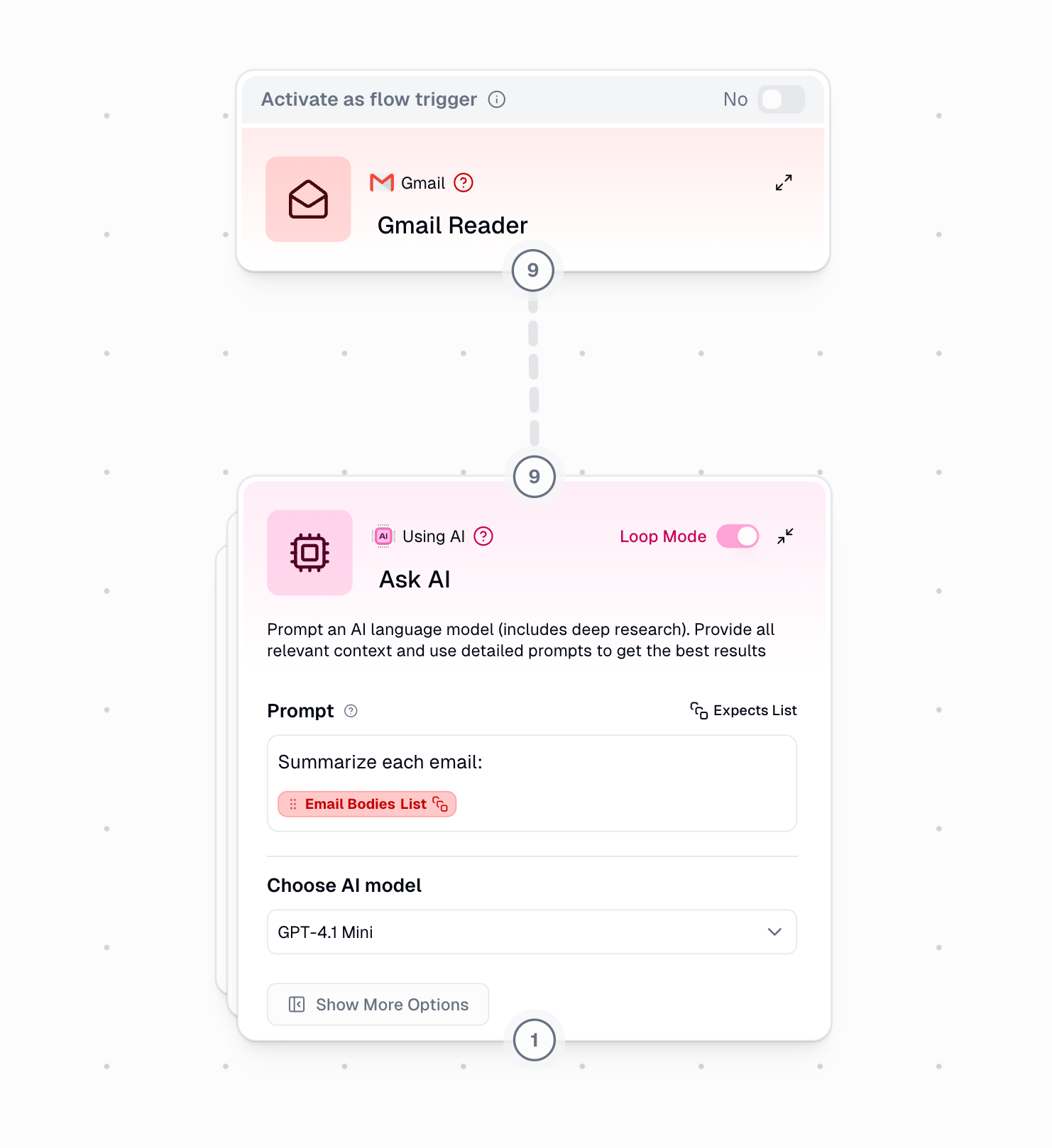
In this example, the Summarizer node processes multiple emails in Loop Mode, creating a summary for each email automatically.