> ## Documentation Index
> Fetch the complete documentation index at: https://docs.gumloop.com/llms.txt
> Use this file to discover all available pages before exploring further.
# Authentication
> Sign in with OAuth or an API key. The CLI stores credentials in your OS keychain.
The Gumloop CLI authenticates with either an [OAuth 2.0](/api-reference/oauth) access token or a personal [API key](/api-reference/authentication#api-key). Both grant the same permissions; OAuth is recommended because it can refresh on its own.
Credentials are stored in your OS keychain (macOS Keychain, GNOME Keyring, or KWallet) — never in a plaintext file. On headless machines, skip `gumloop login` and use [environment variables](#environment-variables) instead.
## Login
```bash theme={"dark"}
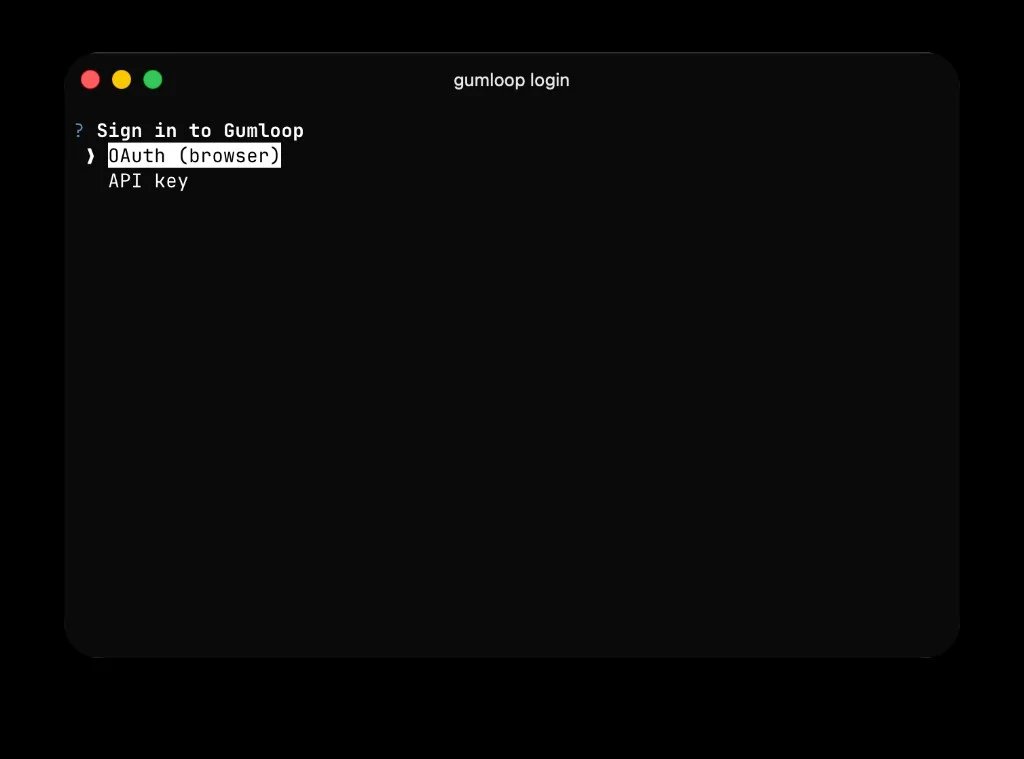
gumloop login
```
Pick **OAuth (browser)** or **API key** when prompted:
 ### OAuth (recommended)
```bash theme={"dark"}
gumloop login --method oauth
```
Here's what happens:
1. The CLI starts a tiny one-shot web server on `localhost:8765` to receive the OAuth redirect.
2. Your browser opens to the Gumloop consent screen — click **Allow**.
3. Gumloop redirects back to `localhost:8765`, the CLI captures the auth code, exchanges it for tokens, and shuts the server down.
4. Both the access token and refresh token are saved to your OS keychain. Expired access tokens are refreshed automatically — you should not need to re-run `gumloop login` until you explicitly `logout`.
**On a remote box** where the CLI can't open a browser:
```bash theme={"dark"}
gumloop login --method oauth --no-browser
```
The CLI prints the authorization URL — open it on any machine, complete the flow, and the redirect will still land back on `localhost:8765` on the remote box (use SSH port-forwarding if needed: `ssh -L 8765:localhost:8765 user@host`).
Other options:
| Flag | Default | Description |
| ----------------- | ------- | ----------------------------------------------------------------------- |
| `--callback-port` | `8765` | Local port for the OAuth redirect handler. Change it if 8765 is in use. |
| `--no-browser` | off | Print the authorization URL instead of opening a browser. |
### API key
```bash theme={"dark"}
gumloop login --method api-key
```
You'll be prompted for two values:
1. **API key** — generate one on the [Connectors page](https://www.gumloop.com/personal/connectors). Requires the Pro plan or above.
2. **User ID** — your Gumloop user ID, also visible on the [Profile Settings page](https://www.gumloop.com/settings/profile/general).
Pass them inline to skip the prompt:
```bash theme={"dark"}
gumloop login --api-key gum_xxx --user-id user_abc
```
To keep the key out of your shell history (and `/proc//cmdline` on Linux), pipe it in via stdin with `-`:
```bash theme={"dark"}
echo "$GUMLOOP_API_KEY" | gumloop login --api-key - --user-id user_abc
```
The same `-` trick works for `--access-token`.
### Verification
`gumloop login` calls a lightweight read endpoint (`models.list`) before saving anything. If the credential is invalid, nothing is written to the keychain.
## Logout
```bash theme={"dark"}
gumloop logout
```
This clears every entry the CLI wrote to your keychain. If you signed in with OAuth, the CLI also revokes your refresh token server-side. Revoke failures don't block the local clear — a warning is printed if the server was unreachable.
## Environment variables
These override stored credentials for a single invocation, which makes them ideal for CI, containers, and headless servers.
| Variable | Purpose |
| ---------------------- | -------------------------------------------------------------------------------------------- |
| `GUMLOOP_ACCESS_TOKEN` | OAuth access token. Wins over any stored credential. |
| `GUMLOOP_API_KEY` | Personal API key. Used only if `GUMLOOP_ACCESS_TOKEN` is not set. |
| `GUMLOOP_USER_ID` | User ID for API key auth (sent as the `x-auth-key` header). Required with `GUMLOOP_API_KEY`. |
| `GUMLOOP_TEAM_ID` | Default team to scope commands to (same as `--team-id`). |
| `GUMLOOP_BASE_URL` | Override the Gumloop API base URL (same as `--base-url`). |
**Example: GitHub Actions step**
```yaml theme={"dark"}
- name: Trigger nightly report
env:
GUMLOOP_API_KEY: ${{ secrets.GUMLOOP_API_KEY }}
GUMLOOP_USER_ID: user_abc
run: |
uv tool install gumloop
gumloop sessions create agent_abc --input "Run the nightly report."
```
## Where credentials are stored
The CLI writes the following entries under the `gumloop-cli` keyring service:
| Entry | Set when |
| --------------- | ------------------------------------------------------------- |
| `access_token` | OAuth login |
| `refresh_token` | OAuth login (if the server issued one) |
| `api_key` | API-key login |
| `user_id` | API-key login |
| `base_url` | Always — the API base URL the credentials were issued against |
Inspect them with your OS tooling (Keychain Access on macOS, `secret-tool` / `kwallet-query` on Linux) or wipe them with `gumloop logout`.
If no keychain backend is available, `gumloop login` refuses to run rather than fall back to a plaintext file. On a headless box, use the [environment variables](#environment-variables) above.
### OAuth (recommended)
```bash theme={"dark"}
gumloop login --method oauth
```
Here's what happens:
1. The CLI starts a tiny one-shot web server on `localhost:8765` to receive the OAuth redirect.
2. Your browser opens to the Gumloop consent screen — click **Allow**.
3. Gumloop redirects back to `localhost:8765`, the CLI captures the auth code, exchanges it for tokens, and shuts the server down.
4. Both the access token and refresh token are saved to your OS keychain. Expired access tokens are refreshed automatically — you should not need to re-run `gumloop login` until you explicitly `logout`.
**On a remote box** where the CLI can't open a browser:
```bash theme={"dark"}
gumloop login --method oauth --no-browser
```
The CLI prints the authorization URL — open it on any machine, complete the flow, and the redirect will still land back on `localhost:8765` on the remote box (use SSH port-forwarding if needed: `ssh -L 8765:localhost:8765 user@host`).
Other options:
| Flag | Default | Description |
| ----------------- | ------- | ----------------------------------------------------------------------- |
| `--callback-port` | `8765` | Local port for the OAuth redirect handler. Change it if 8765 is in use. |
| `--no-browser` | off | Print the authorization URL instead of opening a browser. |
### API key
```bash theme={"dark"}
gumloop login --method api-key
```
You'll be prompted for two values:
1. **API key** — generate one on the [Connectors page](https://www.gumloop.com/personal/connectors). Requires the Pro plan or above.
2. **User ID** — your Gumloop user ID, also visible on the [Profile Settings page](https://www.gumloop.com/settings/profile/general).
Pass them inline to skip the prompt:
```bash theme={"dark"}
gumloop login --api-key gum_xxx --user-id user_abc
```
To keep the key out of your shell history (and `/proc//cmdline` on Linux), pipe it in via stdin with `-`:
```bash theme={"dark"}
echo "$GUMLOOP_API_KEY" | gumloop login --api-key - --user-id user_abc
```
The same `-` trick works for `--access-token`.
### Verification
`gumloop login` calls a lightweight read endpoint (`models.list`) before saving anything. If the credential is invalid, nothing is written to the keychain.
## Logout
```bash theme={"dark"}
gumloop logout
```
This clears every entry the CLI wrote to your keychain. If you signed in with OAuth, the CLI also revokes your refresh token server-side. Revoke failures don't block the local clear — a warning is printed if the server was unreachable.
## Environment variables
These override stored credentials for a single invocation, which makes them ideal for CI, containers, and headless servers.
| Variable | Purpose |
| ---------------------- | -------------------------------------------------------------------------------------------- |
| `GUMLOOP_ACCESS_TOKEN` | OAuth access token. Wins over any stored credential. |
| `GUMLOOP_API_KEY` | Personal API key. Used only if `GUMLOOP_ACCESS_TOKEN` is not set. |
| `GUMLOOP_USER_ID` | User ID for API key auth (sent as the `x-auth-key` header). Required with `GUMLOOP_API_KEY`. |
| `GUMLOOP_TEAM_ID` | Default team to scope commands to (same as `--team-id`). |
| `GUMLOOP_BASE_URL` | Override the Gumloop API base URL (same as `--base-url`). |
**Example: GitHub Actions step**
```yaml theme={"dark"}
- name: Trigger nightly report
env:
GUMLOOP_API_KEY: ${{ secrets.GUMLOOP_API_KEY }}
GUMLOOP_USER_ID: user_abc
run: |
uv tool install gumloop
gumloop sessions create agent_abc --input "Run the nightly report."
```
## Where credentials are stored
The CLI writes the following entries under the `gumloop-cli` keyring service:
| Entry | Set when |
| --------------- | ------------------------------------------------------------- |
| `access_token` | OAuth login |
| `refresh_token` | OAuth login (if the server issued one) |
| `api_key` | API-key login |
| `user_id` | API-key login |
| `base_url` | Always — the API base URL the credentials were issued against |
Inspect them with your OS tooling (Keychain Access on macOS, `secret-tool` / `kwallet-query` on Linux) or wipe them with `gumloop logout`.
If no keychain backend is available, `gumloop login` refuses to run rather than fall back to a plaintext file. On a headless box, use the [environment variables](#environment-variables) above.